There is no single landing page that works for every campaign.
A page designed to collect email subscribers has a different job than one built to sell a product. A webinar registration page needs different information than a simple click-through page. Even when the basic goal is conversion, the path you want the visitor to take can change dramatically.
That is why understanding the different types of landing pages matters.
Instead of choosing a layout because it looks good, it helps to start with a simpler question: What do I want the visitor to do?
Once you know the answer, choosing the right type of landing page becomes much easier.
In this guide, we will look at seven common types of landing pages, how each one works, when you might use it, and what action the visitor should take next.
By the end, you should have a much clearer idea of which landing page fits the goal you are trying to accomplish.
What Are the Different Types of Landing Pages?
Landing pages can be grouped by the specific action they are designed to encourage.
Some are built to capture contact information. Others introduce an offer before sending the visitor somewhere else. Some handle registrations, while others are designed to make a sale directly on the page.
The design may change from one type to another, but the underlying principle stays the same: the page should have a clear purpose.
For this guide, we are going to focus on seven practical types of landing pages:
- Lead generation landing pages
- Squeeze pages
- Click-through landing pages
- Sales pages
- Webinar and event registration pages
- Download landing pages
- Thank-you pages
There can be overlap between these categories. A webinar page, for example, also generates leads. A download page may function much like a squeeze page. The useful distinction is not necessarily what someone calls the page—it is what job the page is supposed to do.
Let’s look at each type individually.
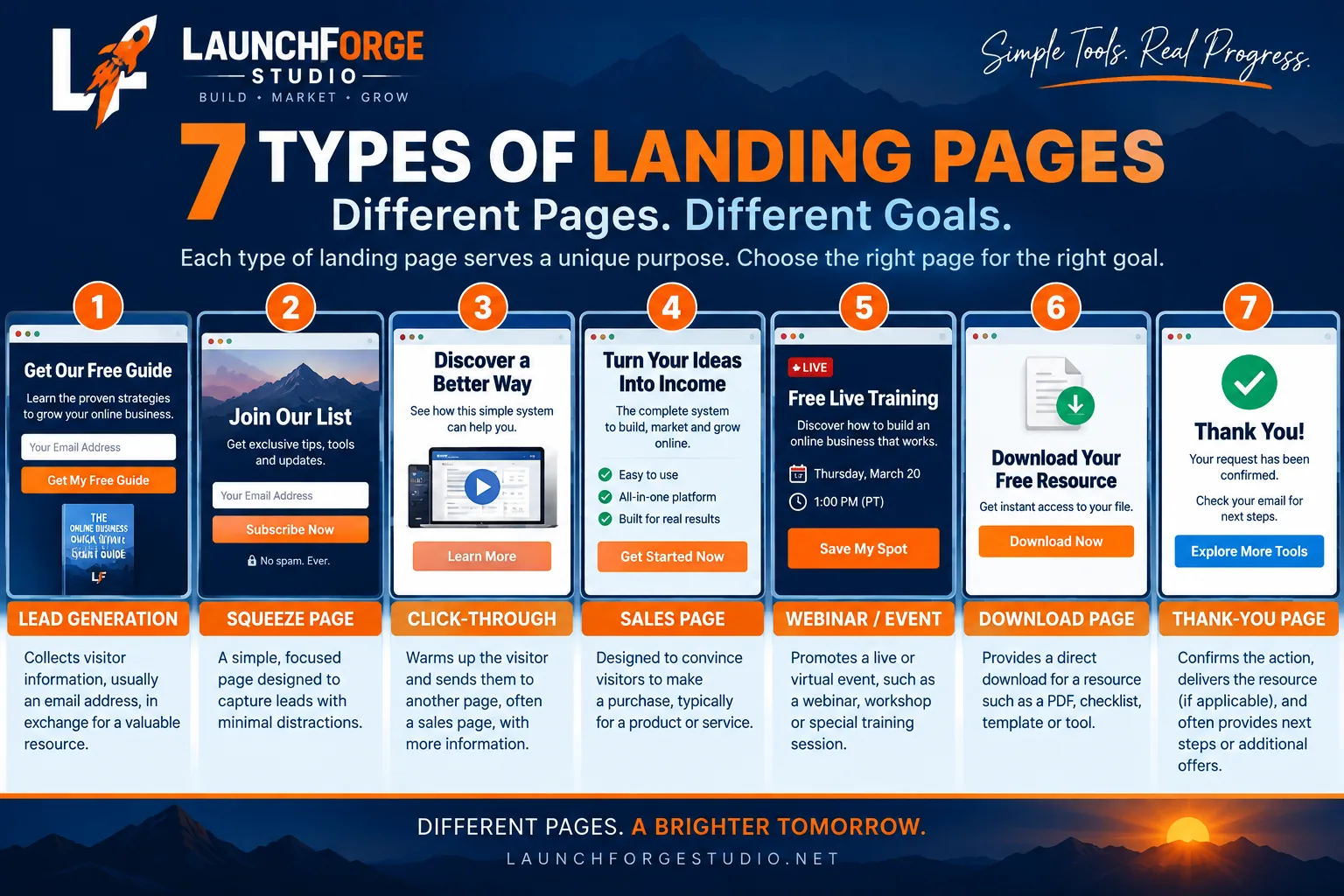
Seven common types of landing pages serve different goals throughout the customer journey.
1. Lead Generation Landing Pages
A lead generation landing page is designed to turn an anonymous visitor into a known contact by collecting information such as a name, email address, or other relevant details.
The visitor usually receives something in return. That might be access to a guide, a newsletter, a free resource, a consultation, a trial, or another offer that gives them a reason to provide their information.
The important part is the exchange.
The business receives a lead it can continue communicating with, while the visitor receives something they consider valuable enough to take the next step.
When Should You Use a Lead Generation Landing Page?
Use this type of landing page when your immediate goal is to build a relationship rather than make a sale on the first visit.
For example, an online business might send traffic to a lead generation page offering a useful resource. After the visitor subscribes, email marketing and automation can continue the conversation instead of relying on that person to return to the website on their own.
What Should the Visitor Do Next?
There should be one obvious action: complete the form and submit it.
Everything on the page—from the headline and supporting copy to the form and call-to-action button—should make that next step easy to understand.
2. Squeeze Pages
A squeeze page is a simplified type of lead generation landing page built around one very specific goal: getting the visitor to provide their email address.
These pages are usually shorter and more stripped down than other landing pages. Instead of explaining an entire business or presenting several options, a squeeze page removes as many distractions as possible.
The offer might be a checklist, report, discount, newsletter, free training, template, or another resource the visitor can access after subscribing.
The idea is simple: present one clear reason to subscribe and make the signup process easy.
When Should You Use a Squeeze Page?
A squeeze page works well when you have a straightforward offer that does not require a long explanation.
If someone already understands why they arrived on the page—for example, because an ad or email introduced the offer—you may only need a strong headline, a short explanation of the benefit, and a simple opt-in form.
What Should the Visitor Do Next?
The visitor should enter their information and subscribe.
Because the page has such a narrow purpose, unnecessary navigation, competing links, and multiple calls to action can work against the goal. The visitor should immediately understand what they will receive and what they need to do to get it.
3. Click-Through Landing Pages
A click-through landing page is designed to prepare a visitor for the next step rather than asking them to complete the final conversion immediately.
Instead of collecting an email address or processing a purchase, the page introduces an offer, explains its value, and gives the visitor enough information to decide whether they want to continue.
The call to action then sends the visitor to another page where the next action takes place.
Think of it as a bridge between the traffic source and the offer.
Someone might arrive from an advertisement, email, social media post, or another campaign. Rather than dropping that visitor directly onto a checkout or sales page, the click-through page provides context first.
When Should You Use a Click-Through Landing Page?
Use a click-through landing page when visitors may need additional information before they are ready to see the main offer or take a more significant action.
For example, an affiliate marketer could use a click-through page to introduce a product, explain why it may be useful, and then direct interested visitors to the merchant’s website.
An online business could also use one between an advertisement and a pricing, product, or registration page.
The goal is not to explain everything. It is to give the visitor enough relevant information to make the next click feel logical.
What Should the Visitor Do Next?
The visitor should click the primary call-to-action button and continue to the next page.
That means the CTA should make the destination clear. Buttons such as See the Offer, View Plans, Learn More, or Continue can work when they accurately describe what happens next.
A good click-through page creates momentum instead of introducing another decision. 🔥
4. Sales Pages
A sales page is a landing page designed to persuade a visitor to purchase a product or service.
Unlike a squeeze page or click-through page, a sales page often needs to do more of the selling directly on the page. The visitor may need to understand the problem being solved, what the offer includes, how it can help, how much it costs, and why they should consider taking action.
Because of that, sales pages can range from relatively short pages for simple offers to long-form pages containing detailed explanations, benefits, demonstrations, testimonials, frequently asked questions, pricing, and multiple calls to action.
Length is not the goal. Providing enough information for the buying decision is.
When Should You Use a Sales Page?
Use a sales page when the primary goal of the campaign is to turn interested visitors into customers.
This could include selling a digital product, course, software subscription, membership, service, or another offer that can be clearly presented online.
The amount of information needed will depend on the offer. A low-cost product that visitors already understand may require very little explanation. A more expensive or unfamiliar offer may need considerably more information before someone feels comfortable buying.
The page should answer the questions a potential customer is likely to have without burying the actual offer beneath unnecessary content.
What Should the Visitor Do Next?
The visitor should purchase the offer or begin the checkout process.
Calls to action such as Buy Now, Get Started, Choose Your Plan, or Start Today should make the next step obvious and accurately reflect what happens after the click.
Every major section of the page should ultimately support that decision rather than sending the visitor toward unrelated destinations. 🔥
5. Webinar and Event Registration Pages
A webinar or event registration landing page is designed to convince visitors to reserve a spot for a specific event.
The event might be a live webinar, online workshop, product demonstration, training session, virtual conference, or even an in-person event. Regardless of the format, the page has one primary job: turn interested visitors into registered attendees.
Because the event happens at a particular time—or provides access to something specific—the page should quickly explain what the visitor is signing up for and why attending may be worth their time.
Important details typically include the topic, date and time, what attendees will learn, who the event is for, and a clear registration form or button.
When Should You Use a Webinar or Event Registration Page?
Use this type of landing page whenever you are promoting an event that requires people to register before attending or receiving access.
It can be especially useful when the event is part of a larger marketing funnel.
For example, a business might use an educational webinar to introduce visitors to a problem, teach them something useful, and then present a related product or service later in the presentation or follow-up sequence.
The registration page does not need to sell everything that comes afterward. Its immediate job is to make the value of attending the event clear.
What Should the Visitor Do Next?
The visitor should register for the event.
The form should request only the information necessary for registration and follow-up. After submitting it, the visitor should receive clear confirmation along with important details such as the event date, time, access instructions, and what to expect next.
That confirmation also creates a natural opportunity for the next stage of the funnel, including reminder emails and post-event follow-up. 🔥
6. Download Landing Pages
A download landing page is designed to give visitors access to a specific digital resource, usually in exchange for taking a simple action.
That resource might be an ebook, checklist, template, worksheet, report, guide, cheat sheet, or another piece of useful content.
In many cases, the visitor provides an email address before receiving the download. This means a download page can also function as a lead generation page.
The difference is primarily in the promise being made: the visitor knows exactly what they are signing up to receive.
A strong download page should make that value immediately clear rather than forcing visitors to guess what is inside the resource.
When Should You Use a Download Landing Page?
Use a download landing page when you have a resource that can provide immediate value while also helping introduce visitors to your business.
For example, a website about building an online business might offer a checklist that walks beginners through the steps needed before launching their first website.
The resource solves a specific problem now, while the signup gives the business an opportunity to continue helping the subscriber through future emails, tutorials, or related offers.
This makes download pages particularly useful for building an email list around a specific topic or audience.
What Should the Visitor Do Next?
The visitor should request or download the resource.
If an email address is required, the form should make it clear what the visitor will receive after submitting it.
Once the form is completed, the resource should be easy to access through a download link, email, or confirmation page.
And that last option leads directly into another important type of landing page. 😎🔥
7. Thank-You Pages
A thank-you page is the page a visitor reaches after completing an action on a landing page.
It might appear after someone joins an email list, downloads a resource, registers for a webinar, submits a form, or completes a purchase.
At its most basic, the page confirms that the action was successful.
But a useful thank-you page can do more than simply say “Thank you.”
It can tell the visitor what happens next, provide access to something they requested, reinforce the decision they just made, and guide them toward another relevant step.
That makes the thank-you page an important part of the overall visitor journey rather than an afterthought at the end of it.
When Should You Use a Thank-You Page?
Use a thank-you page whenever someone completes an action and needs confirmation or instructions about what happens next.
For example, after someone subscribes to an email list, the page might tell them to check their inbox for a confirmation or welcome email.
After a download request, it might provide the resource directly.
After webinar registration, it could confirm the date and time while explaining where the attendee will receive the access link.
And after a purchase, it might provide an order confirmation and instructions for accessing the product or service.
What Should the Visitor Do Next?
That depends on the action they just completed.
The visitor might check their email, download a resource, access a purchase, add an event to their calendar, or continue to another useful piece of content.
The important thing is that they should never be left wondering whether their previous action worked or what they are supposed to do next.
A good thank-you page closes one step of the journey while creating a clear path toward the next one. 🔥
How to Choose the Right Type of Landing Page
With several types of landing pages available, choosing the right one can sound more complicated than it actually is.
You do not need to start by asking which layout looks best or which landing page template has the most features.
Start with the goal.
Ask yourself one simple question:
What is the one action I want this visitor to take?
The answer will usually point you toward the right type of page.
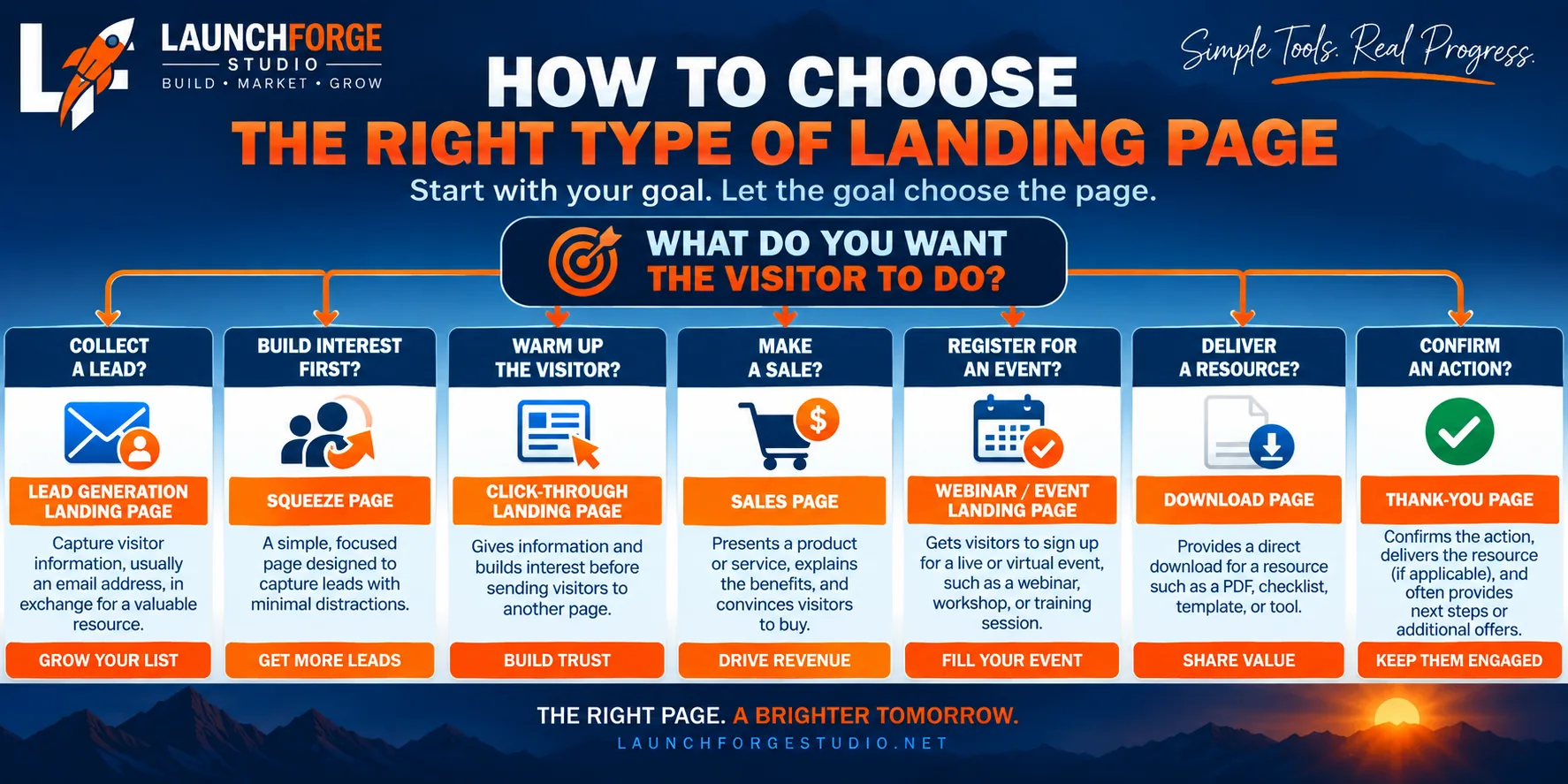
Start with the visitor’s goal to determine which type of landing page best fits the campaign.
If you want to collect contact information and continue the conversation through email, a lead generation or squeeze page may make sense.
If visitors need some context before seeing another offer, a click-through page can provide that bridge.
If you want visitors to purchase directly, you are probably looking at a sales page.
If you are promoting a live training or event, use a webinar or event registration page.
If you are offering a specific resource, a download landing page can connect that resource to your lead-generation strategy.
And once the visitor completes the desired action, a thank-you page can confirm what happened and guide them toward the next step.
Match the Page to the Visitor’s Journey
The type of landing page is only part of the decision.
You should also consider where the visitor is coming from and what they already know.
Someone clicking an advertisement for a free checklist may be ready to enter an email address immediately. Someone discovering an unfamiliar product for the first time may need more information before being asked to buy.
This is where landing pages begin to connect with a larger concept: the marketing funnel.
One landing page may capture the lead. Another page may introduce an offer. A sales page may eventually present the purchase. A thank-you page may begin the next stage of the relationship.
Instead of thinking about each page as an isolated piece of your website, think about the path you are creating for the visitor.
The right landing page is the one that makes the next step clear, relevant, and easy to take.
Common Mistakes When Choosing a Landing Page Type
Choosing the right type of landing page is important, but even the right page can struggle when its purpose becomes unclear.
One of the easiest mistakes to make is trying to get a single landing page to do too many jobs at once.
A page starts as an email signup, then gains a product offer, several navigation links, social media buttons, another call to action, and perhaps a few unrelated promotions.
Before long, the visitor has plenty of choices—but no obvious next step.
Giving Visitors Too Many Choices
A landing page should reduce unnecessary decisions.
That does not mean every page has to be tiny or contain only one button. A longer sales page, for example, may repeat the same call to action several times.
The important distinction is that those buttons are still guiding visitors toward the same primary goal.
Multiple paths leading toward one action can support the page. Multiple unrelated actions can compete with it.
Choosing the Page Before Choosing the Goal
Another common mistake is starting with a template and trying to make the campaign fit inside it.
A beautiful template might catch your attention, but its original purpose may have nothing to do with yours.
Instead, determine the action you want first. Then choose or build a page that supports it.
Goal first. Page second. Design third.
That simple order can prevent a lot of unnecessary rebuilding later.
Asking for Too Much Too Soon
The action should also make sense for what the visitor already knows about you and your offer.
Someone encountering your business for the first time may be comfortable downloading a free guide but not ready to purchase an expensive product.
Likewise, someone who has already researched an offer may not need another long educational page before reaching checkout.
The landing page should help visitors take the next reasonable step, not force them several steps ahead.
Forgetting What Happens After the Conversion
Finally, do not build the landing page in isolation and forget what happens after someone takes action.
Where does the form send them?
Does the promised email arrive?
Does the download work?
Is the thank-you page useful?
Does the next page match what the call to action promised?
A landing page is successful only when the experience after the click or submission continues to make sense.
That is why testing the entire path matters—not just making the landing page look good.
How Landing Pages Work Together in a Funnel
So far, we have looked at each type of landing page individually. In a real online business, however, these pages often work together rather than alone.
That is where funnels enter the picture.
A funnel is simply a planned series of steps that guides someone from their first interaction with your business toward a particular outcome.
For example, a visitor might discover your business through an advertisement, social media post, search result, or email.
From there, the journey could look something like this:
Traffic → Lead Generation Page → Thank-You Page → Email Follow-Up → Sales Page → Purchase
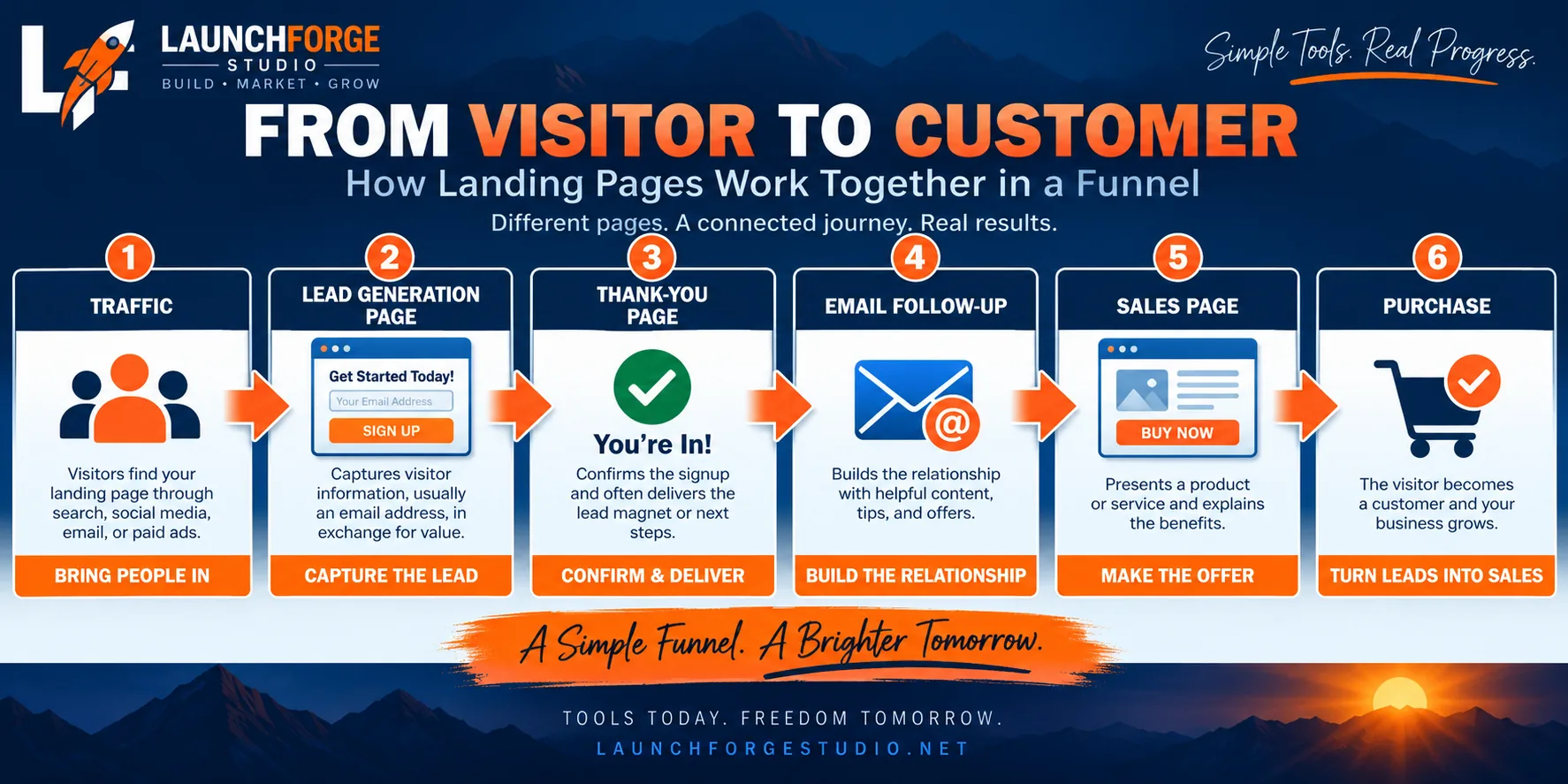
A simple landing page funnel connects traffic, lead capture, follow-up, the offer, and the final purchase.
Not every funnel needs all of those steps, and more steps do not automatically make a funnel better.
The purpose is to create a logical progression.
Each Page Has One Job
One of the advantages of separating a funnel into focused pages is that each page can concentrate on the decision directly in front of the visitor.
The lead generation page does not need to explain every product you sell.
Its job is to capture the lead.
The thank-you page does not need to convince the visitor to subscribe again.
That already happened. Its job is to confirm the action and explain what comes next.
The sales page can then focus on the offer because the visitor has already traveled through the earlier stages of the journey.
This is one reason landing pages and funnels work so naturally together: each page can handle one specific step while the funnel connects those steps into a larger process.
Keep the Journey Consistent
As visitors move between pages, the message should remain consistent.
If an advertisement promises a free landing page checklist, the landing page should clearly offer that checklist. After someone signs up, the thank-you page should confirm how to get it. The follow-up email should deliver what was promised.
Every step should feel like a continuation of the one before it.
When the message suddenly changes—or the visitor cannot figure out what happened to the original promise—the funnel becomes confusing.
The technology behind a funnel can become sophisticated, but the basic idea remains surprisingly simple:
Give the visitor a clear next step, then make sure the next step delivers what you promised.
Do You Need More Than One Type of Landing Page?
Probably.
As your online business grows, you may find that different campaigns need different types of landing pages.
You might use a squeeze page to build your email list, a webinar registration page for a training event, a sales page for an offer, and thank-you pages to complete each conversion path.
That does not mean you need to build everything at once.
In fact, trying to create an entire collection of landing pages before you actually need them can turn into another form of tool and design overload.
Start with the page that supports the goal directly in front of you.
Build it.
Use it.
See how visitors interact with it.
Then add another page when your business or campaign gives you a reason to.
Start Simple and Improve From Real Experience
This is the same approach we are taking with LaunchForge Studio.
Rather than trying to build every possible page, funnel, automation, and marketing system before launching anything, we are building individual pieces as they become useful and documenting what happens along the way.
We recently built a real landing page in WordPress with Divi 5 from a blank page through the finished responsive design. That gave us something more useful than another theoretical example: an actual page we could examine, improve, and learn from.
As we connect more landing pages into funnels, we can apply the same process.
Build the first version.
Connect the pieces.
Test the complete path.
Then improve it based on what we actually learn.
You do not need every type of landing page today.
You need the right page for the next job your business needs to accomplish.
Frequently Asked Questions About Types of Landing Pages
What Is the Most Common Type of Landing Page?
Lead generation pages are among the most commonly used because they give businesses a way to turn website visitors into contacts they can communicate with again.
Instead of depending on someone to remember the website and return later, the business can continue the relationship through email or another follow-up system.
However, the most useful type of landing page depends on the goal of the campaign. A business trying to sell a product directly may benefit more from a sales page, while a webinar campaign needs a registration page.
What Is the Difference Between a Landing Page and a Squeeze Page?
A squeeze page is a specific type of landing page.
Landing page is the broader term for a focused page designed around a particular conversion goal. A squeeze page narrows that goal even further, usually concentrating on collecting an email address with minimal distractions.
In other words, a squeeze page is a landing page, but not every landing page is a squeeze page.
Can a Landing Page Have More Than One Call to Action?
A landing page can contain multiple call-to-action buttons, especially when the page is long.
The important part is that those calls to action generally support the same primary conversion goal.
For example, a long sales page might include a purchase button near the top, another after explaining the benefits, and another near the bottom. Although there are several buttons, they all guide the visitor toward the same action.
Do I Need a Website to Use a Landing Page?
Not necessarily.
A landing page can sometimes operate independently from a traditional multi-page website, depending on the platform being used and the purpose of the campaign.
However, having a website can provide additional context about the business, including supporting content, contact information, policies, and other resources visitors may want to explore.
For LaunchForge Studio, we are building landing pages as focused parts of a larger WordPress website rather than treating them as replacements for the entire site.
Are Landing Pages Only for Paid Advertising?
No.
Visitors can reach landing pages from many traffic sources, including email campaigns, social media, search engines, affiliate promotions, QR codes, blog content, and direct links.
What matters is not whether the traffic was paid or free. What matters is whether the page matches the visitor’s expectations and provides a clear next step.
How Many Landing Pages Should an Online Business Have?
There is no universal number.
An online business might begin with one landing page and add more as new campaigns, offers, resources, and audiences are introduced.
Instead of trying to reach a certain number, build landing pages when there is a specific reason for them to exist.
Each page should have a job. 🔥
Final Thoughts: Choose the Page That Matches the Goal
There are many ways to design a landing page, but the most important decision happens before you choose the layout, template, colors, or software.
Decide what you want the visitor to do.
If the goal is to collect leads, build a page around that action.
If the visitor needs context before moving to another offer, a click-through page may make more sense.
If you are selling directly, give the sales page enough information to support the buying decision.
If you are promoting an event, make registration the obvious next step.
And once someone converts, do not forget the thank-you page and everything that happens afterward.
The different types of landing pages are not competing with one another. They are different tools for different jobs.
The better you understand the job, the easier it becomes to choose the right tool.
Put It Into Practice
Understanding landing pages is useful, but LaunchForge Studio is ultimately about building this stuff for real.
If you want to see the fundamentals behind how landing pages work, start with our guide What Is a Landing Page and How Does It Work?
And when you are ready to build one yourself, follow our step-by-step tutorial How to Build a Landing Page in WordPress With Divi 5.
That is where the pieces start coming together:
Understand the page. Choose the right type. Build it. Connect it. Test it. Improve it.
You do not need to build every landing page at once.
Start with one page, one goal, and one clear next step—then build from there. 🔥🧱