Choosing the right online business tools can have a major impact on how easy—or difficult—your business is to run.
The right tools can save time, automate repetitive work, organize information, improve your marketing, and make it easier to serve customers.
The wrong tools can do exactly the opposite.
They can create additional subscriptions, duplicate features you already have, introduce new learning curves, require complicated integrations, and give you another dashboard to manage.
The difficult part is that almost every piece of business software promises to make something easier.
A new funnel builder promises higher conversions.
An email marketing platform promises better automation.
A website platform promises faster page creation.
A CRM promises better organization.
An analytics tool promises better decisions.
And the latest all-in-one platform promises to replace almost everything else.
Some of those tools may genuinely improve your business.
Others may simply add another layer of complexity.
That is why choosing business software should not begin with a list of features.
It should begin with a much simpler question:
What problem does my business actually need to solve?
Once you understand that, evaluating your options becomes much easier.
Instead of collecting software because it looks impressive, you can build a technology stack where every tool has a specific job and contributes to the way your business actually operates.
In this guide, we are going to look at how to evaluate online business tools based on what really matters—including purpose, features, cost, ease of use, integration, automation, scalability, and the amount of complexity each tool introduces.
The goal is not to find the tool with the longest feature list.
The goal is to choose tools that make your business easier to run.
Start With the Problem, Not the Tool
One of the easiest mistakes to make when choosing technology for an online business is starting with the software instead of the problem.
You discover a new platform.
The demonstration looks impressive.
It has dozens of features, attractive templates, powerful automations, and a dashboard filled with things you could imagine using someday.
So you sign up.
Then you try to figure out where the tool fits into your business.
That process is backwards.
A better approach is to identify the problem first and then look for the simplest tool capable of solving it.
Define What You Actually Need
Before comparing platforms, features, or pricing plans, write down exactly what you are trying to accomplish.
Maybe you need to:
• Build a professional website.
• Capture contact information from visitors.
• Send automated follow-up emails.
• Create landing pages or sales funnels.
• Manage customer information.
• Track links and marketing campaigns.
• Accept payments.
• Schedule appointments.
• Generate more traffic.
Those are business needs.
The software is simply a way to accomplish them.
That distinction matters because it changes the question from:
“What can this tool do?”
to:
“What does my business need this tool to do?”
That one change can eliminate a surprising number of unnecessary software purchases.
Separate Needs From Nice-to-Have Features
Most software platforms are designed to make their feature lists look impressive.
That does not mean you need every feature they offer.
A platform may include advanced automation, artificial intelligence, detailed reporting, team collaboration, dozens of integrations, and sophisticated customization options.
Those capabilities can be valuable.
But if your immediate need is simply to capture a lead and send a follow-up email, most of those features may have very little impact on your business today.
When comparing online business tools, separate the features into two categories:
Must Have: Features required for the tool to perform the job you need it to perform.
Nice to Have: Features that could be useful but are not necessary for accomplishing your immediate objective.
This makes comparisons much easier.
Instead of asking which platform has the most features, you can ask which platform handles your must-have requirements most effectively.
Give Every Tool a Clear Job
Every tool in your business should have a reason for being there.
You should be able to look at any subscription, plugin, platform, or application you use and answer:
“What specific job does this perform in my business?”
If you cannot answer that question clearly, the tool may deserve a closer look.
This does not automatically mean you should cancel it.
But it does mean you should determine whether the software is solving a current problem, supporting an important process, or simply occupying space in your technology stack.
The goal is not to use as few tools as possible.
The goal is to make sure every tool earns its place.
Look for Overlap Before Adding Another Tool
One of the fastest ways an online business becomes difficult to manage is by paying for multiple tools that perform many of the same functions.
This happens more easily than you might think.
You might originally purchase one platform for email marketing.
Later, you add a funnel builder that also includes email automation.
Then you subscribe to another marketing platform that includes landing pages, contact management, and link tracking.
Eventually, you may have three different tools capable of performing some of the same jobs.
Each subscription may have made sense when you purchased it.
The problem appears when you look at the entire system instead of each tool individually.
Compare What You Already Have
Before adding another platform, take inventory of the tools you currently use.
For each one, identify its primary purpose and the features you actually use.
You may discover that several functions are already available inside software you are paying for.
For example, one platform might already provide:
• Landing pages
• Email marketing
• Contact management
• Forms
• Link tracking
• Automation
• Analytics
If you are paying separate services for several of those functions, there may be an opportunity to simplify.
Some platforms combine several marketing functions in one place. For example, I use LeadsLeap for multiple parts of my own marketing system, including lead capture, email follow-up, page building, and link tracking. You can see how those features work together in my complete LeadsLeap marketing tools guide.
That does not mean an all-in-one platform is automatically better.
Specialized tools can provide deeper functionality and may be the right choice when your business genuinely requires it.
The important thing is knowing where the overlap exists.
Consolidation Can Reduce More Than Monthly Costs
Reducing overlapping software can certainly save money.
But the bigger benefit may be reducing the number of systems you need to manage.
Every additional platform can introduce another:
Login.
Dashboard.
Billing account.
Learning curve.
Integration.
Set of settings.
Source of data.
Potential point of failure.
Removing one unnecessary tool may therefore eliminate considerably more than one monthly subscription.
It can remove an entire layer of administrative work.
If your current setup already feels overloaded, my guide on how to simplify your online business without sacrificing growth walks through a practical process for reducing unnecessary complexity without tearing everything apart.
Do Not Consolidate Just for the Sake of Consolidating
There is another side to this.
Combining everything into one platform is not always the right answer.
If a specialized tool performs an important job extremely well, integrates reliably with your existing system, and provides meaningful value, replacing it simply to reduce your tool count may actually make the business worse.
The objective is not:
“Everything must be in one platform.”
The objective is:
“Everything should have a reason to be in the system.”
Sometimes that means consolidating several functions.
Sometimes it means keeping a specialized tool.
The decision should be based on what creates the simplest reliable system for your particular business.
Consider the True Cost of a Tool
The price displayed on a software website is not always the true cost of using that tool in your business.
A platform might cost $20, $50, or $100 per month.
But the subscription price is only one part of the equation.
You also need to consider the time required to learn the software, configure it, connect it to your existing systems, maintain it, and actually use it.
A relatively inexpensive tool can become surprisingly expensive if it creates hours of additional work every month.
Look Beyond the Monthly Subscription
When comparing online business tools, start with the obvious cost.
How much will you actually pay?
Then look deeper.
Consider whether the platform charges additional fees for:
• More contacts or subscribers
• Additional websites or domains
• Higher email sending limits
• Additional users
• Premium integrations
• Automation features
• Increased storage or bandwidth
• Transaction processing
• Removing platform branding
A low introductory price can look attractive until the business grows and important features suddenly require a more expensive plan.
Before choosing a tool, understand what the price looks like at the level you realistically expect to use it.
Your Time Has a Cost Too
Software is supposed to make work easier.
If a platform requires hours of troubleshooting, complicated workarounds, constant maintenance, or repeated manual tasks, that time should be considered part of its cost.
Imagine two tools.
One costs $20 per month but requires several hours of additional work.
Another costs $40 per month but handles the same process reliably with very little attention.
The less expensive tool is not necessarily the better value.
This is especially important for a small online business where one person may be responsible for the website, marketing, customer communication, sales, and administration.
Every hour spent fighting with technology is an hour that cannot be spent somewhere else.
Think in Terms of Value, Not Just Price
The cheapest tool is not automatically the best choice.
Neither is the most expensive.
A better question is:
“What value does this tool create compared with what it costs me?”
A tool may be worth paying for if it saves significant time, replaces several other subscriptions, improves an important process, provides useful information, or helps generate additional business.
On the other hand, even a $10 monthly subscription is expensive if you rarely use it and it contributes nothing meaningful.
This is why reviewing your software expenses periodically can be useful.
Small subscriptions have a habit of accumulating quietly.
Five inexpensive tools can become ten.
Ten can become fifteen.
And suddenly a business is spending a substantial amount every month on software without knowing which tools are actually contributing to results.
Free Tools Still Have a Cost
Free software can be extremely useful, particularly when you are starting out.
But “free” should not automatically mean “use it.”
A free platform can still require your time.
It can still introduce another login.
It can still collect important business data that may eventually need to be migrated.
And it can still become deeply embedded in your workflow.
Before building an important business process around a free tool, consider what happens if you eventually outgrow it.
Ask yourself:
Can this tool grow with me, or am I creating a migration project for myself later?
You do not need to avoid free tools.
You simply need to evaluate them using the same principle as paid software:
Choose based on long-term value, not price alone.
Make Ease of Use Part of the Decision
Features and pricing usually get most of the attention when people compare business software.
But there is another factor that can have just as much impact on whether a tool becomes valuable:
How easy is it to actually use?
A platform can have hundreds of features and impressive technology behind it.
But if accomplishing a simple task requires watching three tutorials, searching through documentation, and clicking through six different menus, those features may not provide much practical value.
The best tool is not necessarily the one capable of doing the most.
Sometimes it is the one that allows you to accomplish what matters with the least unnecessary friction.
Consider the Learning Curve
Every new tool requires some amount of learning.
You need to understand the interface.
Configure the settings.
Learn the terminology.
Create your first project or campaign.
And figure out how the platform fits into the rest of your business.
Some learning is unavoidable.
The question is whether the learning curve is reasonable for what the tool is supposed to accomplish.
If you are implementing a sophisticated system that will eventually manage an important part of your business, investing additional time may make sense.
But if you need a simple form builder and it takes an entire weekend to figure out how to create a basic form, something may be wrong.
Complexity should be justified by the value the tool provides.
Pay Attention to Everyday Tasks
Software demonstrations tend to highlight impressive features.
Your daily experience with the platform may be very different.
Instead of focusing only on what the software can theoretically do, think about the tasks you will perform regularly.
How quickly can you:
• Create or edit a page?
• Add a new contact?
• Send an email?
• Build a form?
• Find important data?
• Change an automation?
• Duplicate an existing campaign?
• Export your information?
These ordinary tasks often matter more than the advanced features featured prominently on a sales page.
A tool you use every day should make common tasks feel straightforward.
Good Software Should Reduce Mental Load
Every platform requires you to remember something.
Where a particular setting is located.
How an automation works.
Which integration connects two systems.
Where customer information is stored.
How reports are generated.
When several complicated platforms are combined, that mental load begins to accumulate.
You are no longer simply running your business.
You are remembering how to operate the machinery behind it.
That is one reason simplicity matters.
A well-designed technology stack should allow you to understand your business without constantly reconstructing how everything works.
Choose Tools You Will Actually Use
It is easy to choose software based on what you imagine you might do someday.
But a simpler tool that you understand and use consistently can provide more value than an advanced platform whose capabilities remain untouched.
Ask yourself:
“Can I realistically see myself using this tool consistently?”
Not just during the excitement of setting it up.
Six months from now.
A year from now.
When you are busy.
When something needs to be changed quickly.
When a customer needs help.
When a campaign needs to launch.
The right online business tools should fit the way you actually work—not force you to reorganize your entire business around the software.
A tool becomes valuable when its capabilities are not only powerful, but usable.
Make Sure Your Tools Work Together
A tool does not operate in isolation.
Your website may need to connect with your forms.
Your forms may need to send information to your email marketing platform.
Your email system may need to trigger automations.
Your sales process may need to communicate with your contact management system.
Your analytics may need information from several of those systems.
That means choosing the right tool is not only about what the tool can do by itself.
You also need to understand how well it fits into the rest of your business.
Look at Your Existing System First
Before adding new software, identify the tools that already play important roles in your business.
Then ask whether the new platform can work with them.
You might need compatibility with:
• Your website platform
• Email marketing software
• Payment processor
• CRM or contact management system
• Forms and landing pages
• Analytics
• Scheduling software
• Automation tools
The more important the process, the more important those connections become.
A new tool should ideally strengthen your existing workflow rather than force you to rebuild everything around it.
Integrations Should Solve a Real Problem
A long list of integrations can look impressive on a software website.
But the number of integrations matters far less than whether the platform connects with the systems you actually use.
You do not need 2,000 integrations.
You need the right integrations.
Before choosing a platform, determine exactly what information needs to move between your tools.
For example:
Visitor completes a form → Contact enters your email system → Follow-up begins → Activity is tracked
If that process can happen reliably, the integration is doing something valuable.
If you want to see how those individual steps fit into a complete workflow, my guide to building a simple lead generation system walks through the process from attracting visitors and capturing leads to follow-up, measurement, and improvement.
If creating that workflow requires multiple additional services, complicated workarounds, and constant troubleshooting, the system may be creating more complexity than it removes.
Every Connection Creates a Dependency
Integrations can make a business more efficient.
They can also create dependencies.
If Tool A sends information to Tool B, which triggers Tool C, which updates Tool D, a problem anywhere in that chain can affect everything that follows.
That does not mean you should avoid integrations.
It means you should understand them.
You should know:
What connects to what?
What information is being transferred?
What happens if the connection fails?
Can the process still be managed if one tool becomes unavailable?
The simpler those answers are, the easier the system will usually be to maintain.
Understanding these dependencies also makes it easier to prepare for disruptions. NIST guidance on information system contingency planning emphasizes having strategies in place to recover systems, operations, and data when a disruption occurs.
Native Features Can Sometimes Be Simpler
There are times when using a feature already included in one of your existing platforms makes more sense than connecting another specialized tool.
Maybe your current platform already includes forms.
Or email automation.
Or landing pages.
Or contact management.
The specialized alternative might offer more features.
But if the built-in option handles everything your business currently requires, adding another platform may introduce unnecessary complexity.
This brings us back to one of the central ideas behind choosing online business tools:
Do not evaluate a tool only by what it adds. Evaluate it by what it adds to the entire system.
The best technology stack is not a collection of individually impressive tools.
It is a collection of tools that work well together.
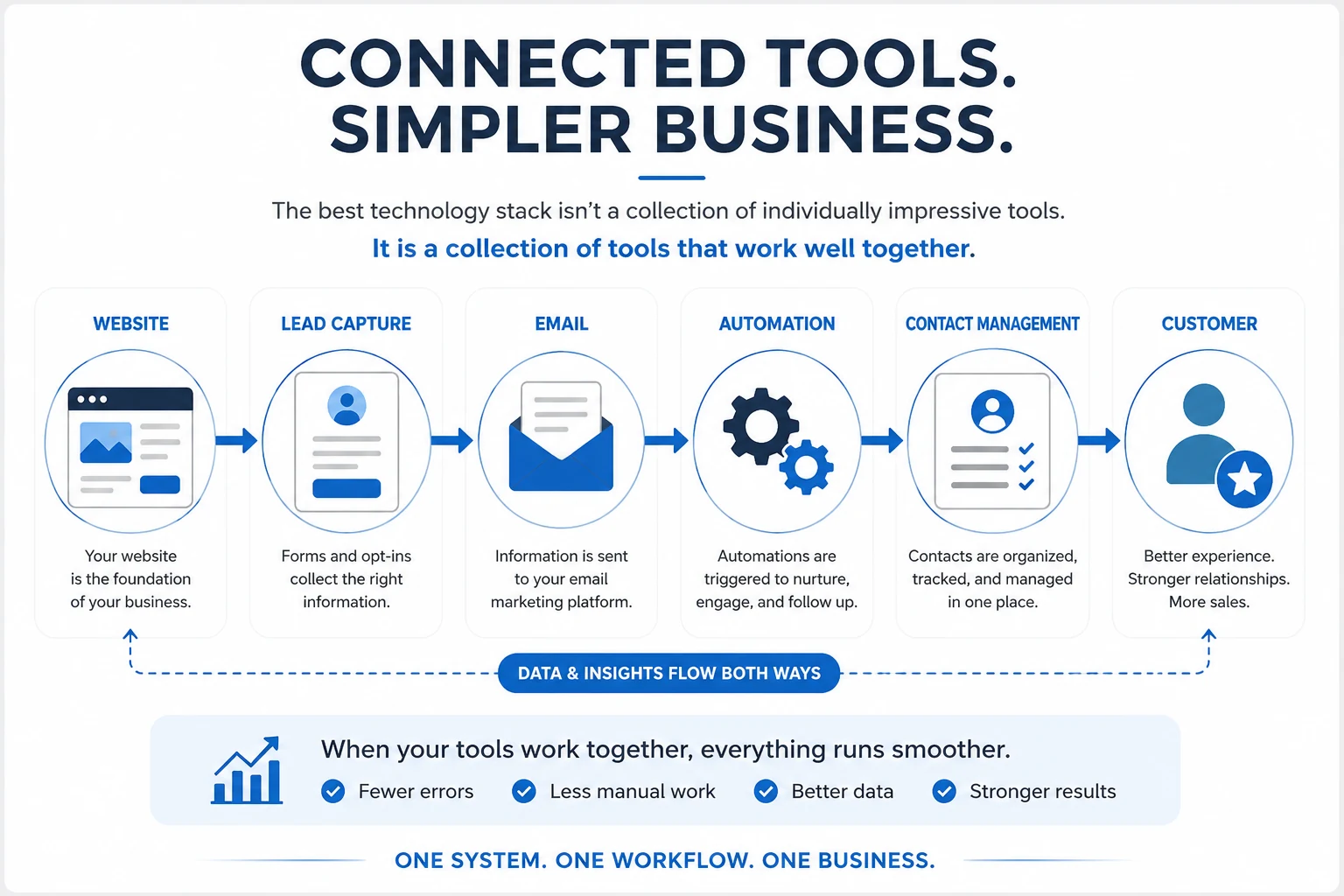
A connected online business system brings your website, lead capture, email marketing, automation, contact management, and customer journey together in one workflow.
Decide What Is Actually Worth Automating
Automation is one of the most attractive features offered by modern online business tools.
And for good reason.
Used properly, automation can handle repetitive tasks, create consistent follow-up, organize information, and allow important processes to continue without requiring constant manual attention.
But automation should not be added simply because a platform makes it possible.
Before automating something, you should understand the process well enough to know whether automation will actually make it better.
Simplify the Process Before You Automate It
Imagine you have a complicated process involving several unnecessary steps.
Automating those steps may make them happen faster.
But the process is still unnecessarily complicated.
A better approach is:
Understand → Simplify → Automate
First, understand what needs to happen.
Then remove steps that do not contribute anything useful.
Only then should you decide which remaining tasks can be automated.
This prevents technology from preserving inefficient processes simply because nobody stopped to question them.
Automate Repetitive and Predictable Tasks
Automation works particularly well when a task follows a consistent pattern.
For example:
• Delivering a requested resource after someone completes a form
• Adding a new lead to the correct email list
• Sending a welcome email
• Starting a follow-up sequence
• Applying a tag based on an action
• Sending appointment confirmations or reminders
• Recording information in another system
These processes have clear triggers and predictable outcomes.
That makes them good candidates for automation.
The more judgment, creativity, or personal interaction a task requires, the more carefully you should consider whether it belongs inside an automated workflow.
Consider What Happens When an Automation Fails
Automated processes can be easy to forget once they are working.
That is part of their appeal.
But it can also create problems.
A connection may stop working.
An integration may change.
An email sequence may contain outdated information.
A form may stop sending data to the correct place.
A payment may fail to trigger the next step.
When evaluating automation features, ask:
Can I easily see whether the automation is working?
Can I understand what happened if something fails?
Can I test the workflow without disrupting customers?
Can I make changes without rebuilding the entire process?
Good automation should reduce the amount of attention a process requires without making the process impossible to understand.
Keep Important Human Touchpoints
Not everything should be automated.
Some interactions benefit from an actual person.
Customer questions.
Important sales conversations.
Personalized support.
Relationship building.
Situations requiring judgment or empathy.
Technology can help organize and support those interactions without replacing them.
For example, automation might notify you that a customer needs attention.
But you can decide how to respond.
That distinction matters.
The purpose of automation is not to remove people from the business.
It is to remove repetitive work so people have more time for the parts of the business where they provide the most value.
Use a Simple Checklist Before Choosing a Tool
By this point, you may have noticed that choosing the right software is less about finding the most impressive platform and more about asking the right questions.
Features matter.
Price matters.
Automation matters.
Integrations matter.
But none of those things should be evaluated independently.
A tool needs to make sense within the business you are actually building.
Before adding another platform, subscription, plugin, or application, run it through a simple checklist.
What Problem Does It Solve?
Start here.
If you cannot clearly explain the problem a tool is supposed to solve, there is probably no reason to add it yet.
Be specific.
Instead of:
“It will help with marketing.”
Try:
“It will capture leads from my website and automatically begin my follow-up sequence.”
The clearer the problem, the easier the tool becomes to evaluate.
Does It Duplicate Something I Already Have?
Check your existing software before buying something new.
You may already have access to the feature you need.
If another tool performs the same function, determine whether the new option provides enough additional value to justify another subscription and another system to manage.
What Will It Really Cost?
Look beyond the advertised monthly price.
Consider:
• The plan you will realistically need
• Additional usage fees
• Future upgrades
• Setup time
• Learning time
• Maintenance
• Additional integrations
• The cost of eventually switching
The true cost of software includes both money and attention.
When evaluating business software, it helps to look beyond the advertised price and consider how the expense fits into your broader business costs. The U.S. Small Business Administration recommends looking at both one-time and monthly expenses to get a clearer picture of what your business actually costs to operate.
Is It Easy Enough to Use Consistently?
A powerful platform provides little value if you avoid using it because everything feels unnecessarily difficult.
Consider the tasks you will perform most frequently.
Can you accomplish them without fighting the software?
Can you understand the system well enough to troubleshoot basic problems?
Can you imagine still using it comfortably a year from now?
Will It Work With the Rest of My Business?
Think about where the tool fits.
What needs to connect to it?
What information needs to enter?
Where does that information need to go next?
A useful tool should support the flow of the business rather than becoming an isolated island inside it.
Can It Grow Without Creating Unnecessary Complexity?
You do not need software capable of supporting every possibility you might encounter ten years from now.
But you also do not want to replace an important platform every few months.
Look for enough flexibility to support reasonable growth without paying for enormous amounts of complexity before you need it.
Does This Tool Earn Its Place?
Finally, bring everything back to one question:
Does this tool make an important part of my business easier, better, faster, or more reliable?
If the answer is yes, and the value justifies the cost and complexity, you may have found the right tool.
If the answer is unclear, waiting may be the better decision.
There will always be another platform.
Another feature.
Another launch.
Another piece of software promising to transform the way you work.
You do not need all of them.
You need the right tools doing the right jobs inside a system you understand.
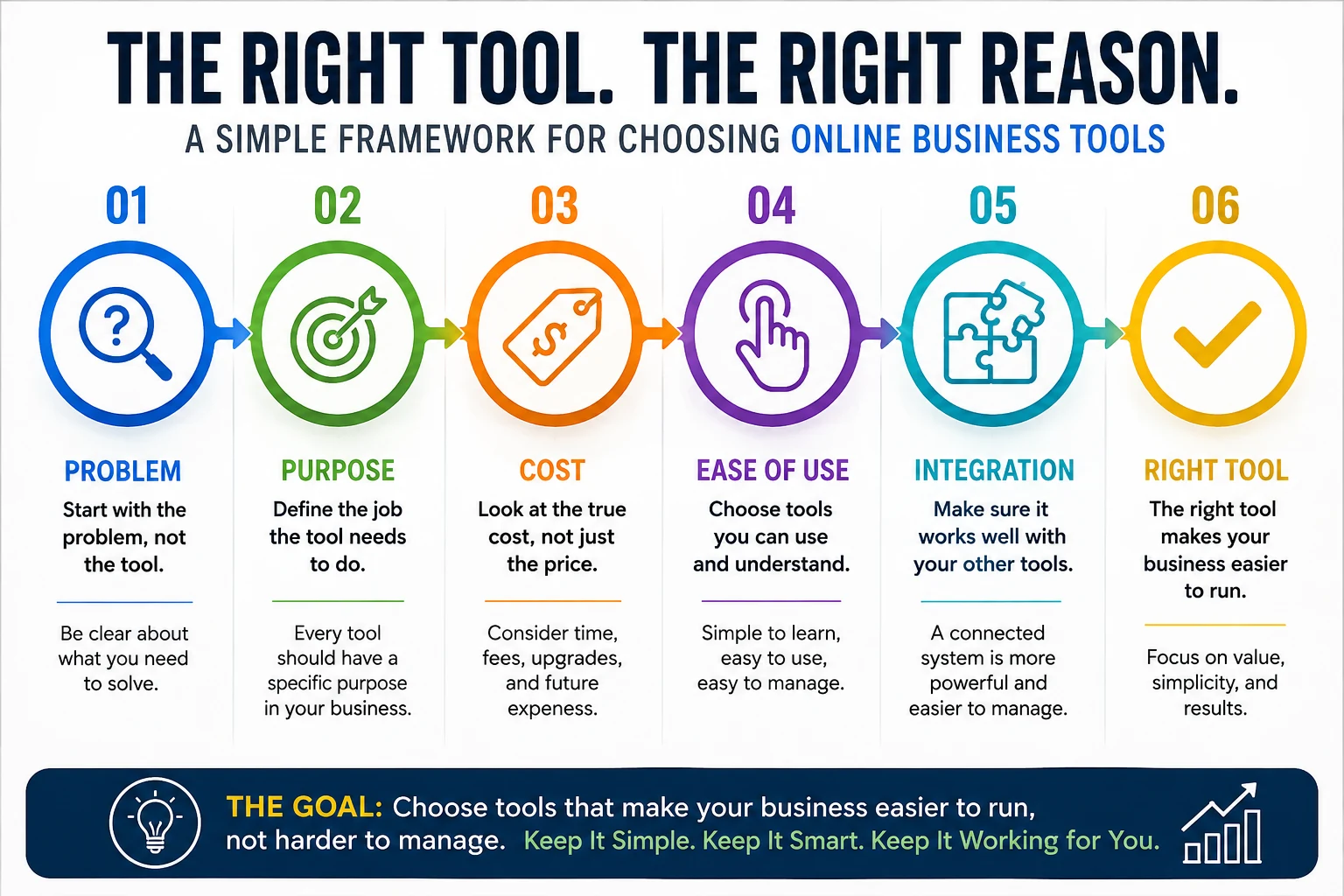
A simple framework for choosing online business tools based on purpose, cost, ease of use, integration, and the problem they need to solve.
Choose Tools That Make Your Business Easier to Run
There will always be another tool promising to help you build faster, automate more, generate better results, or simplify your business.
Some of those tools may genuinely be useful.
But the goal is not to collect the most software.
It is to build a business where technology supports what you are trying to accomplish.
The right tools should help you save time, reduce unnecessary work, organize important information, connect your marketing processes, and make the business easier to understand.
They should solve problems rather than create new ones.
Build Around What You Need Today
You do not need to predict every tool your business might require in the future.
Start with what you need now.
Choose technology that solves those problems well and gives you enough room to grow.
When your business eventually creates a new requirement, you can evaluate another tool based on a real need instead of a hypothetical one.
That approach keeps your technology stack connected to the business itself.
Review Your Tools as Your Business Changes
The right tool today may not always be the right tool tomorrow.
Your audience may grow.
Your marketing may change.
Your processes may become more sophisticated.
New technology may provide a genuinely better way to accomplish something.
Periodically review the tools you use and ask:
• Am I still using this?
• What job does it currently perform?
• Is it providing enough value to justify its cost?
• Does another tool already perform the same function?
• Is it making the business easier or adding unnecessary work?
You do not need to constantly rebuild your technology stack.
You simply need to make sure it continues serving the business you are actually running.
Keep the System Understandable
As your business grows, some additional complexity may be unavoidable.
That is not necessarily a problem.
The important thing is that you continue to understand how the pieces work together.
You should know where your leads come from.
Where their information goes.
How your follow-up works.
How customers move toward your offers.
Where important data is stored.
And which tools are responsible for each part of the process.
When you understand the system, you can improve it.
When the system becomes too complicated to understand, improvement becomes much harder.
Let Every Tool Earn Its Place
Choosing online business tools does not have to become an endless search for the perfect technology stack.
Start with the problem.
Define the job.
Consider the true cost.
Look at ease of use.
Check compatibility.
Automate intentionally.
And make sure the tool contributes something meaningful to the system you are building.
You do not need every new platform that appears.
You do not need every feature.
And you certainly do not need more complexity simply because technology makes it possible.
Choose tools that solve real problems.
Choose tools that work well together.
Choose tools you understand and will actually use.
Most importantly:
Build a business where your tools work for you—not a business where you spend all your time working for your tools.
READY TO SIMPLIFY YOUR SETUP?
See How The Pieces Can Work Together
You do not need more tools just for the sake of having more tools. Explore a simpler approach that brings the essential parts of your online business together so you can spend less time managing technology and more time building and growing.