Creating a customer journey for online business does not have to involve complicated marketing strategies, expensive software, or a collection of disconnected tools.
But it does require understanding something many beginners overlook.
What happens between someone discovering your business for the first time and deciding they trust you enough to take the next step?
Think about it.
Someone finds your website through a Google search. They read an article, explore another page, and maybe download a free resource.
A few days later, they receive a helpful email. They return to your website, learn more about what you offer, and eventually decide whether your product or service is right for them.
Each interaction plays a role in their experience.
And whether you have planned those interactions or not, your visitors are already experiencing a customer journey.
The question is whether that journey feels helpful, connected, and easy to follow—or confusing enough that potential customers leave before discovering what you can offer.
For beginners building an online business, this is where understanding the customer journey becomes especially valuable.
You do not need a massive marketing budget or an advanced automation system to get started.
You need to understand what your visitors are looking for, what questions they have along the way, and how your website, content, landing pages, and follow-up messages can help them move forward.
In this guide, we will explore the stages of the customer journey, explain how it differs from a traditional sales funnel, and walk through the process of creating a simple customer journey map for your online business.
We will also look at a practical example, common mistakes to avoid, and ways to improve the experience as your business grows.
Because building a successful online business is not simply about getting people to visit your website. It is about giving them a reason to stay, return, and eventually trust what you have to offer.
What Is a Customer Journey for an Online Business?
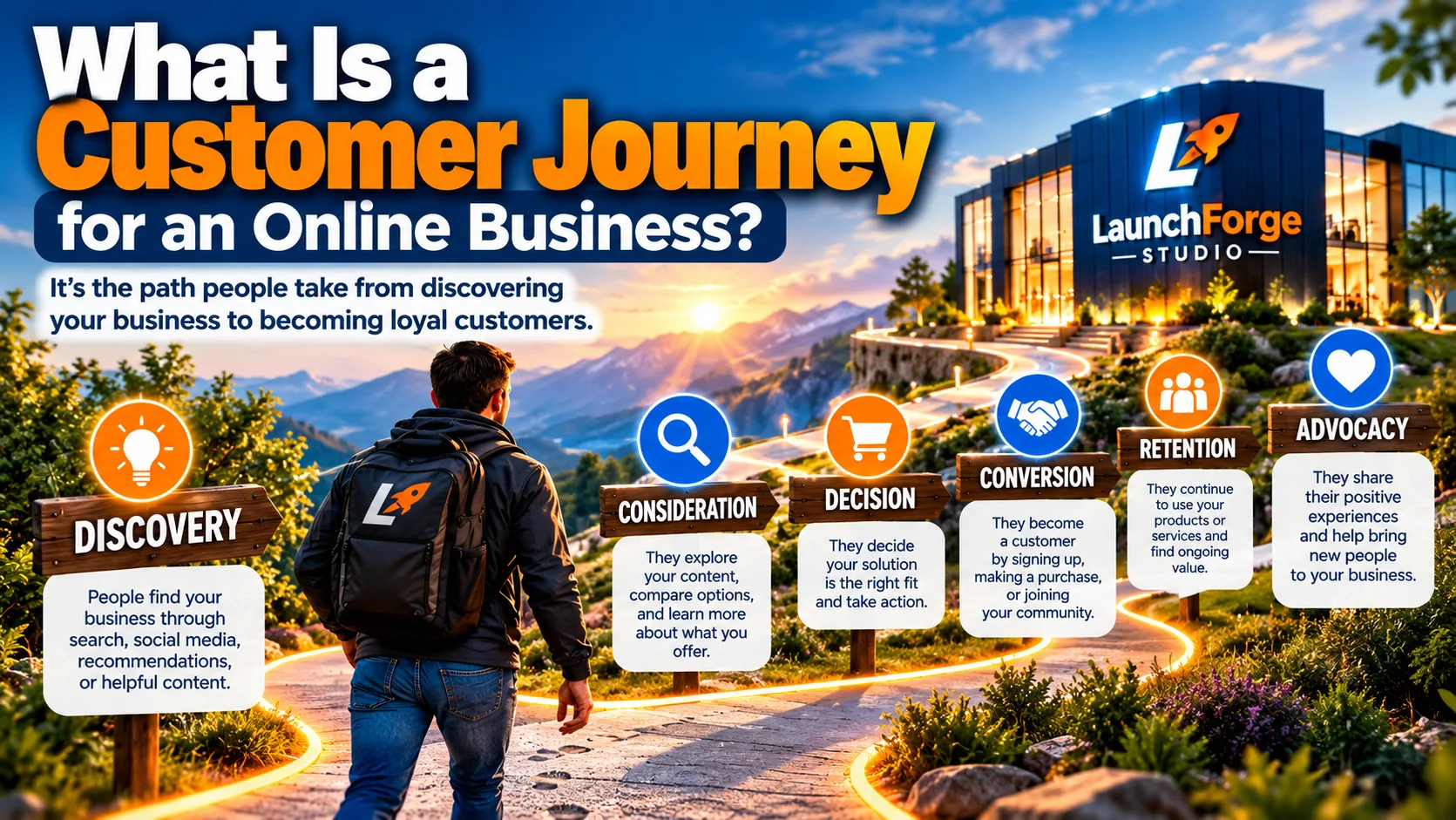
A customer journey represents the experiences people have as they discover, explore, and build relationships with an online business.
A customer journey is the complete experience someone has with your business, beginning with their first interaction and continuing through the decisions, conversations, and experiences that follow.
For an online business, that journey might begin when someone discovers your website through a search engine, social media post, online advertisement, or recommendation.
But finding your business is only the beginning.
What happens next can influence whether that person continues exploring, subscribes to your email list, considers an offer, makes a purchase, or decides to look elsewhere.
A customer journey is not simply the path to making a sale. It includes how people discover, evaluate, interact with, and experience your business over time.
That distinction matters because most people do not arrive at a website ready to purchase something immediately.
Some are looking for answers.
Others are comparing their options.
Some are interested but uncertain whether a particular product or service is right for them.
And others may already be customers who need additional information, support, or reassurance.
Understanding these different situations helps you create an online experience that responds to what people actually need rather than pushing everyone toward the same action.
A Simple Customer Journey Example
Imagine someone wants to start an online business but has no idea which tools they need.
They search Google for information about building a website and discover an educational article on your site.
The article answers their initial questions and introduces them to related topics, such as landing pages, email marketing, and sales funnels.
They explore a few additional resources and begin to understand what is involved.
At some point, they notice an opportunity to download a free beginner’s checklist.
They subscribe to receive it.
Over the following days, they receive a short series of helpful emails explaining common mistakes, useful tools, and practical next steps.
Eventually, they return to your website to learn more about a business platform you have discussed.
If the platform appears suitable for their goals and budget, they may decide to explore it further or make a purchase.
Their experience does not necessarily end there.
They may return for tutorials, troubleshooting information, or additional resources as they begin building their business.
That entire sequence represents a customer journey.
Notice something important about this example.
The visitor was not asked to make a purchase the moment they arrived.
Instead, they had opportunities to learn, evaluate their options, and decide what made sense for their situation.
Not every visitor will follow this exact path. Some may skip steps, return several times, or never become customers.
The purpose of understanding the journey is not to control every decision someone makes.
It is to make useful information and appropriate next steps available when people need them.
What Are Customer Touchpoints?
Every interaction someone has with your business is known as a customer touchpoint.
A touchpoint might be something as simple as reading a blog post or clicking a link in an email.
Other examples include:
- Search engine results: Someone discovers your business while researching a question or problem.
- Social media content: A post introduces your business, offers useful advice, or encourages further exploration.
- Website pages: Visitors learn about your business, products, services, or educational resources.
- Blog articles: Helpful content answers questions and introduces related topics.
- Landing pages: Focused pages invite visitors to take a specific action.
- Signup forms: Visitors provide their contact information to receive a resource or additional communication.
- Email messages: Follow-up content helps subscribers learn more and consider their options.
- Product or service pages: Potential customers evaluate whether an offer meets their needs.
- Customer support: People receive assistance before or after making a purchase.
These interactions do not operate independently in the mind of a visitor.
Together, they influence how someone perceives your business.
For example, imagine reading an excellent educational article that promises to help beginners simplify their online business.
You click through to another page, only to encounter confusing navigation, unclear pricing, and an aggressive sales message that has little connection to what you just read.
Even if the original article was helpful, the overall experience may leave you feeling uncertain.
Now imagine the opposite.
The article answers your question, recommends a relevant next step, and leads to a page that clearly explains your options without unnecessary pressure.
That experience is easier to understand and more likely to build confidence.
The goal is not to create as many touchpoints as possible. It is to make the important ones helpful, relevant, and consistent.
Why Understanding the Customer Journey Matters for Beginners
When you are starting an online business, it is easy to concentrate on individual tasks.
You need a website.
You need visitors.
You need an email list.
You need landing pages, marketing tools, and possibly a way to sell products or services.
Each task seems important, and it can feel as though everything needs to happen at once.
But these activities become easier to prioritize when you understand how they support the people you are trying to help.
For example, attracting website visitors serves little purpose if those visitors cannot find the information they came looking for.
Building an email list becomes less useful if subscribers never receive relevant follow-up communication.
Creating an attractive landing page may not accomplish much if its message does not match the expectations established by the content or advertisement that brought visitors there.
Understanding the customer journey helps you connect those individual activities to a larger purpose.
It can help you:
- Identify what visitors need: Understand the questions people may have at different stages.
- Create more relevant content: Develop articles and resources that address those questions.
- Improve navigation: Make it easier for visitors to discover useful information.
- Plan meaningful calls to action: Suggest next steps that fit the visitor’s current interests.
- Build trust over time: Provide consistent information rather than relying on immediate sales pressure.
- Recognize potential obstacles: Notice where confusing pages, missing information, or complicated processes may discourage visitors.
- Prioritize improvements: Focus on the parts of your online business that could make the greatest difference to the customer experience.
Perhaps most importantly, this approach encourages you to see your online business from the visitor’s perspective.
Instead of asking only, “How can I get more people to click my offer?” you begin asking a more useful question:
“What does this person need to understand or feel confident about before taking the next step?”
That shift can influence how you write articles, design pages, organize information, and communicate with subscribers.
You do not need to predict every visitor’s behavior or build a complicated system to benefit from this approach.
Start by understanding the most common questions your audience has and making the next useful step easier to find.
As your business grows, you can use feedback and performance data to improve the experience further.
How the Five Stages Work Together
Although we have explored each stage individually, the greatest value comes from understanding how they connect.
Imagine someone discovering your online business through an educational article.
That first interaction represents awareness.
As they explore your tutorials, compare different tools, and begin evaluating possible solutions, they move into consideration.
When they feel confident enough to register for a platform, purchase a product, or take another meaningful action, they enter the decision stage.
But their experience does not end there.
Helpful onboarding resources, ongoing education, and accessible support can contribute to retention.
And when someone has a genuinely positive experience, they may eventually recommend your business to others.
The following illustration brings these five stages together and shows practical ways an online business can support customers throughout their experience
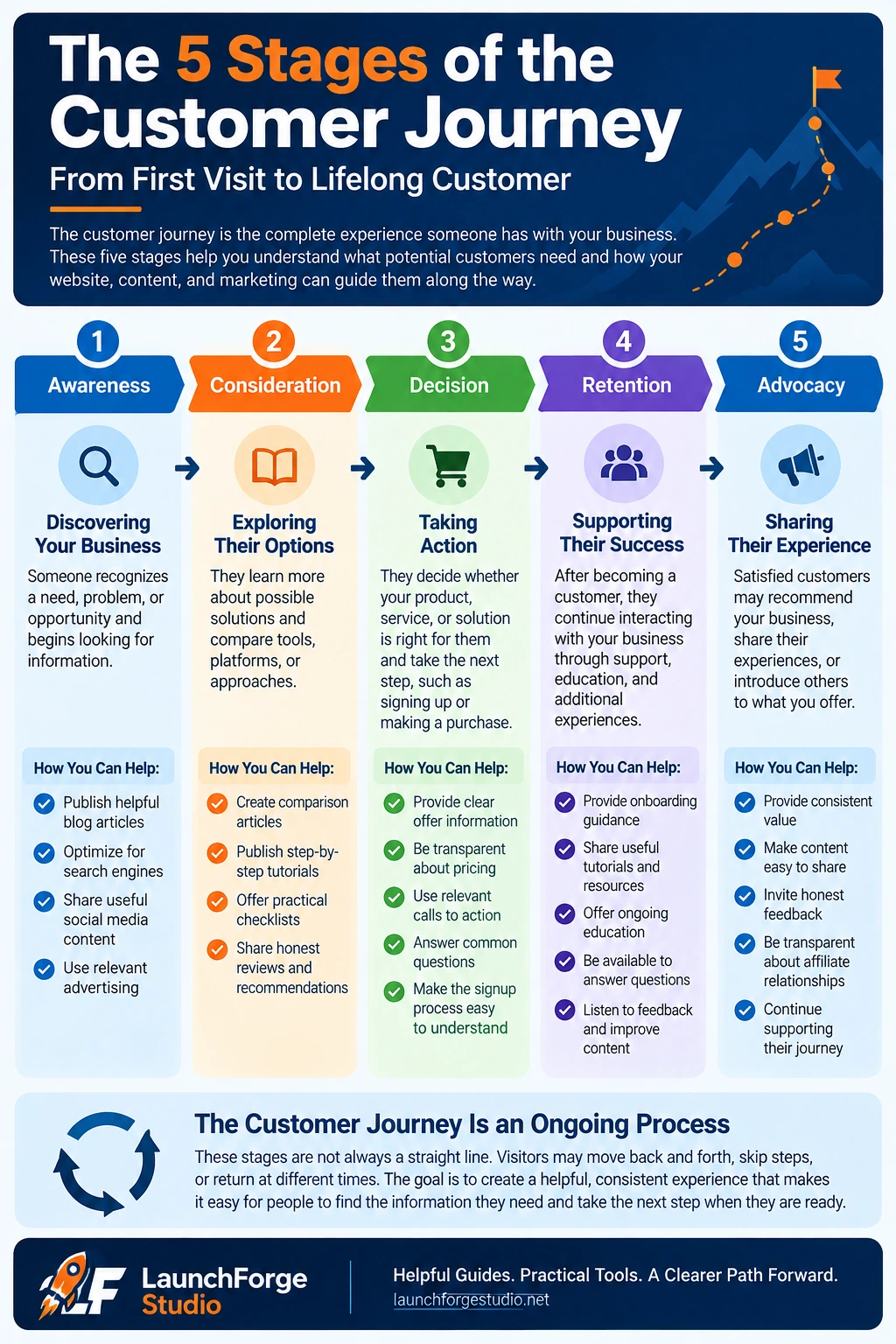
The five stages of the customer journey and practical ways to support visitors and customers at each stage.
Remember: The Customer Journey Is Not Always a Straight Line
While the five stages provide a helpful framework, real customers do not always follow them in order.
Someone might read an article, leave your website, return several weeks later, and compare additional options before making a decision.
An existing customer might return to the consideration stage when evaluating another product or service.
And some visitors may never become customers at all.
That is perfectly normal.
A well-planned customer journey creates opportunities for positive experiences. It does not guarantee that every visitor will make a purchase.
For beginners, the goal is not to build an elaborate marketing system that anticipates every possible interaction.
Start by helping people discover your business, understand what you offer, and find a logical next step.
Then use feedback and performance data to improve the experience as your business grows.
Now that we understand the five stages, let’s explore how the customer journey compares with another important marketing concept: the sales funnel.
Customer Journey vs. Sales Funnel: What’s the Difference?
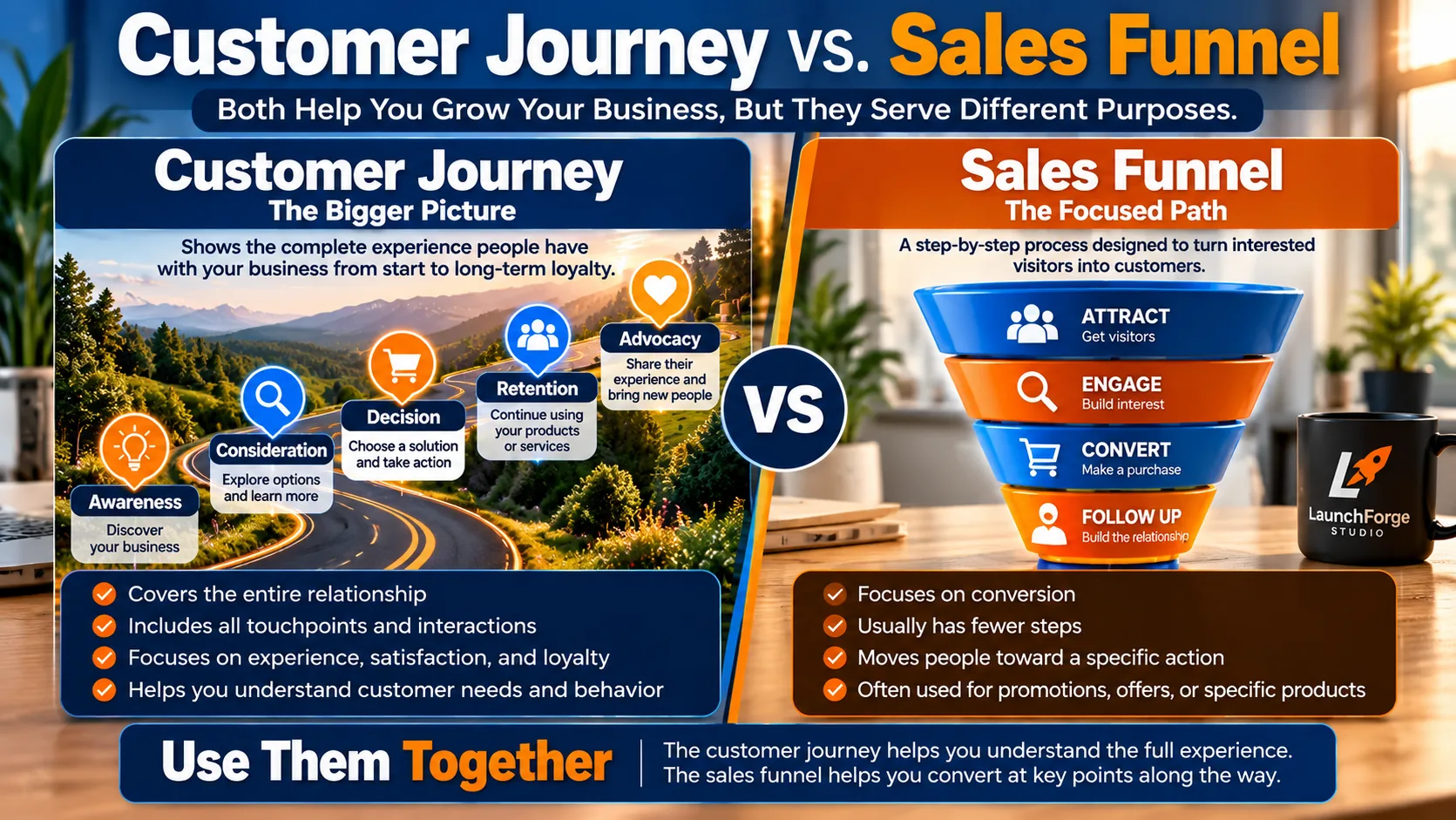
A customer journey covers the complete customer experience, while a sales funnel focuses on guiding visitors toward specific conversions.
If you have spent any time researching online marketing, you have probably encountered the term sales funnel.
You may have also heard people discussing customer journeys, lead generation systems, conversion paths, and marketing automation.
With so many related terms, it is understandable that beginners sometimes wonder whether they all describe the same thing.
The customer journey and sales funnel are closely connected, but they are not identical.
A customer journey describes the overall experience someone has with your business. A sales funnel describes the process your business uses to guide potential customers toward a specific conversion.
Understanding this difference can help you build a marketing system that serves your visitors rather than simply moving them from one promotional message to another.
What Is a Sales Funnel?
A sales funnel is a structured process designed to guide potential customers through a series of steps toward a particular action.
That action might involve subscribing to an email list, registering for a webinar, requesting information, or purchasing a product.
For example, a simple online business sales funnel might involve:
- Someone clicks a link in an educational article.
- They arrive at a landing page offering a free beginner’s checklist.
- They submit their email address to receive the resource.
- They receive a follow-up email introducing additional educational content.
- They eventually encounter a relevant product or service offer.
Each step has a specific purpose.
The landing page encourages a signup.
The follow-up messages provide additional information.
The offer gives interested subscribers an opportunity to explore a solution.
A funnel helps organize these activities into a connected process rather than leaving each interaction completely separate.
However, not everyone who enters a funnel will complete every step.
Some visitors may decide the free resource is all they need.
Others may subscribe but never open the follow-up emails.
Some may explore the offer and decide it is not right for them.
That is normal.
A sales funnel creates a structured opportunity for conversion, but it does not guarantee a sale.
For a deeper explanation of how funnels work and the different stages involved, explore our beginner’s guide to what a sales funnel is and how it works.
What Makes the Customer Journey Different?
The customer journey takes a broader view.
Instead of concentrating primarily on a particular conversion process, it considers the person’s overall experience with your business.
That experience may begin long before someone encounters your landing page or enters an email sequence.
For example, imagine someone who discovers LaunchForge Studio while searching for information about starting an online business.
They read an article about choosing the right business tools.
A few days later, they return to explore a guide about creating a landing page.
They might follow LaunchForge Studio on social media, read additional tutorials, or compare different business platforms.
Eventually, they decide to download a resource or explore an offer.
Those interactions are all part of their customer journey, even if they did not follow a predefined sales funnel.
And the journey may continue after a purchase or signup.
They might return for tutorials, seek help understanding a particular feature, or recommend an educational resource to someone else.
The customer journey follows the person’s experience across multiple interactions, while a sales funnel organizes selected steps toward a defined goal.
This difference becomes especially important when you are building a business around helpful content, educational resources, and long-term relationships.
Not every visitor will be ready to enter a funnel.
Sometimes the most valuable thing your website can do is answer a question and give someone a reason to return.
Customer Journey vs. Sales Funnel: The Key Differences
Let’s break down the distinction into a few practical points.
1. The Customer Journey Focuses on the Person
A customer journey asks questions such as:
- What is this visitor trying to accomplish?
- What information do they need?
- What questions or concerns might they have?
- How do they feel about the experience?
- What might encourage them to continue exploring?
- What could cause frustration or uncertainty?
These questions help you understand the experience from the visitor’s perspective.
A sales funnel, by comparison, focuses more directly on the actions involved in reaching a particular conversion.
Both perspectives are useful, but they answer different questions.
2. The Customer Journey Can Include Multiple Funnels
A person might interact with several different marketing processes during their relationship with your business.
For example, they could subscribe through a lead magnet funnel, register for a webinar through another landing page, and later explore a separate product offer.
Each funnel serves a particular purpose.
But the person’s overall experience connects those interactions.
If the messaging across these processes is inconsistent, the experience may feel confusing.
Understanding the broader journey helps you create more continuity between them.
3. The Customer Journey Continues After a Conversion
Many sales funnels focus on generating a lead or completing a purchase.
The customer journey also includes what happens afterward.
Does the customer receive helpful information?
Can they find support?
Do they understand how to use what they purchased?
Are they given opportunities to continue learning?
These experiences influence whether someone feels satisfied with their decision.
For an educational business, providing useful guidance after a signup or purchase can be just as important as helping someone make the initial decision.
4. A Sales Funnel Is Usually More Structured
A funnel generally follows a planned sequence.
For example:
Landing page → Signup form → Thank-you page → Email follow-up → Offer.
A customer journey is often less predictable.
Someone might discover your website through Google, return from a social media post, read several articles, and eventually click a link in an email.
They may skip certain steps or revisit earlier ones.
You can design a funnel, but you cannot completely control the path every customer takes.
That is why a useful customer journey strategy considers different ways people may interact with your business.
Do You Need Both a Customer Journey and a Sales Funnel?
For many online businesses, understanding both concepts is beneficial.
However, that does not mean beginners need to create an elaborate customer journey map and several automated funnels before launching their first website.
Start with the basics.
If you are building an educational website, focus on helping visitors find relevant information and understand what your business offers.
If you want to grow an email list, create a straightforward lead capture process.
If you are promoting a product or service, make sure interested visitors can find clear information and take the next step without unnecessary confusion.
These activities can support both your customer journey and your sales funnel.
For example, imagine you publish an article explaining how to choose an all-in-one business platform.
The article helps readers during the consideration stage of their customer journey.
Within that article, you offer a relevant beginner’s checklist.
The checklist leads to a landing page where interested visitors can subscribe.
That landing page becomes part of a simple lead generation funnel.
After subscribing, readers receive helpful follow-up emails that introduce additional resources and explain their options.
The email sequence supports the funnel while also contributing to the broader customer experience.
The funnel provides structure. The customer journey provides context.
When the two work together, your marketing activities can become more relevant and easier for visitors to understand.
Why Beginners Should Start With the Customer Journey
It can be tempting to begin by building landing pages, installing automation tools, and connecting every available marketing feature.
After all, these activities can make an online business feel productive.
But tools alone do not explain what your visitors need.
Before creating a complicated funnel, ask yourself a few simple questions.
Who am I trying to help?
What problem are they attempting to solve?
What information would be useful when they first discover my business?
What questions might they have before considering an offer?
What happens after they subscribe or make a purchase?
Answering these questions can help you determine which marketing tools and processes are actually necessary.
For example, if your visitors are complete beginners, they may benefit from educational articles and introductory resources before encountering detailed product comparisons.
If they are already familiar with a particular problem, they may appreciate a direct comparison of possible solutions.
And if they have already purchased a product, another promotional email may be less helpful than a tutorial explaining how to get started.
The best next step depends on where someone is in their journey, not simply on which marketing tool you want them to use.
This approach can also help you avoid a common beginner mistake: building a collection of disconnected funnels and pages without a clear understanding of how they serve your audience.
A simple, connected system is often easier to manage than several complicated processes that compete for attention.
Once you understand the experience you want to create, you can choose the tools that support it.
And that brings us to the next important question.
How do you actually map the customer journey for your own online business?
How to Create a Customer Journey Map: 7 Beginner-Friendly Steps
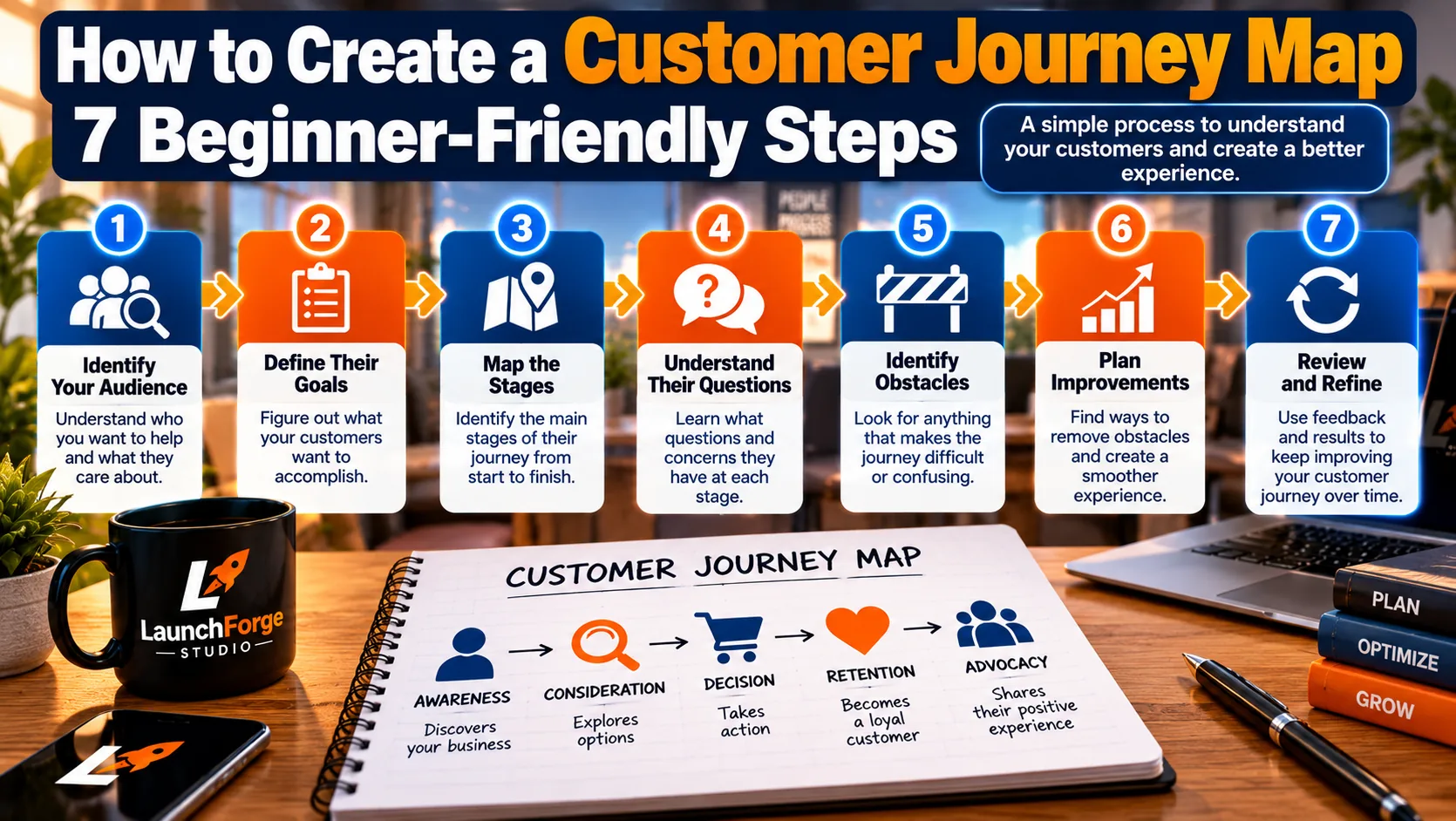
Follow these seven beginner-friendly steps to map customer interactions, identify obstacles, and create a more helpful online business experience.
Now that you understand the stages of the customer journey and how they differ from a sales funnel, it’s time to put that knowledge into practice.
One of the most useful ways to do this is by creating a customer journey map.
A customer journey map is a simple outline of the experiences someone may have while discovering, evaluating, and interacting with your business.
For a deeper understanding of the process, Nielsen Norman Group’s guide to customer journey mapping explains the essential components of a journey map, including customer goals, actions, emotions, and opportunities for improvement.
It helps you identify what potential customers are trying to accomplish, what information they need, and where they might encounter confusion or unnecessary obstacles.
For beginners, creating a customer journey map does not require expensive software, complicated diagrams, or advanced marketing experience.
You can begin with a notebook, a basic document, or a simple spreadsheet.
The purpose is not to create something impressive to look at.
The purpose is to understand your audience well enough to make their experience easier, clearer, and more helpful.
Let’s walk through seven practical steps.
Step 1: Identify Who You Want to Help
Before mapping a customer journey, you need a reasonably clear understanding of the people your online business is intended to serve.
This does not mean creating an elaborate customer profile filled with assumptions about someone’s age, income, hobbies, or personal life.
Instead, begin with the problem your audience is trying to solve.
For example, imagine you’re building an educational website for people who want to start an online business.
Your audience might include:
- Complete beginners who have never built a website.
- People who feel overwhelmed by complicated marketing software.
- Affiliate marketers looking for simpler ways to manage their tools.
- Small business owners who want to establish an online presence.
- Budget-conscious entrepreneurs trying to avoid unnecessary expenses.
These groups may share certain interests, but they do not necessarily have identical needs.
A complete beginner might want to understand how websites work.
Someone who already operates a website may be more interested in generating leads or improving conversions.
The more clearly you understand the problem someone wants to solve, the easier it becomes to create a useful journey around that problem.
Start With One Specific Audience
Rather than trying to map every possible customer at once, choose one group.
For example:
A beginner who wants to start an online business but feels overwhelmed by the number of tools and decisions involved.
That gives you a practical starting point.
You can expand your customer journey mapping later as you learn more about other audience segments.
Avoid Assuming You Know Everything
If your business is new, you may not have enough information to understand your audience perfectly.
That’s normal.
Start with reasonable hypotheses based on the questions people ask, the problems your content addresses, and the experiences you have observed.
As you gather feedback and website data, update your understanding.
A customer journey map should evolve as you learn.
Step 2: Define What Your Customer Wants to Accomplish
Once you’ve identified your intended audience, determine what that person is trying to achieve.
This is important because your business goals and your customer’s goals are not always the same.
You may want someone to subscribe to your email list.
But that person may simply want to understand how to build their first website.
You may want them to explore a business platform.
But they may still be comparing options and trying to determine which features are necessary.
A helpful customer journey begins with the customer’s goal, not your preferred conversion.
Identify the Immediate Goal
Ask yourself:
- What brought this person to my website?
- What question are they trying to answer?
- What problem are they hoping to solve?
- What would make this interaction useful to them?
- What information might they need before taking another step?
For our beginner entrepreneur example, the immediate goal might be:
Understand what tools are necessary to start an online business without spending money on unnecessary software.
That goal gives your content and marketing activities a clear direction.
An article explaining the basic tools needed to launch an online business would be relevant.
A detailed sales pitch for advanced automation software might not be.
Consider the Larger Goal
People often have both immediate and long-term goals.
Someone researching website builders may ultimately want to create an online business that generates income.
However, their immediate goal may simply be choosing a platform they can understand and afford.
Helping them accomplish that smaller goal can create a positive first experience.
Over time, they may return for guidance about traffic, email marketing, sales funnels, or other aspects of growing their business.
When you help people make progress toward their goals, your business becomes part of a useful experience rather than just another promotional destination.
Step 3: Identify the Main Stages and Customer Touchpoints
Now it’s time to outline the interactions someone may have with your online business.
Begin with the five customer journey stages we covered earlier:
- Awareness
- Consideration
- Decision
- Retention
- Advocacy
Then identify the touchpoints that may occur during each stage.
Remember, a touchpoint is any interaction someone has with your business.
Awareness Touchpoints
Someone may first encounter your business through:
- A Google search result.
- An educational blog article.
- A social media post.
- A relevant online advertisement.
- A recommendation from another website.
At this stage, consider whether the information they discover matches what they were looking for.
If your article promises to explain how to start an online business, does it actually answer that question?
Consideration Touchpoints
As visitors explore their options, they might interact with:
- Comparison articles.
- Product reviews.
- Beginner tutorials.
- Educational email messages.
- Frequently asked questions.
- Platform feature explanations.
These resources should help people evaluate their options without creating unnecessary pressure.
Decision Touchpoints
When someone considers taking action, important touchpoints may include:
- Product or service pages.
- Pricing information.
- Webinar registration pages.
- Signup forms.
- Checkout processes.
- Calls to action.
At this stage, clarity becomes especially important.
Visitors should understand what they’re being invited to do and what happens next.
Retention Touchpoints
After a signup or purchase, interactions might include:
- Welcome emails.
- Getting-started tutorials.
- Educational resources.
- Support information.
- Product updates.
- Relevant follow-up communication.
If you’re recommending a third-party product as an affiliate, be clear about which resources you provide and which services are handled by the product provider.
Advocacy Touchpoints
Satisfied customers or readers may interact with your business through:
- Social sharing.
- Referrals.
- Reviews.
- Testimonials.
- Recommendations to friends or colleagues.
You cannot force these interactions, but a consistently helpful experience may encourage them.
Keep Your First Map Manageable
You do not need to include every possible touchpoint.
Start with the interactions most relevant to your audience and business model.
For example, a beginner affiliate marketing website might initially focus on educational articles, landing pages, email follow-up, and relevant product recommendations.
That’s enough to create a useful first version.
Step 4: Understand the Questions and Concerns at Each Stage
Identifying touchpoints is only part of the process.
You also need to consider what visitors may be thinking or feeling when they encounter them.
Someone reading an introductory article may feel curious but uncertain.
Someone comparing software platforms may feel overwhelmed by features and pricing.
Someone preparing to purchase may want reassurance about support, setup, or ongoing costs.
These concerns can influence whether the experience feels helpful or frustrating.
Ask Questions From the Visitor’s Perspective
At the awareness stage:
Do I understand what I need to get started?
During consideration:
Which solution makes the most sense for my situation?
During decision:
Am I confident about what I’m signing up for?
During retention:
Can I get help and continue making progress?
During advocacy:
Would I feel comfortable recommending this resource to someone else?
These are examples, not assumptions about every visitor.
Real people may have different questions depending on their experience, goals, and circumstances.
Use Real Feedback Whenever Possible
As your website grows, look for patterns in:
- Questions readers ask.
- Comments on your content.
- Email replies.
- Common support inquiries.
- Search queries that bring people to your website.
- Feedback from people who use your resources.
This information can help you understand which concerns are most important.
For example, if several readers ask whether they need separate hosting for a particular business platform, that may indicate your existing explanation needs to be clearer.
You could update the relevant article or create a short tutorial addressing the question.
A customer journey map becomes more useful when it’s informed by actual visitor behavior and feedback rather than assumptions alone.
Step 5: Look for Obstacles That Make the Journey Difficult
Now examine the interactions you’ve identified and ask where visitors might experience unnecessary difficulty.
These obstacles are sometimes called friction points.
A friction point is anything that makes it harder for someone to understand information, complete an action, or continue their experience.
Some obstacles are obvious.
Others may be easy to overlook when you’re familiar with your own website.
Common Friction Points for Online Businesses
Confusing navigation
Visitors may struggle to find the information they need if your menus are complicated or pages are poorly organized.
Unclear calls to action
A button labeled “Click Here” may not explain what happens next.
More descriptive wording can help visitors understand the destination.
Slow-loading pages
Large images, unnecessary scripts, and poorly optimized website elements can make pages frustrating to use.
Poor mobile usability
Text that’s difficult to read, buttons that are hard to tap, or layouts that do not adapt to smaller screens can create obstacles.
Inconsistent messaging
If an advertisement promises one thing but the landing page discusses something unrelated, visitors may lose confidence.
Missing information
People may hesitate if they cannot find pricing details, product limitations, support information, or clear explanations of what an offer includes.
Complicated forms
Requesting unnecessary information or presenting too many steps can discourage people from completing a signup.
Unhelpful follow-up emails
Messages that repeatedly promote offers without providing relevant information may cause subscribers to disengage.
Examine Your Website Like a First-Time Visitor
One useful exercise is to open your website in a private browser window and pretend you’ve never visited it before.
Choose a realistic starting point, such as an educational article.
Then ask yourself:
Can I understand what this page is about?
Can I find related information?
Do the links lead where I expect?
Is the next step clear?
Does the website work comfortably on a mobile device?
If I decide to explore an offer, can I understand what I’m being invited to consider?
This exercise won’t replace actual usability testing, but it can reveal obvious problems.
Small improvements that remove confusion may be more useful than adding another complicated marketing feature.
Step 6: Plan Helpful Improvements and Next Steps
Once you’ve identified potential obstacles, decide how to improve the experience.
You do not need to fix everything immediately.
Begin with the issues that appear most likely to interfere with a visitor’s ability to accomplish their goal.
For example, imagine your website has an educational article that receives consistent traffic.
The article answers an important question, but visitors have no clear way to explore the next related topic.
You might improve the experience by adding a relevant internal link to another helpful guide.
Or perhaps your landing page receives visitors, but the signup form is difficult to use on mobile devices.
Improving the form may be more valuable than creating another advertising campaign.
Match Improvements to the Customer’s Needs
Here are several practical examples.
If visitors cannot find information:
Improve navigation, organize related articles, and add descriptive internal links.
If readers seem uncertain about their options:
Publish balanced comparisons, explain important features, and address common questions.
If a landing page is confusing:
Clarify the headline, simplify the message, and make the call to action easier to understand.
If subscribers stop engaging:
Review whether your follow-up emails deliver the information people expected when they signed up.
If customers struggle after purchasing:
Provide relevant tutorials or direct them to the appropriate official support resources.
If people repeatedly ask the same question:
Consider adding a clear explanation to the relevant page or creating a dedicated educational resource.
Prioritize Simplicity
Beginners sometimes assume improving a customer journey requires purchasing additional marketing software.
But many improvements involve things you can do with your existing website and tools.
You might rewrite a confusing paragraph.
Add a useful link.
Simplify a form.
Clarify an offer.
Improve a page’s mobile layout.
Or create one helpful follow-up message.
The goal is not to build the most complicated customer journey. It’s to make the next useful step easier for the people you’re trying to help.
Step 7: Review Results and Improve Your Customer Journey Over Time
Your first customer journey map is a starting point, not a finished document that should remain unchanged forever.
As your online business develops, you’ll learn more about your audience.
Some articles may attract more visitors than expected.
Certain pages may generate more engagement.
Readers may ask questions you hadn’t considered.
And some marketing activities may produce little meaningful response.
These observations can help you improve your customer journey.
Start With a Few Useful Measurements
Depending on your website and available tools, you might review:
- Which articles attract visitors.
- Where visitors come from.
- Which internal links receive clicks.
- Whether people complete signup forms.
- How landing pages perform.
- Which email messages generate engagement.
- What questions readers ask most frequently.
You do not need to monitor dozens of metrics.
Choose measurements that relate to the experience you’re trying to improve.
For example, if your immediate goal is helping readers discover additional educational resources, relevant internal-link clicks may be more useful than obsessing over total website traffic.
If you’re trying to improve lead capture, form submissions and landing page conversion rates may provide more relevant information.
Make One Meaningful Improvement at a Time
Suppose you notice that a landing page receives visitors but generates relatively few signups.
There could be several explanations.
The offer may not match visitor expectations.
The headline may be unclear.
The form may be difficult to use.
Or visitors may simply not be interested in the resource.
Instead of changing everything at once, begin by investigating the most plausible issue.
Make a targeted improvement and observe what happens.
Remember that small websites may not receive enough traffic to draw reliable conclusions from every short-term change.
Avoid assuming a single good or bad day proves that an adjustment worked.
Update Your Map as Your Business Grows
Your audience, offers, and content may change over time.
As you publish more articles, introduce additional resources, or develop new marketing processes, revisit your customer journey map.
Ask whether the experience still makes sense.
Are visitors finding the information they need?
Are important pages connected?
Are your calls to action relevant?
Does your follow-up communication match the expectations established earlier?
Are customers receiving appropriate support after taking action?
These questions can guide ongoing improvements.
A useful customer journey map should help you make better decisions, not become another complicated task you feel obligated to maintain.
Your First Customer Journey Map Does Not Have to Be Perfect
If you’ve followed these seven steps, you already have the foundation for a practical customer journey map.
You understand who you’re trying to help, what they want to accomplish, where they may interact with your business, and which obstacles could make their experience more difficult.
That’s a meaningful starting point.
You can begin with a simple written outline of the most likely path someone might take.
For example:
A visitor discovers an educational article.
They explore a related guide.
They find a relevant resource or offer.
They decide whether to subscribe or take another step.
They receive helpful information that supports their decision.
And, if they become a customer, they can find resources that help them continue making progress.
You can refine that outline as you learn more about your audience.
You don’t need to predict every possible customer interaction. You need a useful starting point and a willingness to improve it.
Once you’ve mapped the experience you want to create, the next step is connecting the practical tools that support it.
That includes your website, landing pages, email marketing, and automation systems.
How to Connect Your Website, Landing Pages, and Email Marketing
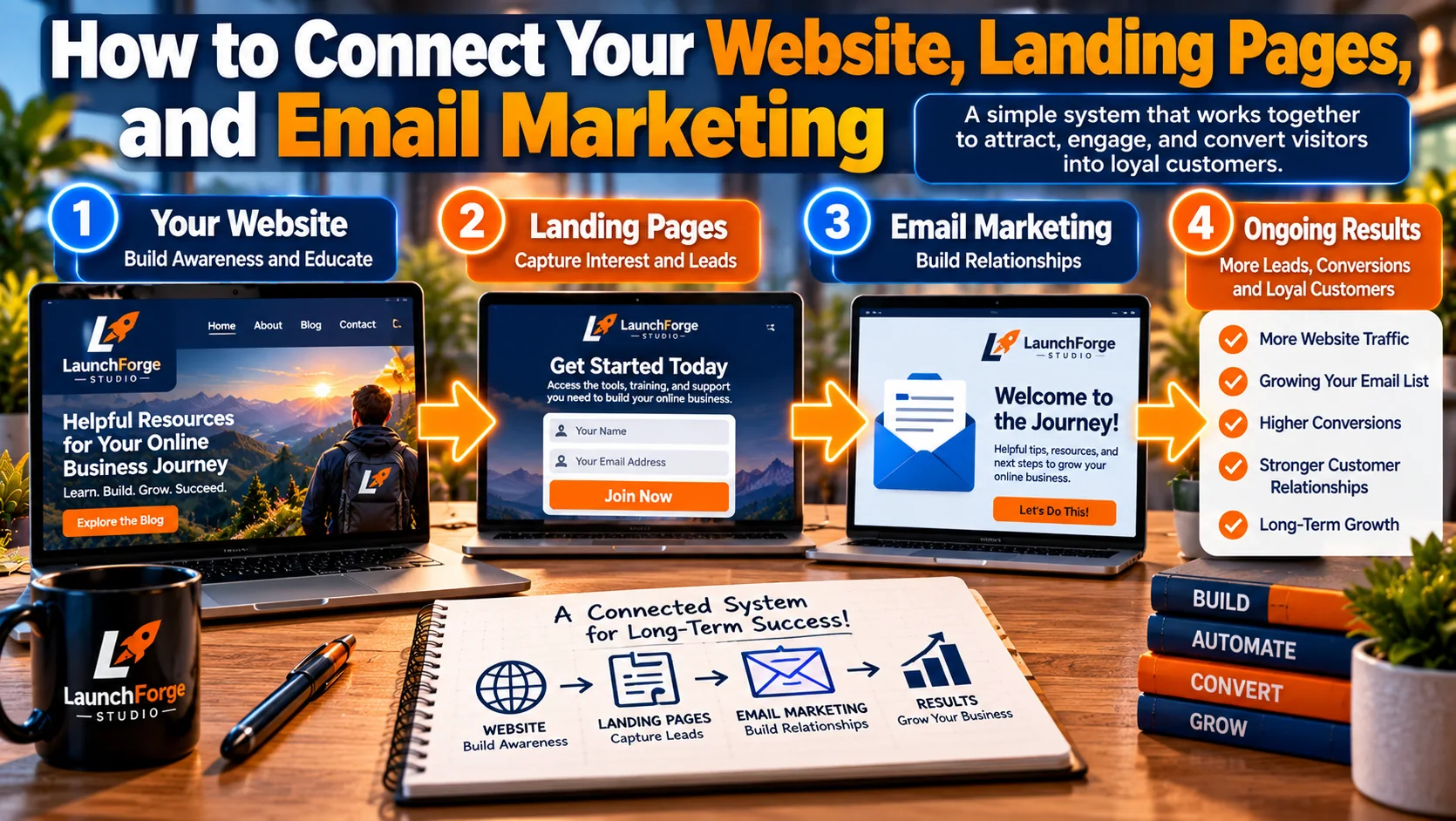
A connected marketing system helps visitors move from discovering your website to exploring offers, joining your email list, and building lasting relationships.
Once you’ve mapped your customer journey, the next challenge is making sure your marketing tools support the experience you want to create.
For many beginners, this is where things can become unnecessarily complicated.
You might have a website built on one platform, landing pages hosted somewhere else, an email marketing service managing subscribers, and separate tools handling automation.
Each tool may work perfectly well on its own.
But if they aren’t connected properly, visitors can encounter confusing messages, disconnected experiences, or unnecessary steps.
A successful customer journey depends less on how many tools you own and more on how effectively those tools work together.
The good news is that you don’t need an elaborate marketing system to create a connected experience.
Start with a few essential components.
Your Website: The Starting Point for Discovery and Education
Your website often serves as the central location where people learn about your business.
If you’re still building your online presence, our guide on how to build a business website with WordPress walks you through the fundamentals of creating a website that supports your business goals.
It introduces your purpose, explains what you offer, and provides opportunities to explore useful information.
For an educational online business, blog articles can play an especially important role.
Someone might discover your website through an article answering a specific question.
If that article helps them, they may become interested in exploring related topics.
This is where thoughtful navigation and internal linking become valuable.
For example, a beginner reading about starting an online business might benefit from a related guide explaining how to choose the right tools.
The goal is to make relevant information easy to discover without overwhelming visitors with unnecessary options.
Every important page should have a clear purpose and, where appropriate, a logical next step.
Landing Pages: Turning Interest Into a Specific Action
While your website may serve several purposes, a landing page generally focuses on one particular action.
If you’re new to landing pages, our beginner-friendly guide explaining what a landing page is and how it works will help you understand their purpose and how they fit into your online marketing strategy.
That action might involve downloading a checklist, subscribing to a newsletter, registering for a webinar, or exploring a relevant offer.
A landing page should connect naturally with the content that brought someone there.
For example, if an article discusses choosing an online business platform, a related beginner’s checklist could provide a useful next step.
However, if the visitor clicks expecting educational information and instead encounters an unrelated sales pitch, the experience may feel disconnected.
The promise made before the click should match what visitors find afterward.
Keep landing pages straightforward.
Use a clear headline, explain the benefit of taking action, and avoid requesting information you don’t actually need.
Email Marketing: Continuing the Conversation
Not everyone will be ready to make a decision during their first website visit.
Email marketing provides an opportunity to continue communicating with people who have chosen to subscribe.
For example, someone who downloads a beginner’s checklist might receive a welcome email containing the promised resource.
A later message could introduce a related tutorial.
Another might explain common mistakes or offer guidance on choosing appropriate tools.
Eventually, subscribers who are interested may appreciate learning about a relevant product or service.
The important thing is maintaining continuity.
If someone subscribes to receive beginner-friendly educational content, your follow-up messages should reflect that expectation.
Email marketing works best as part of a helpful ongoing relationship, not simply a delivery system for repeated promotional messages.
Make sure subscribers understand what they’re signing up for and can unsubscribe easily.
Automation: Connecting the Steps Without Adding Complexity
Marketing automation can help deliver information or perform routine actions when certain conditions are met.
For example, when someone completes a signup form, an automation might add them to the appropriate email list and send a welcome message.
Another automation could deliver a short educational sequence over several days.
These processes can save time, but they should support a clear purpose.
Before adding automation, ask yourself:
- What action should trigger this process?
- What information does the visitor expect next?
- Does the automation make the experience easier?
- Could a simpler process accomplish the same goal?
For beginners, one reliable welcome sequence may be more useful than several complicated automations that are difficult to maintain.
Do You Need an All-in-One Business Platform?
Not necessarily.
Separate tools can work well when they’re compatible, affordable, and manageable.
However, an all-in-one business platform may reduce the need to connect multiple services manually.
Depending on the platform and plan, website building, landing pages, contact management, email marketing, and automation may be available within a shared system.
For beginners who want fewer moving parts, that can be worth considering.
At LaunchForge Studio, we use Profit Hub System as the foundation for our website and business-building tools.
Our experience with the platform also helps inform the educational content we publish.
However, no platform is automatically the right choice for everyone.
Consider your budget, technical comfort level, business goals, and the features you genuinely need before choosing a solution.
If you’re still comparing your options, our guide on how to choose the best all-in-one business platform for beginners can help you understand what to look for before making a decision.
The best marketing setup is one you can understand, maintain, and improve as your business grows.
Start With One Connected Customer Experience
You don’t need to connect every marketing feature immediately.
Begin with one simple process:
- Publish a useful article that answers a question your audience is asking.
- Provide a relevant next step, such as another guide or a free resource.
- Use a focused landing page if visitors need to complete a specific action.
- Deliver any promised resource and follow-up information.
- Make it easy for interested visitors to explore an appropriate offer.
- Continue providing useful information after they take action.
Test the process yourself.
Follow the links, complete the forms, check the emails, and review the experience on a mobile device.
If something feels confusing or unnecessarily complicated, improve it before adding more features.
A simple customer journey that works reliably is more valuable than an elaborate system that leaves visitors wondering what to do next.
A Real Customer Journey Example for a Beginner’s Online Business
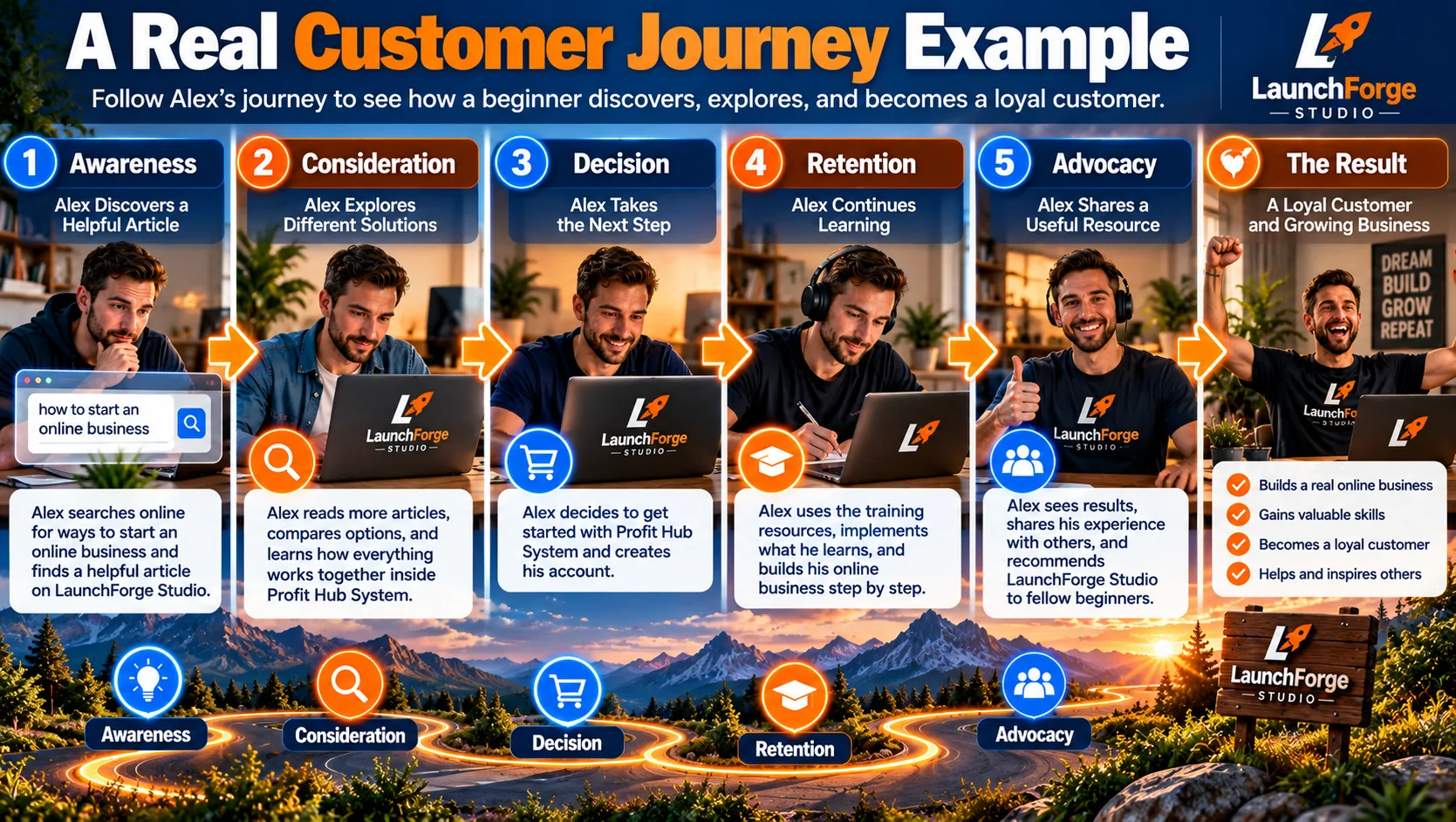
Follow Alex’s hypothetical journey from discovering helpful business resources to making an informed decision and sharing his experience with others.
Let’s bring everything together with a practical example.
Imagine someone named Alex who wants to start an online business but has very little experience with websites, marketing tools, or sales funnels.
Alex has a limited budget and wants to avoid paying for software that may not be necessary.
We’ll follow Alex through a hypothetical customer journey to see how a beginner-friendly educational website could help at each stage.
Awareness: Alex Discovers a Helpful Article
Alex searches Google for information about starting an online business without technical experience.
One of the results leads to an educational article explaining the basic tools beginners need.
The article answers several questions and introduces Alex to concepts such as website builders, landing pages, and email marketing.
Instead of immediately pushing a product, the website provides useful information.
Alex leaves with a better understanding of what’s involved.
Consideration: Alex Explores Different Solutions
A few days later, Alex returns to the website.
This time, the goal is to compare business-building platforms.
Alex reads a guide explaining the differences between all-in-one platforms and separate marketing tools.
The article discusses features, pricing considerations, technical requirements, and potential limitations.
Alex also explores related tutorials to better understand how the tools work.
These resources help Alex evaluate different approaches without feeling pressured to make an immediate decision.
Decision: Alex Takes the Next Step
After researching several options, Alex decides to explore a platform recommended in one of the educational articles.
The recommendation leads to a page explaining the platform’s features and providing access to additional information.
Alex reviews the available details, considers the costs, and decides whether the platform fits the business being planned.
In this example, Alex chooses to sign up.
However, another visitor might decide to keep researching or select a different solution.
Both outcomes are normal parts of the customer journey.
Retention: Alex Continues Learning
After signing up, Alex begins building a website.
Naturally, new questions arise.
How should the homepage be organized?
What belongs on a landing page?
How can website visitors become email subscribers?
Alex returns to the educational website and discovers tutorials addressing these questions.
The continued availability of helpful resources supports Alex’s progress and creates additional opportunities for a positive experience.
Advocacy: Alex Shares a Useful Resource
Several weeks later, a friend asks Alex where to find beginner-friendly information about building an online business.
Alex remembers the educational articles that helped during the research process and shares a link.
That recommendation introduces another potential visitor to the website.
The entire journey began with one helpful article.
What This Example Teaches Us
Alex’s experience demonstrates an important principle.
Every interaction should help the visitor make progress toward something meaningful.
The introductory article answered a question.
The comparison guide supported an informed decision.
The product information made the next step understandable.
And the tutorials provided continued educational value.
Notice that the website did not need to force Alex through every possible marketing step.
Instead, it made relevant information available as Alex’s needs changed.
This is what a well-planned customer journey can accomplish.
It helps your business provide the right information at useful moments while allowing visitors to make their own decisions.
Common Customer Journey Mistakes to Avoid
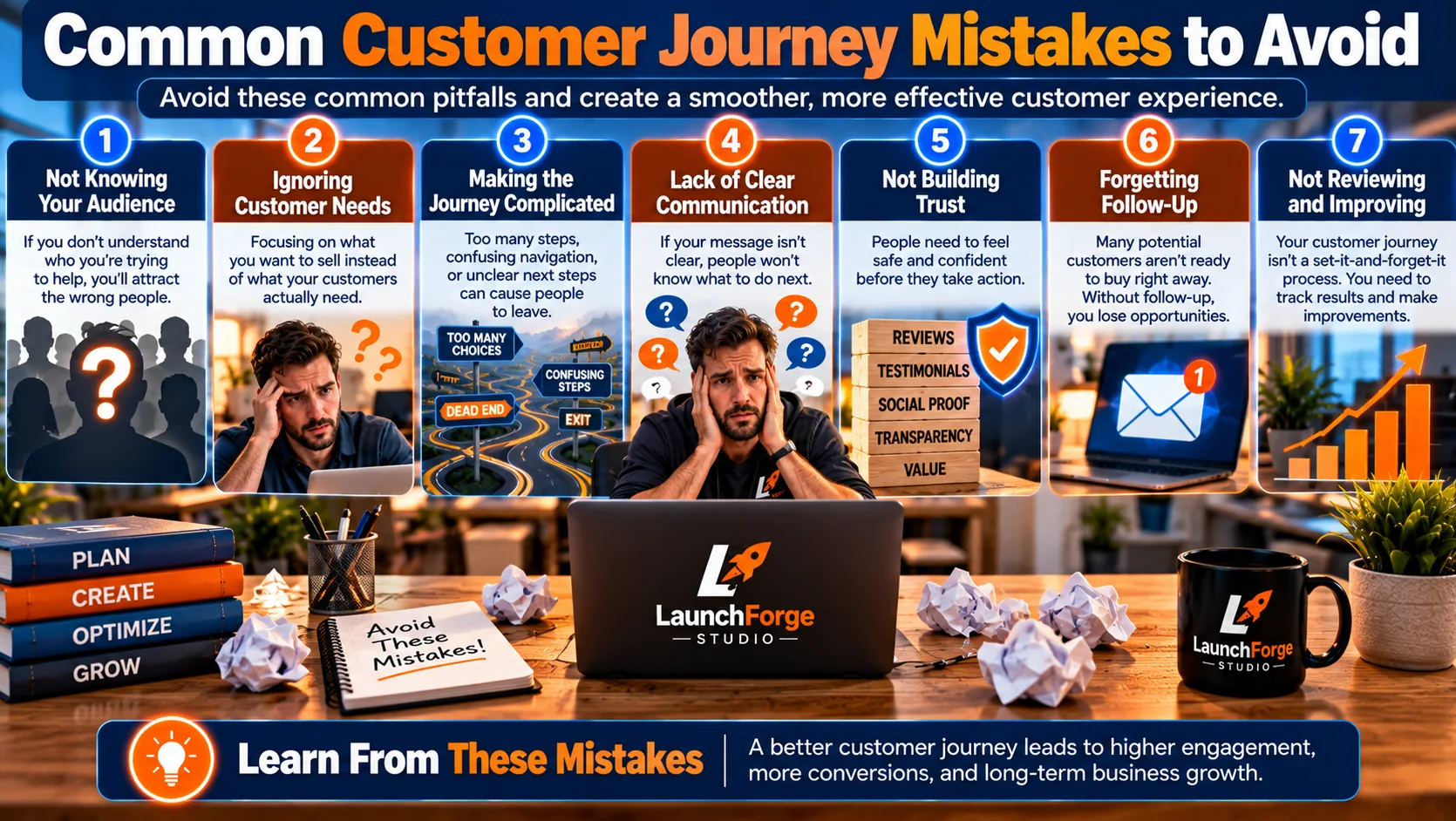
Avoiding common customer journey mistakes can help create clearer communication, smoother experiences, and stronger customer relationships.
Even a simple customer journey can become confusing when individual marketing activities are disconnected.
Watch out for these common mistakes:
- Focusing only on traffic: Attracting visitors is important, but they also need helpful information and a clear next step.
- Promoting too early: Someone researching a problem may not be ready for an immediate sales pitch.
- Creating disconnected pages: Articles, landing pages, and offers should deliver consistent messages.
- Ignoring mobile visitors: Difficult navigation, unreadable text, and complicated forms can interrupt the experience.
- Forgetting existing customers: Useful tutorials, education, and appropriate support matter after a purchase.
- Adding unnecessary automation: Complicated workflows can create more problems than they solve.
If visitors are reaching your website but not taking the next step, our guide on how to improve website conversion rates explores practical ways to reduce friction, strengthen your calls to action, and create a better experience for your visitors.
The goal is not to eliminate every possible obstacle. It’s to recognize the most important ones and improve them over time.
How to Measure and Improve Your Customer Journey
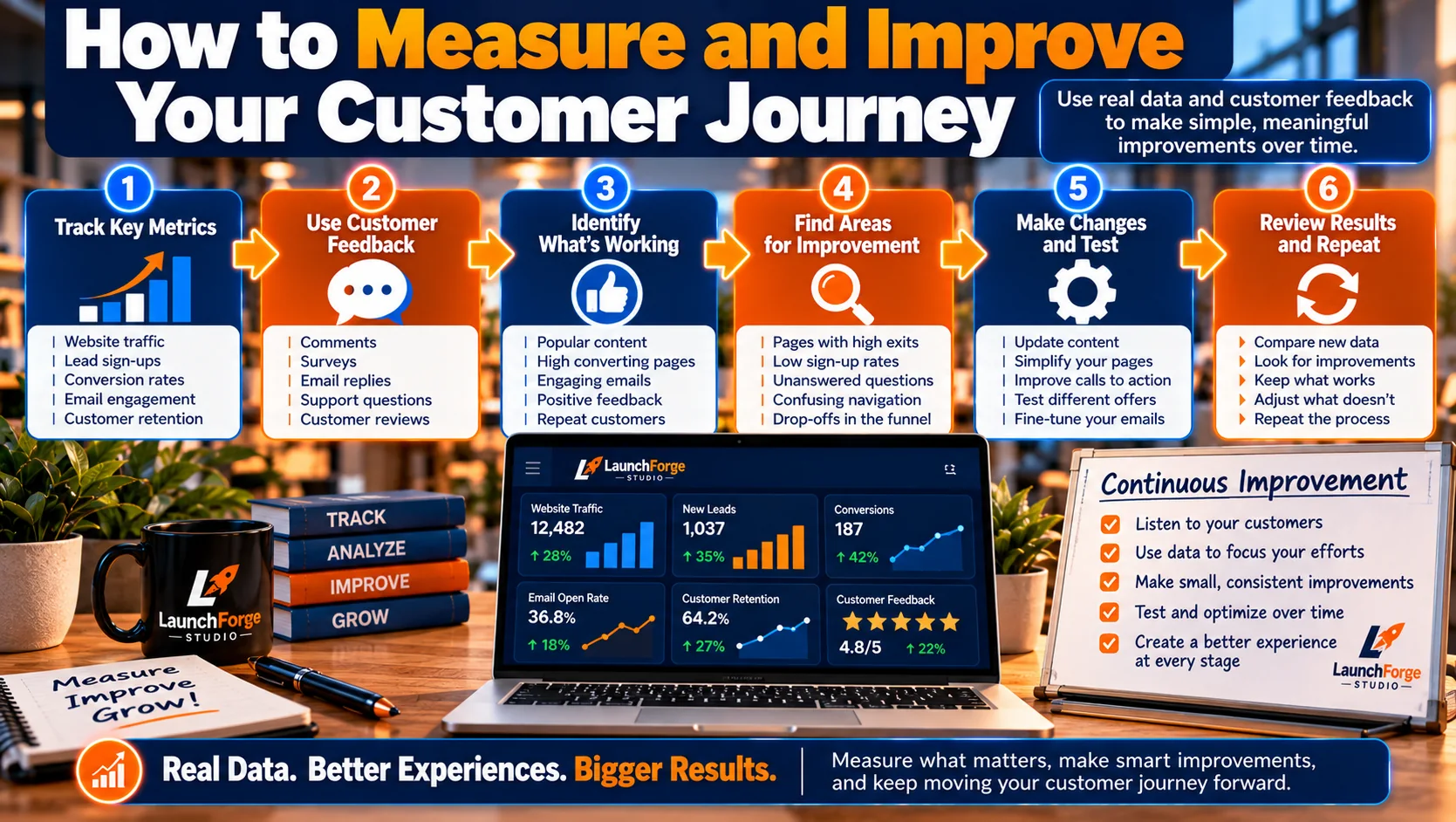
Track meaningful metrics, listen to customer feedback, identify obstacles, and make ongoing improvements to your online business customer journey.
You don’t need advanced analytics to begin understanding how visitors interact with your website.
Start with a few meaningful questions.
Which articles attract visitors? Do readers explore related content? Are people completing signup forms? Where might visitors encounter unnecessary confusion?
Tools such as Google Analytics and Google Search Console can provide useful information about website traffic and search visibility.
For a closer look at how visitors interact with your website, Google’s official guide to Google Analytics engagement reports explains how to examine visitor activity and identify opportunities to improve the user experience.
If you’re unsure where to begin with website analytics, our beginner-friendly guide on how to track website traffic explains how to understand where your visitors come from and use that information to make better marketing decisions.
Email marketing and landing page tools may also offer engagement and conversion reporting.
However, numbers require context.
A low conversion rate does not automatically mean a page is poorly designed. The offer, audience, traffic source, and visitor expectations may all influence results.
Measure what matters to your business, investigate potential problems, and make improvements based on evidence rather than assumptions.
Your Simple 7-Day Customer Journey Action Plan
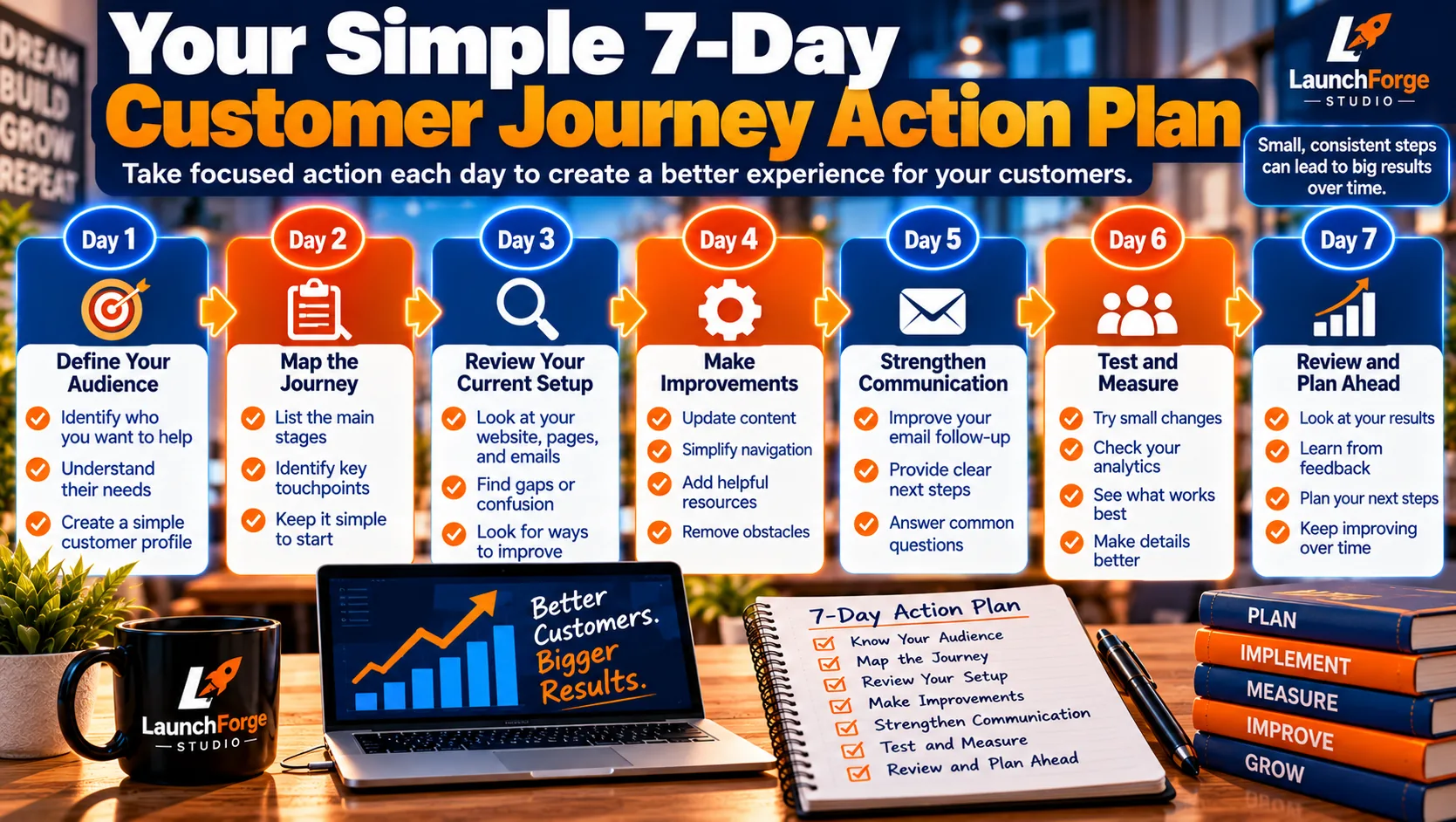
Follow a simple seven-day plan to better understand your audience, identify customer journey obstacles, and make meaningful improvements.
You don’t need to rebuild your entire online business to improve the customer experience.
Start with one manageable task each day.
- Day 1: Identify one audience segment and the problem you want to help them solve.
- Day 2: Write down the questions they may have before making a decision.
- Day 3: Identify the pages and resources that answer those questions.
- Day 4: Follow your website’s links as though you’re a first-time visitor.
- Day 5: Improve one confusing page, message, or call to action.
- Day 6: Test an important signup or follow-up process.
- Day 7: Review what you’ve learned and choose your next improvement.
You can repeat this process as your website and audience grow.
Frequently Asked Questions About Customer Journeys
What Is the Main Purpose of a Customer Journey?
The main purpose of a customer journey is to understand how people discover, evaluate, and interact with your business over time.
By recognizing their questions, needs, and potential obstacles, you can create a more helpful experience.
For beginners, this means making it easier for visitors to find useful information, explore relevant solutions, and decide what steps make sense for them.
A customer journey should focus on helping people make informed decisions, not simply encouraging more purchases.
Can a Small Online Business Benefit From Customer Journey Mapping?
Absolutely.
Customer journey mapping is not limited to large companies with dedicated marketing departments.
A small online business can benefit by identifying how visitors discover its website, which resources they explore, and where they might encounter confusion.
You can start with a simple written outline rather than investing in specialized software.
Even small improvements, such as clearer navigation or more relevant internal links, can make the experience easier to follow.
Do I Need Expensive Software to Create a Customer Journey Map?
No.
You can create your first customer journey map using a notebook, a document, or a basic spreadsheet.
Begin by identifying your intended audience, their main goal, the stages they may experience, and the interactions that matter most.
As your business grows, analytics and marketing tools may provide additional insights.
However, understanding your customers is more important than purchasing complicated software.
How Many Touchpoints Should a Customer Journey Have?
There is no universal number of touchpoints that every online business should include.
The appropriate number depends on your audience, business model, and the decisions customers are making.
A simple journey might involve an educational article, a related landing page, and a helpful follow-up email.
A more complex purchase may involve several visits, comparisons, questions, and interactions.
Focus on making each important touchpoint useful rather than creating additional steps unnecessarily.
How Often Should I Update My Customer Journey Map?
Review your customer journey map whenever you make meaningful changes to your website, marketing processes, products, or services.
You can also revisit it periodically as you gather more information about visitor behavior and customer feedback.
For a growing online business, a quarterly review can be a reasonable starting point, but it is not a requirement.
The important thing is to keep your map relevant as your audience and business evolve.
What Is the Biggest Mistake Beginners Make With Customer Journeys?
One common mistake is focusing entirely on what the business wants visitors to do while overlooking what visitors actually need.
For example, encouraging someone to purchase a product before answering their basic questions may create unnecessary pressure.
A better approach is to understand the person’s goal, provide relevant information, and make appropriate next steps easy to find.
When you build your marketing around helping people make progress, the customer journey becomes more useful for everyone involved.
Final Thoughts: Make Every Step Easier for Your Customers
Creating a customer journey for online business doesn’t require a complicated marketing strategy or an expensive collection of software.
It begins with understanding the people you’re trying to help.
When you recognize their questions, provide relevant information, and connect your marketing activities thoughtfully, you create a more useful experience.
Your website introduces your business. Your content builds understanding. Your landing pages offer meaningful next steps. And your follow-up communication helps maintain the relationship.
You don’t need to build everything at once. Start with one helpful experience, connect the important steps, and improve as you grow.
That’s how a collection of marketing tools begins to become a connected online business.