
You publish a great blog post. You spend hours researching, writing, editing, and making sure every detail is right. Finally, you hit Publish.
And then comes the million-dollar question:
Will anyone remember to come back and read your next article?
That’s a challenge almost every blogger and small website owner faces. Getting someone to discover your content is one thing. Giving them a convenient reason to return is something entirely different.
Search engines can introduce new visitors. Social media can help spread the word. But neither guarantees that someone who enjoyed your latest article will see the next one.
That’s where follow.it comes into the picture.
Follow.it is a content subscription platform that helps website owners notify interested readers when new articles are published. Instead of expecting visitors to remember your website address or repeatedly check for updates, you can offer them a simple way to follow your content.
But is follow.it actually worth using? Does its free plan provide enough functionality for beginners? Are its premium features worth paying for? And how does it compare with traditional email marketing software?
Those are exactly the questions we’re exploring in this follow.it review.
At LaunchForge Studio, we use follow.it to help readers stay connected with our growing collection of online business guides, WordPress tutorials, marketing insights, and educational resources. We also use its Super-Cool publisher plan, giving us firsthand experience with the platform beyond its free offering.
And we’re not here to pretend that adding a subscription form will magically produce thousands of loyal readers overnight.
A notification system can help people discover your latest content, but it can’t make that content valuable. That’s still our job.
In this guide, we’ll examine follow.it’s features, pricing, WordPress integration, subscriber management capabilities, and potential limitations. We’ll also share how we’re using it at LaunchForge Studio, explain where it fits alongside email marketing tools, and help you decide whether the free or paid version makes sense for your website.
Our goal is simple: help you make an informed decision before investing your time or money in another online business tool.
Affiliate disclosure: LaunchForge Studio uses follow.it and participates in its affiliate program. If you sign up through one of our referral links and become a paying customer, we may earn a commission at no additional cost to you. Our recommendations reflect our own experience and evaluation.
What Is Follow.it and How Does It Work?
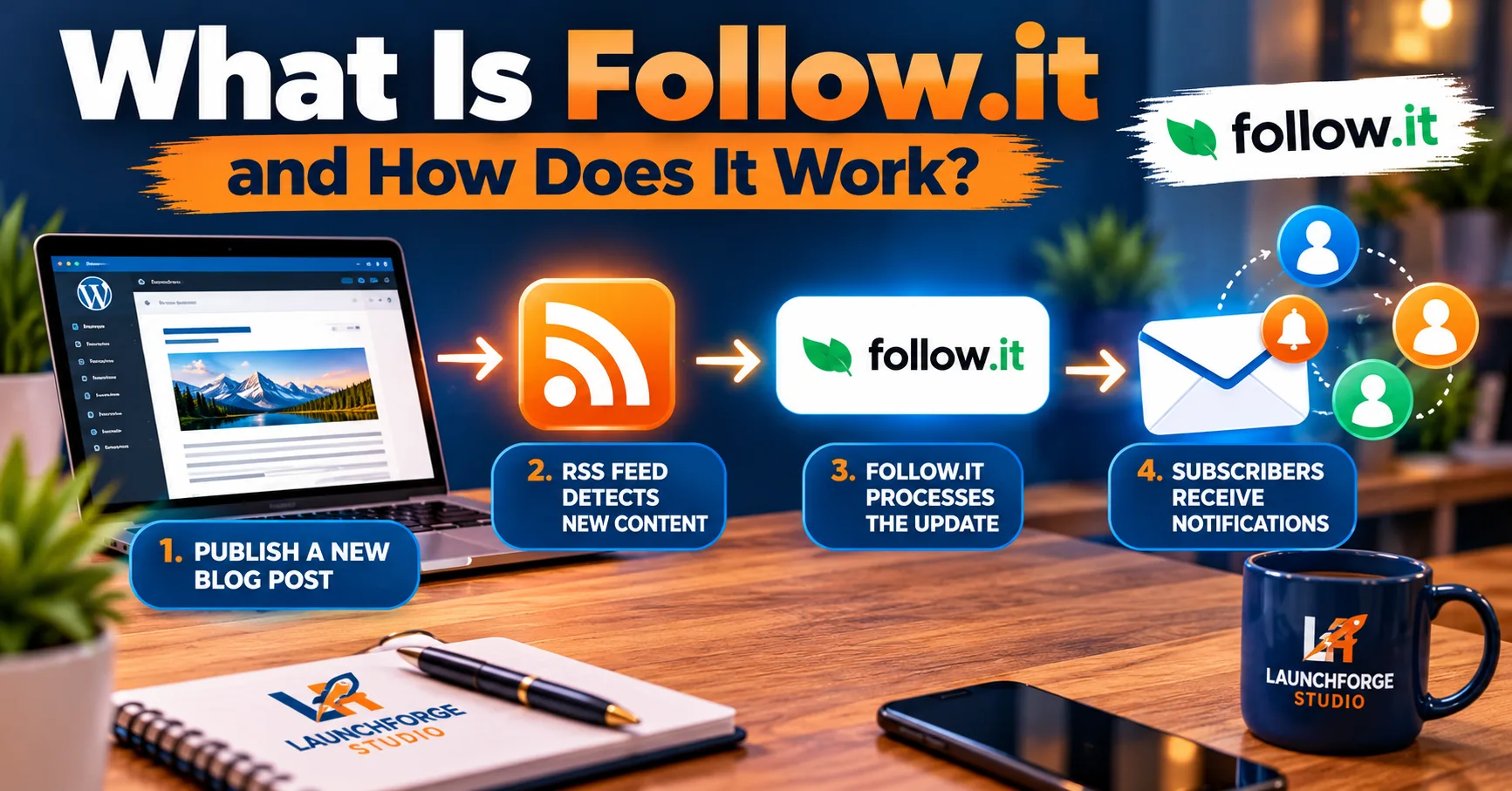
How follow.it connects WordPress blog updates to subscribers through RSS-powered notifications.
Imagine discovering a website that publishes exactly the kind of information you’ve been searching for.
Maybe it’s a blog about starting an online business, a WordPress tutorial website, or a resource dedicated to helping beginners understand digital marketing.
You find an article you love, learn something useful, and promise yourself you’ll return when the next one is published.
Then life happens.
Your inbox fills up, your browser tabs multiply like rabbits, and that helpful website disappears somewhere into the vast wilderness of the internet.
Follow.it helps solve that problem by giving readers a convenient way to stay connected with websites they enjoy.
Follow.it is a content-following and notification platform that allows people to subscribe to updates from websites, blogs, and other online publications. When new content becomes available, subscribers can receive notifications through supported delivery methods, including email.
For website owners, this creates an opportunity to turn an occasional visitor into someone who regularly discovers their latest content.
For readers, it eliminates the need to repeatedly check whether their favorite websites have published something new.
How Follow.it Connects to Your Website
At the heart of follow.it is a technology called RSS, which stands for Really Simple Syndication.
RSS allows websites to publish a structured feed containing information about their latest content.
Think of an RSS feed as a continuously updated list of your website’s newest articles.
When you publish a new blog post, your website can add that article to its RSS feed. Services like follow.it can then detect the update and make it available to subscribers.
For WordPress users, this is particularly convenient because WordPress normally generates RSS feeds automatically.
In many cases, your main WordPress feed can be found by adding /feed/ to your website address.
For example:
https://yourwebsite.com/feed/
You generally don’t need coding experience to create a standard WordPress RSS feed.
Once follow.it is connected to the appropriate feed, it can monitor your website for new content and distribute updates according to subscribers’ delivery preferences.
The exact notification timing depends on the publisher’s configuration, subscription settings, and available integration features.
What Happens When Someone Subscribes?
Let’s say someone visits your website, enjoys one of your articles, and decides they want to receive future updates.
Here’s how the process generally works:
- A visitor discovers your subscription option. This might be a signup form on your blog, a dedicated subscription page, or a link to your follow.it feed.
- The visitor chooses to follow your content. They complete the applicable subscription process and select their preferred delivery settings.
- Follow.it connects that subscriber to your publication. The reader can manage how they receive updates through the platform’s supported options.
- You publish a new article. Your website updates its RSS feed, making the new content available for detection.
- Follow.it delivers the update. Depending on the subscriber’s preferences, they may receive an individual email, a digest, or another supported notification.
- The reader can return to your website. Interested subscribers can follow the notification back to the original article and continue exploring your content.
The important takeaway is that you don’t have to manually email every subscriber each time you publish a new blog post.
Once the system is properly configured, follow.it can handle the content notification process.
That gives website owners more time to concentrate on creating useful articles rather than repeatedly announcing them.
Follow.it Is More Than a Simple Email Signup Form
At first glance, follow.it might look like another tool for collecting email subscribers.
But its underlying purpose is different from a traditional lead capture form.
A typical marketing opt-in form might enroll someone in a welcome sequence, deliver a downloadable resource, or begin an automated sales follow-up.
Follow.it focuses primarily on helping people follow published content.
Depending on the available features and subscriber preferences, readers can receive updates individually, in digest form, or through other supported channels.
This flexibility matters because different readers have different habits.
Some people want to know immediately when a new article appears. Others prefer receiving a collection of updates at a more convenient time.
Rather than assuming everyone wants the same experience, follow.it gives readers choices.
Why This Matters for Small Website Owners
For beginners, maintaining an audience can be just as challenging as attracting one.
You might publish helpful content consistently, optimize your articles for search engines, and share them across social media.
If you’re still working on attracting your first readers, our guide on how to get your first 100 website visitors shares practical strategies for beginners.
But if visitors have no convenient way to follow your work, you may have to rely on those same discovery channels to reach them again.
A subscription system creates an additional connection between your website and interested readers.
That doesn’t guarantee more traffic, higher search rankings, or increased revenue.
What it does provide is another opportunity for people who already appreciate your content to discover what you publish next.
And for an educational website, that can be a meaningful part of building long-term relationships.
The goal isn’t simply to collect as many email addresses as possible.
It’s to make staying connected easy for people who genuinely want to hear from you.
Because when someone chooses to follow your content, they’re telling you something important:
They found enough value in what you’ve already shared to be interested in what comes next.
Why We Started Using Follow.it at LaunchForge Studio
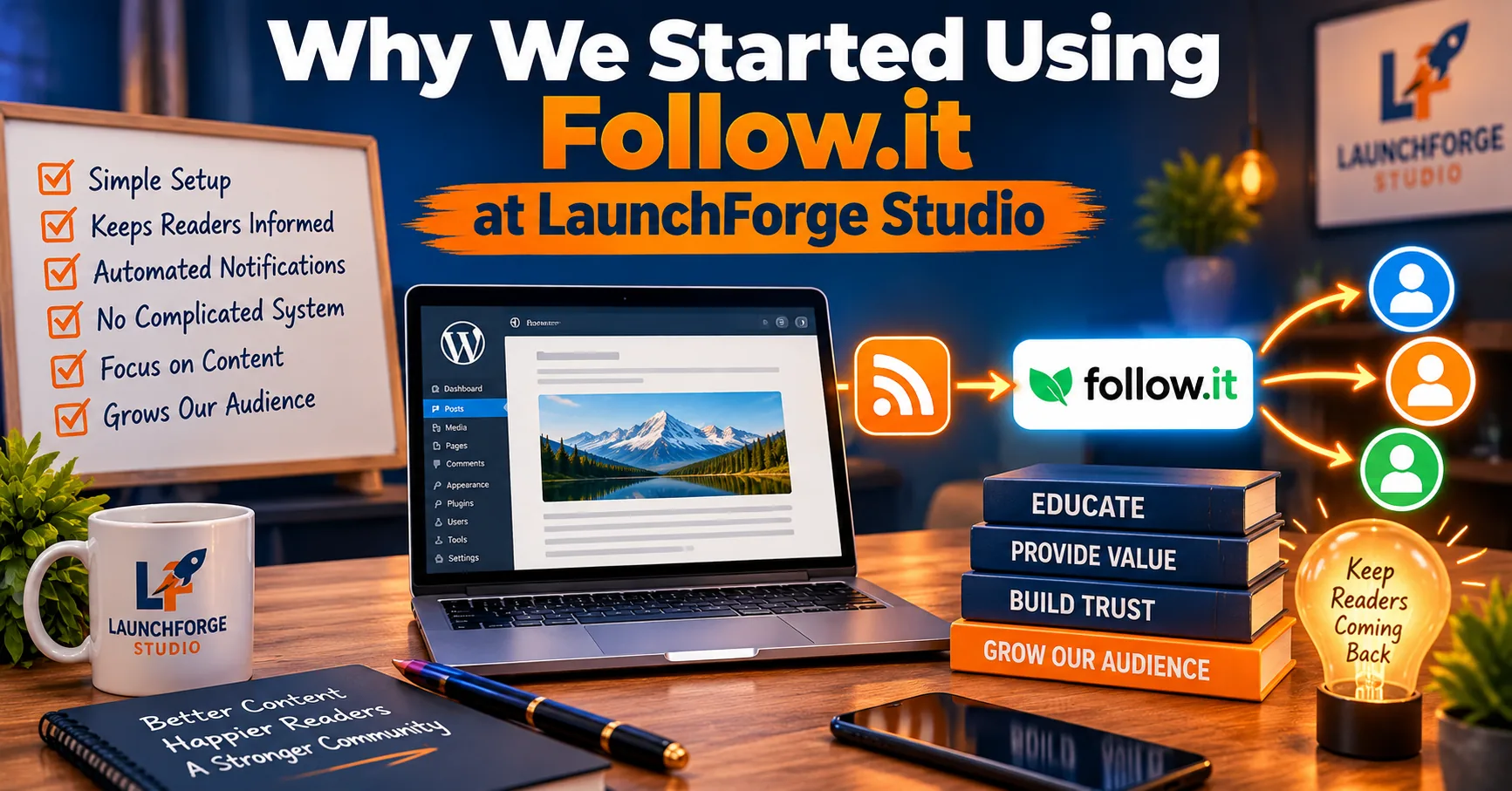
Why we chose follow.it to help readers stay connected with our educational content without adding unnecessary complexity.
There’s a point in building an online business when you realize that publishing more content isn’t the only challenge.
You also need to make that content easier for people to discover, follow, and revisit.
That’s something we’ve been working on at LaunchForge Studio.
Our website is built around a simple philosophy: provide genuine value, help people make informed decisions, and focus on serving readers before expecting anything in return.
We publish educational resources covering online business development, WordPress website building, affiliate marketing, lead generation, digital marketing tools, and practical strategies for beginners.
As our content library continued to grow, we started thinking more seriously about what happens after someone reads one of our articles.
What if they enjoy a tutorial but aren’t ready to start an online business?
What if they’re researching a particular marketing tool and want to explore more options before making a decision?
What if they simply appreciate our educational approach and want to know when we publish something new?
Those visitors might not be ready to join a marketing funnel, request information, or purchase anything.
But they might still want to hear from us.
That’s where follow.it became interesting.
We Wanted to Make Our Educational Content Easier to Follow
One of our goals is to make LaunchForge Studio a resource people can return to whenever they need guidance.
That means thinking beyond individual articles.
Someone who discovers our guide about building a WordPress website might eventually become interested in landing pages, lead generation, website performance, or email marketing.
These subjects naturally connect because they’re different parts of building and managing an online presence.
If you’re developing your own publishing strategy, our guide on how to build a simple content marketing system for your online business explains how to organize and connect your content around your audience’s needs.
However, expecting readers to remember our website and manually check for new articles isn’t particularly convenient.
We wanted a straightforward way for interested visitors to subscribe to content updates.
Follow.it offered a system specifically designed around that purpose.
Instead of requiring us to manually announce every new article through a separate email campaign, the platform can detect newly published content and notify subscribers according to their preferences.
For a website that regularly publishes educational material, that functionality makes sense.
Why We Didn’t Want Another Complicated Marketing System
Here’s something beginners quickly discover about building an online business:
There is no shortage of software willing to become another monthly expense.
You can find separate platforms for website hosting, email marketing, landing pages, automation, analytics, social media scheduling, lead generation, and just about everything else.
Before long, your collection of subscriptions starts looking like a family reunion where nobody remembers who invited whom.
And yes, every single one wants a monthly payment.
At LaunchForge Studio, we’re particularly conscious of unnecessary tool overload.
If you’re trying to avoid unnecessary subscriptions and choose software that genuinely supports your goals, our guide on how to choose the right tools for your online business can help you make more informed decisions.
Our website operates using Profit Hub System as its underlying business platform, and we use other tools when they serve a clear, practical purpose.
We weren’t looking for another complete marketing platform when we explored follow.it.
We already had systems for other business functions.
What interested us was a more focused solution for blog subscriptions and new-content notifications.
That distinction helped us evaluate follow.it based on the problem we actually wanted to solve.
Why We Chose the Super-Cool Publisher Plan
Follow.it offers a free publisher plan, so purchasing a premium subscription isn’t required to begin using the service.
However, we decided to invest in its Super-Cool plan.
Our reasoning wasn’t that every website needs the highest available tier.
We wanted to explore more of the publisher functionality and determine how those features might support LaunchForge Studio as our educational library expanded.
The additional capabilities available through the paid publisher plans include options related to feed management, customization, statistics, and the subscriber experience.
We were also interested in the platform’s discovery features and opportunities to make our content available to readers who might not have encountered our website directly.
For us, this was an investment in testing and developing our content distribution strategy.
Would we recommend that every beginner immediately purchase Super-Cool? Absolutely not.
Someone launching a first WordPress blog may find that the free Basic plan provides everything necessary to begin offering subscriptions.
Premium features become worth considering when they solve a specific problem or support a clearly defined publishing goal.
We’ll examine those differences in more detail in our pricing section.
How We’ve Implemented Follow.it on Our Website
We haven’t simply created a follow.it account and left it sitting in a forgotten browser tab.
We’ve begun integrating the service into our actual publishing workflow.
For example, we’ve added follow.it subscription forms to two important areas of LaunchForge Studio:
Our Blog & Insights page: This is where readers can explore articles about online business, marketing strategies, industry developments, and other topics relevant to building an online presence.
Our Guides & Tutorials page: This section focuses on practical educational resources, helping readers understand tools, website-building processes, and business systems.
These locations make sense because visitors exploring our educational content are already demonstrating an interest in learning.
Rather than interrupting them with aggressive sales messaging, we can offer a straightforward invitation to receive future updates.
We’ve also configured our feed’s branding and established its presence in the follow.it directory.
Those steps help create a more recognizable and organized subscription experience.
Of course, implementing these features doesn’t automatically mean we’ve developed a large subscriber audience.
Our focus is on establishing the system properly, observing how people use it, and making improvements based on actual results.
What We’ve Learned So Far
One of our biggest takeaways is that content subscriptions and traditional marketing funnels don’t have to compete with each other.
They can serve different purposes.
Someone subscribing to our blog updates may simply want useful information.
Someone requesting a specific business resource may have a different goal and may choose to enter a more structured email follow-up process.
Both relationships can be valuable when expectations are clear and the subscriber understands what they’re signing up to receive.
We’ve also learned that setting up a subscription system is only the beginning.
Website owners still need to think about:
- Whether subscription forms are easy to find.
- Whether the signup process works correctly.
- Whether notifications represent the publication professionally.
- Whether readers understand what they’re subscribing to.
- Whether the content continues to provide enough value to justify staying subscribed.
A subscription tool can make communication easier, but it cannot replace the trust that comes from consistently helping people.
Our Experience Is Still Evolving
We want to be transparent about something.
We’re actively using and exploring follow.it, but we’re not going to claim that it has already generated dramatic traffic increases, thousands of subscribers, or substantial revenue for LaunchForge Studio.
Those claims would require evidence.
What we can say is that follow.it has given us a practical way to offer content subscriptions and explore additional publishing features as our website develops.
We’ll continue evaluating the platform based on usability, subscriber engagement, available features, and whether it contributes meaningful value to our readers.
And that’s the same standard we encourage anyone to apply when choosing an online business tool.
Don’t buy software because someone promises spectacular results. Choose it because you understand what it does, why you need it, and how you’ll measure whether it’s helping.
For LaunchForge Studio, follow.it is one part of a larger effort to make our educational resources easier to discover and follow.
The next question is what the platform actually provides—and which features matter most for a growing website.
Follow.it Features: What Do Website Owners Actually Get?
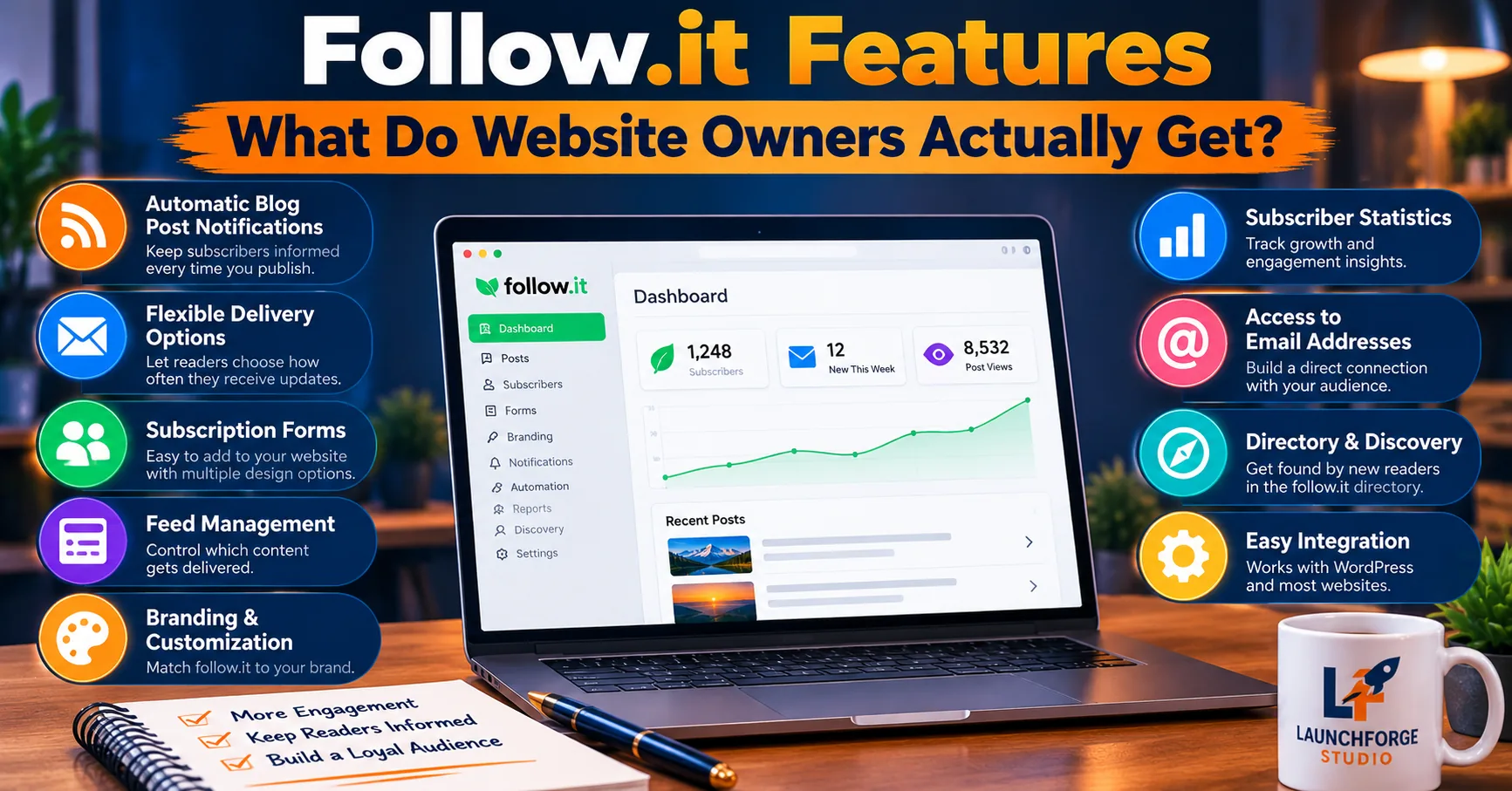
An overview of follow.it features for publishers, including automated blog notifications, subscription forms, branding options, and subscriber insights.
When evaluating any online business tool, it’s easy to get distracted by an impressive list of features.
Automatic notifications. Subscriber management. Custom branding. Analytics. Audience discovery.
They all sound useful, but here’s the question we believe matters most:
What will these features actually help you accomplish?
For bloggers and website owners, follow.it is primarily designed to make published content easier for interested readers to follow.
Some features are available through its free publisher plan, while others depend on the paid tier you choose.
Let’s examine the platform’s main capabilities from a practical website owner’s perspective.
Automatic Blog Post Notifications
One of follow.it’s central features is its ability to detect newly published content and make updates available to subscribers.
For a WordPress website, this typically involves connecting the platform to an RSS feed.
When a new article appears in that feed, follow.it can process the update and notify subscribers according to their delivery preferences.
Imagine running a blog that publishes two or three educational articles every week.
Without an automated notification system, you might need to prepare separate announcements, manage subscriber lists, and schedule messages manually.
With follow.it properly configured, much of the routine content notification process can happen automatically.
That doesn’t mean notifications are necessarily delivered the instant you click Publish. Detection intervals, integration methods, and subscriber preferences can affect delivery timing.
But the underlying benefit is clear.
You can spend more time creating useful content and less time manually announcing every new article.
For a small website owner managing several responsibilities, that’s a meaningful convenience.
Flexible Notification Delivery Options
Not every reader wants to receive website updates the same way.
Some people enjoy receiving an email whenever a new article is published.
Others would rather receive a digest that combines multiple updates into a single message.
Follow.it supports different delivery preferences, allowing readers to choose from available notification methods and schedules.
This flexibility can be especially helpful for websites that publish frequently.
Consider a reader following several business and technology blogs.
Receiving individual notifications for every article might quickly become overwhelming.
A digest option can provide a more manageable way to stay informed.
For publishers, this means the subscription experience doesn’t have to follow a rigid, one-size-fits-all approach.
The easier it is for readers to receive content on their own terms, the more practical the subscription becomes.
Of course, the delivery options available to an individual subscriber may depend on their account settings and the platform’s current features.
Subscription Forms for Your Website
A content subscription system isn’t particularly useful if visitors can’t find a way to subscribe.
Follow.it provides options for adding subscription forms and links to websites.
These can be placed in areas where visitors are already exploring your content.
For example, a WordPress blogger might add a subscription form to a blog landing page, a tutorial library, or another clearly identified content section.
At LaunchForge Studio, we’ve incorporated follow.it subscription forms into our Blog & Insights and Guides & Tutorials pages.
We chose those locations because they’re directly connected to the educational material people may want to follow.
The goal isn’t to interrupt readers every few seconds with another popup.
It’s to make the option available when someone decides they want future updates.
A good subscription invitation should communicate three things:
- What readers will receive: Notifications about new articles, guides, or other published content.
- Why subscribing is useful: They won’t have to repeatedly check the website for updates.
- What to expect: The nature of the content and how notifications are delivered.
Clear expectations are particularly important when you’re trying to build long-term relationships with an audience.
Feed Management for Multiple Publications
A single WordPress blog may only need one main feed.
However, some website owners manage several websites, publications, or content sources.
Follow.it’s publisher plans offer different feed allowances, with higher tiers providing greater capacity.
This can be useful for agencies, publishers, and creators managing multiple projects.
Instead of treating each website as an entirely separate subscription system, publishers can manage supported feeds through their follow.it account.
For a beginner operating one blog, this may not be a major selling point.
For someone managing several publications, it could become considerably more valuable.
That’s why we encourage readers to evaluate features based on their actual requirements.
A feature that saves one publisher hours of work may be completely unnecessary for another.
Branding and Notification Customization
Your website’s branding shouldn’t necessarily disappear the moment someone subscribes to its updates.
Readers who recognize your website name, logo, and communication style are better positioned to understand where a notification originated.
Follow.it offers publisher customization features, with additional options available through paid plans.
Depending on the plan and configuration, publishers may have more control over elements such as sender information, notification presentation, and message customization.
At LaunchForge Studio, we’ve already added our brand logos to our follow.it setup.
That helps us maintain a recognizable connection between our website and its subscription experience.
Branding isn’t merely about making something look attractive.
It’s also about clarity.
When a reader receives a notification, they should understand which publication it represents and why they’re receiving it.
Consistent identification can help support that experience.
Subscriber Statistics and Engagement Insights
Publishing content without measuring what happens afterward makes improvement difficult.
Follow.it provides publisher statistics, with reporting capabilities varying by subscription plan.
These can help website owners understand aspects of their audience and notification activity.
Depending on the available reporting features, publishers may be able to examine subscriber activity, delivery performance, and engagement with content updates.
For example, a publisher might want to understand whether readers are interacting with notifications or whether particular articles generate more interest.
That information can help guide future decisions about content topics, publishing frequency, and subscription placement.
However, it’s important to understand what these statistics do—and don’t—tell you.
Follow.it engagement statistics are not the same as Google Search Console performance data.
Google Search Console helps website owners understand how their pages perform in Google Search.
Follow.it focuses on activity connected to its content-following and notification service.
Both can provide useful information, but they measure different parts of the reader journey.
And neither should be used to invent conclusions that the data doesn’t support.
Access to Subscriber Email Addresses
This is one feature we believe deserves special attention, especially for business owners.
When someone subscribes to your content through follow.it, you should not automatically assume that every follower’s email address becomes part of an unrestricted marketing list.
According to follow.it’s publisher documentation, access to subscriber email addresses depends partly on how the person subscribed.
For example, publishers can access addresses collected through certain website-based subscription methods or designated subscription links.
However, followers who discover a publication through the follow.it directory are treated differently, and their email addresses are not automatically provided to the publisher.
Why does that matter?
Because a content follower and a marketing lead are not necessarily the same thing.
If you’re interested in building a dedicated marketing list, our beginner’s guide on how to build an email list from scratch explains how to get started.
Someone may want notifications about your WordPress tutorials without agreeing to receive promotional campaigns.
Website owners should respect those distinctions and make sure their subscription practices match the permissions readers have provided.
If exporting subscriber information or using it in another email platform is essential to your business, review follow.it’s current access rules before choosing a plan.
Don’t assume that every subscription service handles subscriber data in the same way.
Follow.it Directory and Content Discovery
One of the more interesting aspects of follow.it is that its platform isn’t limited to subscription forms embedded on individual websites.
It also includes ways for readers to discover publications and feeds.
This creates another potential discovery channel for website owners.
At LaunchForge Studio, our feed has already been listed in the follow.it directory.
That means we’ve taken an additional step toward making our educational content available beyond our own website.
However, let’s be clear about what this does and doesn’t mean.
Being listed in a directory doesn’t guarantee subscribers, organic search rankings, or a sudden increase in website traffic.
Directory exposure is an opportunity, not a promised outcome.
Whether it produces meaningful results depends on factors such as audience interest, discoverability, and the usefulness of the published content.
We view it as one more way to help interested readers encounter our resources.
Curated Content and Discovery Opportunities
Follow.it also offers discovery-related capabilities that can help organize and surface content from different publications.
For readers, curated collections can make it easier to follow subjects they care about.
For publishers, participation in relevant discovery environments may introduce their content to people who haven’t visited their websites directly.
This is an area we’re continuing to explore through our Super-Cool subscription.
We wouldn’t claim that these capabilities have already produced measurable audience growth for LaunchForge Studio.
Instead, we’re interested in understanding how they work and whether they can contribute to our long-term content distribution strategy.
As with any discovery tool, relevance matters more than simply appearing in another directory.
Reaching ten people who genuinely care about your subject may be more valuable than attracting a hundred visitors who have no interest in what you publish.
Which Follow.it Features Matter Most for Beginners?
After examining the available capabilities, here’s how we’d prioritize them for someone starting a WordPress blog.
First, get the core subscription process working.
Make sure follow.it can detect your published content and that visitors have a clear way to subscribe.
Second, test the reader experience.
Confirm that subscription forms work, notifications are understandable, and readers know what they’re signing up to receive.
Third, monitor actual engagement.
Pay attention to whether people subscribe and interact with your updates before investing in additional features.
Fourth, consider premium upgrades only when necessary.
Branding controls, advanced statistics, and expanded feed management can be valuable, but they shouldn’t distract from the basics.
And finally, remember that even the most sophisticated notification system has one unavoidable limitation:
It cannot make an unhelpful article worth reading.
Follow.it can help distribute your content.
Your job is to make that content worth following.
For us, that’s the most important relationship between the platform and our larger publishing strategy.
Now that we’ve explored the features, the next practical question is how to connect follow.it to a WordPress website and make those subscriptions available to readers.
How to Set Up Follow.it on a WordPress Website
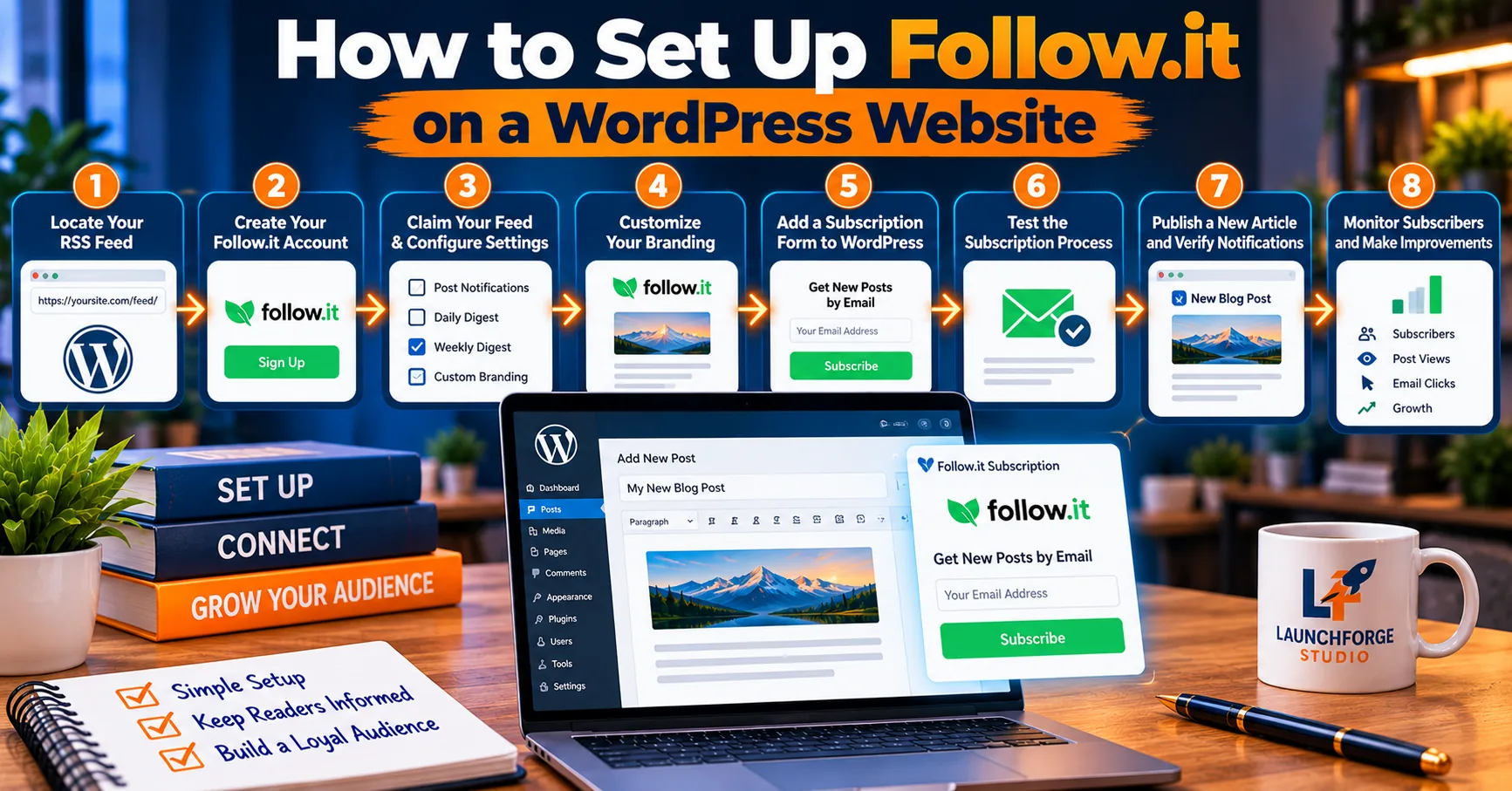
Eight steps for connecting your WordPress website to follow.it and keeping readers informed about new articles.
Understanding what follow.it does is helpful, but seeing how to put it into practice is where things get interesting.
Fortunately, you don’t need to be a programmer or an experienced website developer to begin offering blog subscriptions through follow.it.
If you’re using WordPress, much of the technical foundation may already be in place.
WordPress normally generates RSS feeds automatically, and follow.it can use those feeds to identify newly published articles.
That means you can establish a basic content subscription system without building an entirely separate email notification process from scratch.
At LaunchForge Studio, we’ve integrated follow.it into our WordPress website and placed subscription forms in areas where readers explore our educational resources.
Let’s walk through the general process so you can understand what’s involved before getting started.
Step 1: Locate Your WordPress RSS Feed
WordPress includes built-in RSS feeds that allow compatible services to detect newly published content. For additional technical details, you can explore the official WordPress documentation on feeds.
Before connecting your website to follow.it, it’s useful to understand where your published content is coming from.
WordPress normally creates an RSS feed containing information about your latest posts.
For many WordPress websites, the main feed is available at:
https://yourwebsite.com/feed/
Replace yourwebsite.com with your actual domain.
For example, a website called Example Business might have its RSS feed at:
https://examplebusiness.com/feed/
When you visit the address, you may see structured XML content rather than a normal webpage.
Don’t panic.
That’s expected. An RSS feed is designed for software to read, not necessarily for humans to browse like a regular article.
The feed contains information that allows compatible services to identify newly published content.
If your feed doesn’t load, check whether your website uses a custom feed address or whether a plugin, security setting, or server configuration is interfering with RSS access.
For most standard WordPress installations, however, the default feed is already available.
Step 2: Create Your Follow.it Account and Connect Your Website
Next, visit the follow.it website and begin the process of adding or managing a feed.
The platform provides tools for finding and following existing feeds, as well as publisher options for managing a website’s content.
Enter your website address or RSS feed URL as requested during setup.
Follow.it can attempt to identify the relevant feed and connect it to its notification system.
If your website has multiple feeds, make sure you’re connecting the one that contains the content you want subscribers to receive.
For example, a WordPress website may have separate feeds for categories, comments, or other content types.
Most bloggers will want visitors to follow the main posts feed unless they have a specific reason to offer separate subscriptions.
The important thing is to connect the correct source of content before inviting readers to subscribe.
Otherwise, subscribers may receive updates they weren’t expecting—or miss the articles they actually wanted.
Step 3: Claim Your Feed and Configure Publisher Settings
Once your feed has been identified, you’ll want to establish control over its publisher settings.
Follow.it provides a feed-claiming process that allows website owners to manage supported publishing features.
Depending on the current verification process, you may need to demonstrate that you control the website or feed.
Follow the platform’s instructions and complete any required ownership verification.
After claiming your feed, review the available publisher settings.
These may include options related to your publication’s name, description, appearance, notification preferences, and other capabilities supported by your plan.
Take a few minutes to make sure the information accurately represents your website.
For example, your feed description should explain what readers can expect to receive.
If your blog publishes WordPress tutorials, online business guides, and digital marketing resources, say so.
Avoid vague descriptions that tell potential subscribers almost nothing about your content.
A clear publication description helps readers decide whether following your website is relevant to their interests.
Step 4: Customize Your Feed’s Branding
Branding helps connect your subscription experience to the website readers originally visited.
Depending on your follow.it plan, you may have access to different customization options.
At LaunchForge Studio, we’ve added our brand logos to our follow.it setup.
This helps readers recognize the connection between our website and the notifications associated with our publication.
When reviewing your branding, pay attention to the following elements:
- Publication name: Use a name readers will recognize from your website.
- Logo: Choose a clear, professional image that represents your brand.
- Description: Explain the topics and resources subscribers can expect.
- Notification presentation: Review the customization options available under your publisher plan.
- Website links: Make sure any displayed links lead to the correct destination.
You don’t need an elaborate visual identity to begin.
Even a simple, consistent presentation can make your subscription experience more recognizable.
The goal is clarity, not decoration for its own sake.
Step 5: Add a Follow.it Subscription Form to WordPress
Now we reach one of the most important parts of the process.
Visitors need an obvious and convenient way to subscribe.
Follow.it provides subscription options that can be incorporated into a website, including embeddable forms and supported integration methods.
The exact installation steps depend on your WordPress editor, theme, and the form or code provided by follow.it.
For websites using the WordPress block editor, an appropriate Custom HTML block may be suitable for supported embed code.
For websites using a visual page builder, the builder may provide a code or HTML module designed for this purpose.
At LaunchForge Studio, we use WordPress with Divi 5, which gives us flexibility in arranging content and subscription elements.
We’ve placed follow.it subscription forms on our Blog & Insights and Guides & Tutorials pages.
These locations were chosen intentionally.
Someone browsing our blog may want to receive future articles about online business, marketing, and technology.
Someone exploring our tutorials may want notifications when we publish another practical guide.
In both situations, the subscription form supports what the visitor is already doing.
Our recommendation is to place subscription options where they naturally complement the content, rather than interrupting the reading experience.
Where Should You Place Your Subscription Form?
There’s no universal placement that works best for every website.
However, several locations are worth considering.
Blog landing page: A logical location for readers exploring your latest articles.
Tutorial or resource library: Useful when visitors regularly return for educational content.
End of an article: Gives readers an opportunity to subscribe after they’ve experienced the value of your content.
Dedicated subscription page: Helpful if you want to explain exactly what subscribers receive.
Website footer: Can provide a consistent subscription opportunity without dominating the page.
You don’t need to use every location.
Start with one or two sensible placements, make sure they work correctly, and evaluate whether visitors use them.
Step 6: Test the Subscription Process
Before announcing your new subscription option to the world, test it yourself.
This is one of those small steps that can prevent a surprising amount of frustration later.
Open the page containing your subscription form and go through the process as a visitor would.
Use an email address you control for testing, and follow any verification instructions.
Check whether the form loads correctly and whether the subscription process is understandable.
Then review the experience on a mobile device.
A form that looks beautiful on a desktop monitor may be difficult to use on a smaller screen.
Pay attention to whether buttons are easy to tap, fields are readable, and the surrounding page layout remains usable.
Also check whether the subscriber can understand what kind of updates they’ll receive.
A successful subscription experience should be simple, clear, and predictable.
If something doesn’t work, correct it before promoting the form more widely.
Step 7: Publish a New Article and Verify Notifications
Once your feed is connected and your subscription form is working, it’s time to confirm that follow.it can detect new content.
Publish a new article on your WordPress website.
Then check whether the article appears in the connected follow.it feed.
If you’re testing with your own subscription, verify whether the notification arrives according to the delivery settings you selected.
Keep in mind that notifications may not arrive immediately.
The timing can depend on how follow.it detects updates, your publisher configuration, and the subscriber’s chosen delivery method.
Follow.it also documents WordPress integration options that can notify its system when new content is published.
These integrations may help reduce the delay associated with periodically checking an RSS feed.
If timely notifications are particularly important for your website, review the available integration methods and confirm that they’re compatible with your current WordPress configuration.
Step 8: Monitor Your Subscribers and Make Improvements
Once your subscription system is running, your work isn’t necessarily finished.
Now you can begin learning how visitors interact with it.
Follow.it provides publisher statistics and management capabilities, although the available reporting features depend on your plan.
Some useful questions to consider include:
Are visitors subscribing?
If your website receives visitors but very few subscriptions, the form may be difficult to find or the value of subscribing may not be clear.
Are subscribers engaging with updates?
Where supported by your reporting tools, review whether notifications lead readers back to your content.
Are your subscription forms placed effectively?
A form on your blog landing page may perform differently from one placed after an individual tutorial.
Are you publishing content consistently enough to justify a subscription?
Subscribers need a reason to remain interested.
That doesn’t mean publishing something every day.
It means continuing to deliver the type of information people expected when they subscribed.
Common Follow.it Setup Mistakes to Avoid
Even a relatively straightforward integration can produce problems when important details are overlooked.
Here are several mistakes worth avoiding.
Connecting the wrong RSS feed. Make sure your selected feed contains the content you want subscribers to receive.
Forgetting to test the form. Never assume that an embedded form works simply because it appears on the page.
Making subscription invitations unclear. Tell readers what they’re signing up for rather than relying on a generic button.
Ignoring mobile usability. Test your subscription pages on smaller screens.
Assuming notifications are instantaneous. Understand the platform’s detection and delivery behavior before promising immediate updates.
Confusing blog subscriptions with marketing consent. A person requesting article notifications has not necessarily agreed to unrelated promotional campaigns.
Upgrading before understanding your needs. Explore the free functionality before paying for features you may not use.
These are manageable issues, but addressing them early helps create a better experience for everyone involved.
Do You Need Technical Experience to Use Follow.it?
For a basic WordPress blog subscription setup, extensive technical experience generally isn’t necessary.
If you can navigate your WordPress dashboard, identify your website’s RSS feed, and add a supported form to a page, you’re already familiar with much of the process.
If you’re still learning the basics of WordPress, our guide on how to build a business website with WordPress walks beginners through creating and managing their own website.
More advanced configurations may require additional troubleshooting or knowledge of your theme, plugins, and website settings.
But beginners don’t need to master every technical detail before getting started.
Start with a working feed, a clear subscription form, and a successful test.
Everything else can be improved as your website develops.
And remember, the purpose of setting up follow.it isn’t to add another complicated system to your business.
It’s to make something easier.
For your readers, that means discovering your latest content without constantly checking your website.
For you, it means having a repeatable way to notify interested subscribers when new articles become available.
Once you’ve established that foundation, the next decision is whether follow.it’s free plan provides everything you need—or whether its premium features justify the additional expense.
Follow.it Pricing: Free vs. Paid Publisher Plans
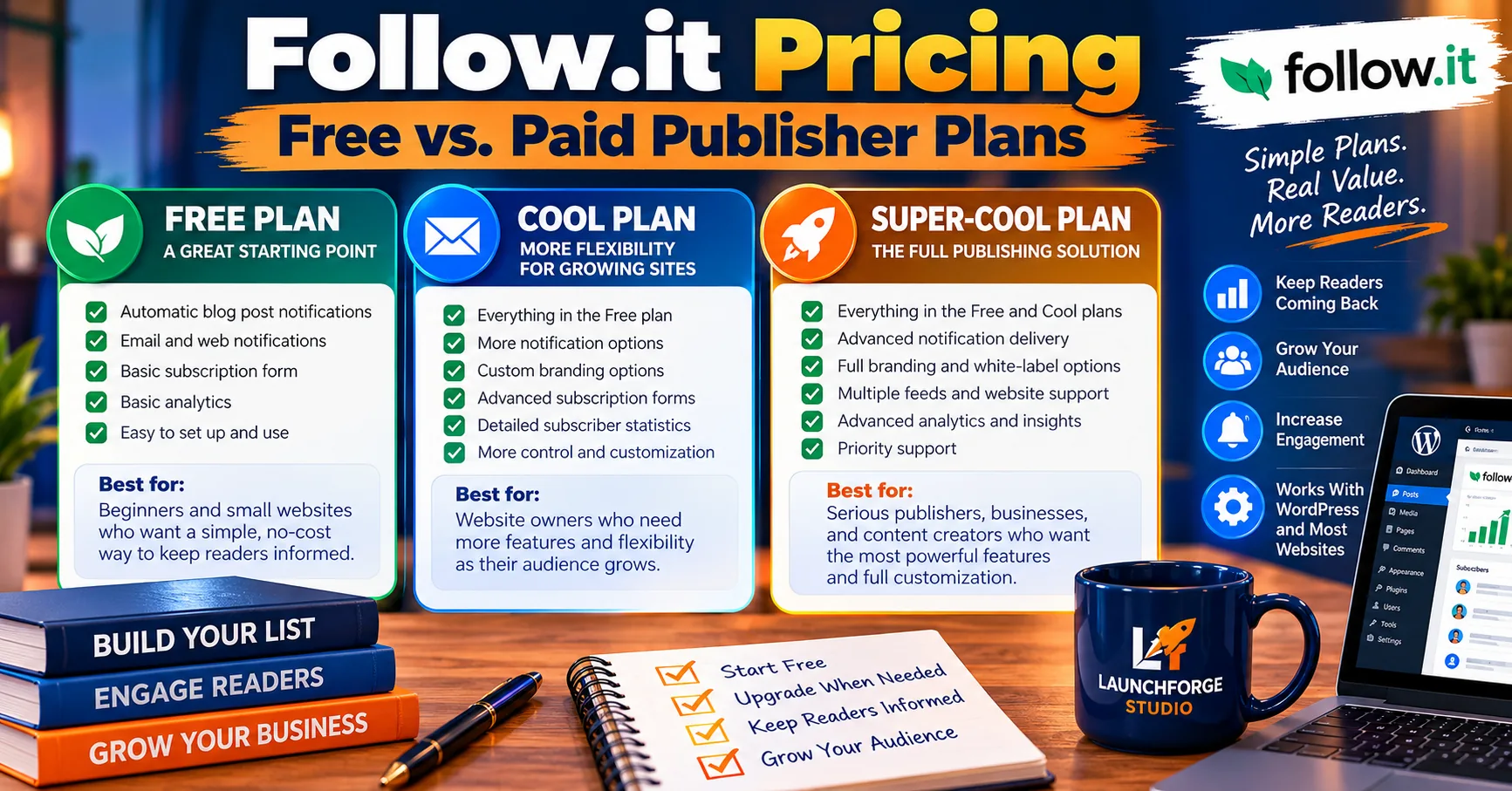
Comparing follow.it’s free and paid publisher plans to help website owners choose an option that fits their needs.
One of the first questions people ask when researching a new blogging tool is simple:
How much is this going to cost me?
It’s a reasonable question, especially if you’re building your first website or trying to keep your monthly business expenses under control.
After all, a subscription tool is supposed to help you connect with readers, not become another expense you struggle to justify.
The good news is that follow.it offers a free publisher plan, so you don’t necessarily need to spend money to start giving readers a way to follow your blog.
The platform also offers paid publisher plans for website owners who need additional features and flexibility.
The three main publisher tiers are:
- Basic: The free starting point for publishers.
- Cool: A paid tier offering additional publisher capabilities.
- Super-Cool: A higher-tier option with expanded publishing and management features.
It’s important to distinguish these publisher plans from follow.it’s separate subscription options for readers. They’re designed for different purposes and shouldn’t be confused when comparing costs.
Let’s look at how to decide which publisher plan makes sense for your website.
Follow.it Basic: A Free Starting Point for Beginners
If you’re launching your first blog, the Basic plan is the logical place to begin.
It allows publishers to establish a content-following system without immediately committing to a recurring subscription expense.
For a small WordPress website, that can be particularly appealing.
You may not know how frequently you’ll publish, how many visitors will subscribe, or whether you’ll eventually need advanced customization.
Starting free gives you an opportunity to answer those questions before spending money.
The Basic publisher plan supports the core process of connecting a feed and allowing readers to follow new content.
One of the biggest advantages of Follow.it’s free publisher plan is that it allows unlimited followers and emails, without requiring publishers to upgrade simply because their audience grows. The Follow.it team confirmed this benefit directly, making it particularly appealing to beginners, independent bloggers, and budget-conscious website owners who want to build a loyal readership without worrying about subscriber limits or email volume restrictions.
However, certain advanced features and customization options are reserved for paid plans.
Who should consider Basic?
Beginners, hobby bloggers, and small website owners who primarily want to notify interested readers when new articles become available.
Our recommendation is to begin with the free plan if you don’t yet have a clear reason to upgrade.
Follow.it Cool: When You Need More Flexibility
The Cool plan is designed for publishers who want capabilities beyond the free offering.
Depending on the current feature comparison, these may include additional customization, reporting, and feed-management options.
This tier is worth investigating when your website has moved beyond simply offering a basic subscription form.
For example, you may want more control over how your publication appears to subscribers or access to additional information about engagement.
But before upgrading, ask yourself whether the extra features will actually improve your publishing workflow.
Who should consider Cool?
Website owners who are actively building an audience and have identified specific limitations in the Basic plan.
If you can name the feature you need and explain how you’ll use it, upgrading becomes a more informed decision.
Follow.it Super-Cool: Our Choice at LaunchForge Studio
At LaunchForge Studio, we decided to purchase the Super-Cool publisher plan.
Our decision was based on wanting to explore the platform’s broader publishing capabilities as we continued developing our educational website.
We were particularly interested in customization, subscriber-related features, statistics, and opportunities connected to content discovery.
We’ve already configured our branding, incorporated subscription forms into our website, and established our feed’s directory presence.
These are practical steps toward making our content easier for interested readers to follow.
However, purchasing Super-Cool doesn’t automatically make it the best choice for every blogger.
Someone publishing one article each month may have completely different needs from a website managing multiple feeds and publishing several times per week.
Who should consider Super-Cool?
Active publishers who need its specific advanced features and can justify the expense as part of their content distribution strategy.
We chose it because we wanted to develop and evaluate those capabilities firsthand—not because a premium plan guarantees more traffic or subscribers.
How to Compare the Plans Without Overspending
Rather than choosing a plan based entirely on its name or the number of features advertised, start with a few practical questions.
Do you need more than the basic notification system?
If all you want is a convenient way for readers to follow new posts, the free plan may be sufficient.
Are there premium features you’ll actually use?
Additional customization and reporting tools can be useful, but only if they support your goals.
Are you managing multiple publications?
Feed allowances and management capabilities may become more important as the number of websites you operate increases.
Will the upgrade improve the subscriber experience?
A premium feature is easier to justify when it makes subscriptions clearer, more convenient, or more useful.
Can your current budget comfortably support the expense?
A growing website doesn’t need every premium tool immediately.
Prioritize the services that solve real problems, and avoid paying for functionality simply because it sounds impressive.
Where to Find Current Follow.it Pricing
For the latest plan details and available features, visit the official follow.it website and review the current publisher options before making a decision.
Because subscription prices, billing options, and feature availability can change, we recommend reviewing follow.it’s official publisher pricing comparison before making a purchase.
You can explore the platform and its available plans through follow.it.
Compare the features included with each tier and make sure you’re reviewing publisher pricing, rather than plans intended for readers.
For our part, we’ll continue evaluating whether the Super-Cool features we use provide enough practical value to justify keeping the subscription.
Our Recommendation: Start With Your Needs, Not the Highest Tier
Here’s how we would approach the decision.
If you’re a beginner launching a WordPress blog, start by evaluating Basic.
If you’re actively publishing and discover that certain limitations are affecting your workflow, compare Cool with the features you need.
If you’re managing a larger publishing operation or want more advanced controls, investigate Super-Cool.
There’s no prize for buying the most expensive subscription.
The goal is to choose a tool that supports your website without creating unnecessary financial pressure.
And remember: paying more for a subscription platform doesn’t automatically mean more people will subscribe to your content.
That still depends on what you’re publishing, how clearly you communicate its value, and whether readers want to hear from you again.
Now that we’ve examined the publisher plans, there’s another important question to answer.
How does follow.it compare with traditional email marketing software—and could you realistically use it instead of an autoresponder?
Follow.it vs. Traditional Email Marketing Software
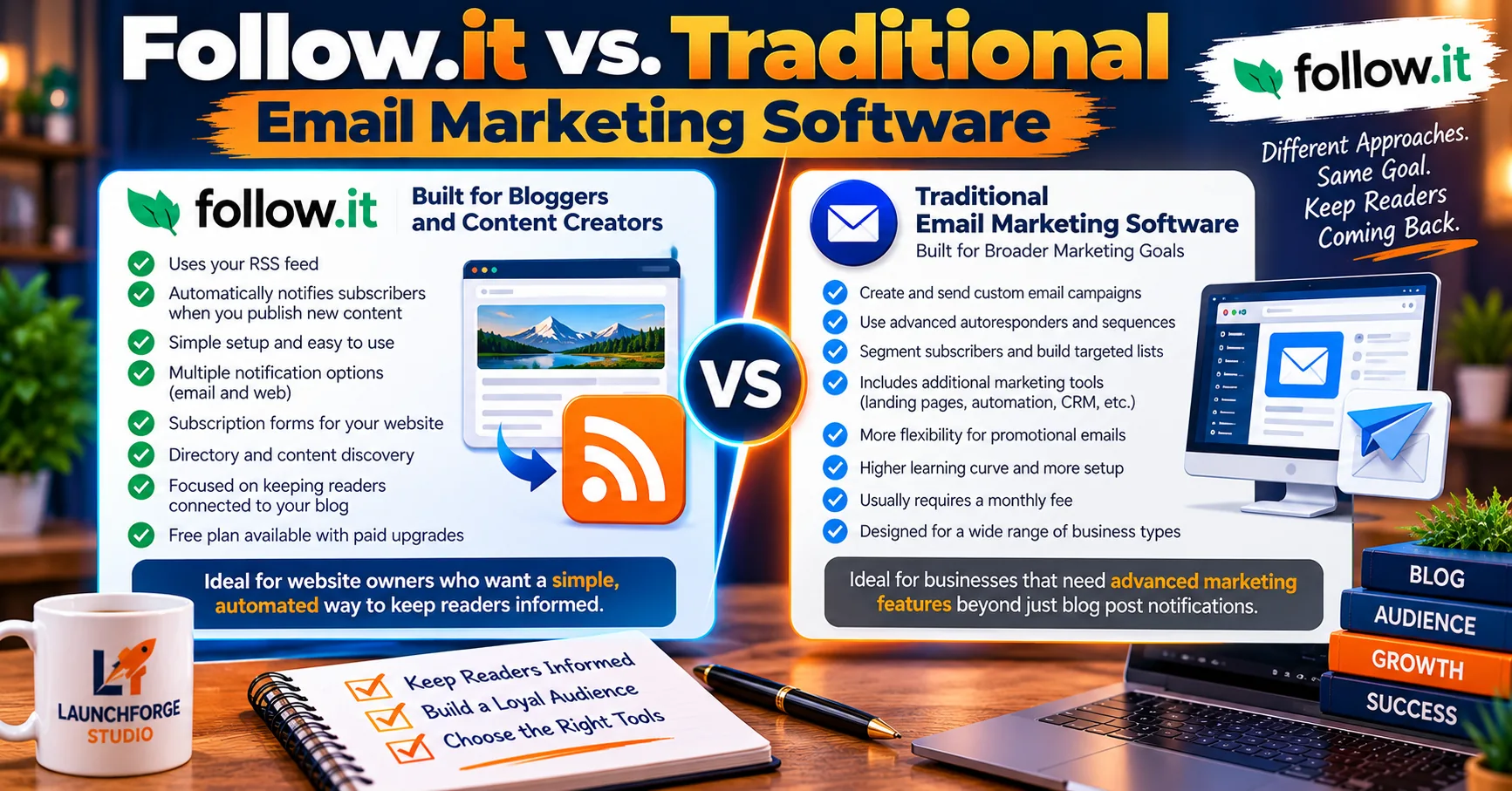
Comparing follow.it’s content notification approach with traditional email marketing platforms and their broader campaign automation capabilities.
If you’re building an online business, you’ve probably encountered plenty of advice about growing an email list.
And for good reason.
Email gives businesses and content creators an opportunity to maintain relationships with people who have expressed an interest in what they offer.
But here’s something that often gets overlooked:
Not every email subscription needs to serve the same purpose.
Some people want to receive your latest blog articles. Others might request a downloadable resource, subscribe to a newsletter, or sign up for a series of educational emails.
That’s why we believe it’s important to understand the difference between follow.it and traditional email marketing software.
Although both can help website owners communicate with subscribers, they’re designed around somewhat different goals.
Follow.it Focuses on Keeping Readers Connected to Your Content
Follow.it is particularly useful for website owners who regularly publish articles, tutorials, news, or other educational resources.
Its core functionality centers on allowing readers to follow content and receive updates when something new becomes available.
For example, when we publish another guide at LaunchForge Studio, follow.it provides a way for interested subscribers to discover that new content through their selected notification settings.
We don’t need to create an entirely separate marketing campaign simply to let readers know another article is available.
That’s one of the reasons we appreciate the platform.
It supports our educational publishing strategy without requiring every content subscription to become a sales-oriented interaction.
For bloggers who primarily want to keep their audience informed, this focused approach can be a real advantage.
Traditional Email Marketing Software Serves Broader Marketing Goals
Dedicated email marketing platforms generally provide tools for managing campaigns, creating automated sequences, segmenting subscribers, and delivering messages based on specific business objectives.
For a deeper look at how these systems work, explore our guide on how to build a simple follow up system that turns leads into customers.
For example, a business might use an autoresponder to welcome new leads, deliver a requested resource, or provide a series of helpful emails introducing a particular service.
If you’re interested in creating that kind of automated introduction, our guide on how to create a welcome email sequence for new subscribers walks you through the process step by step.
These capabilities can be valuable, especially when a website offers products, services, or structured educational programs.
However, they’re not always necessary for someone whose immediate goal is simply notifying readers about new blog posts.
A beginner shouldn’t feel obligated to build an elaborate email marketing system just to announce a new article.
Sometimes the simplest solution is the one that best fits the job.
Can Follow.it and an Email Autoresponder Work Together?
Absolutely—and this is how we approach things at LaunchForge Studio.
We use different tools for different parts of our business, choosing them according to the purpose they serve.
Follow.it supports our content subscription strategy.
Our separate email marketing tools help us manage other forms of communication, including lead generation and follow-up.
These systems can complement each other because subscribers may have different interests and expectations.
Someone following our blog might simply enjoy learning about WordPress, website development, or digital marketing.
Someone requesting information about an online business platform may be interested in a more structured educational follow-up.
Both relationships matter.
The key is respecting what each person actually requested.
We believe readers should receive the kind of information they signed up for, with clear expectations about future communications.
Which Option Is Better for Your Website?
The answer depends on what you’re trying to accomplish.
If your primary goal is helping readers stay informed about newly published content, follow.it is an appealing option worth exploring.
If you need detailed marketing automation, personalized campaigns, or specialized sales follow-up, a dedicated email marketing platform may be more appropriate.
And if your website serves both purposes, using complementary tools can make sense.
Our experience with follow.it has been positive, and we’ve found its content subscription capabilities to be a welcome addition to LaunchForge Studio.
We particularly appreciate having a system that supports our educational resources while fitting into our broader website strategy.
Our takeaway is simple: follow.it doesn’t need to replace every other marketing tool to be valuable.
It has a clear role in helping publishers stay connected with their readers, and that’s exactly why we chose to use it.
Is Follow.it Worth It? Our Experience and Final Verdict
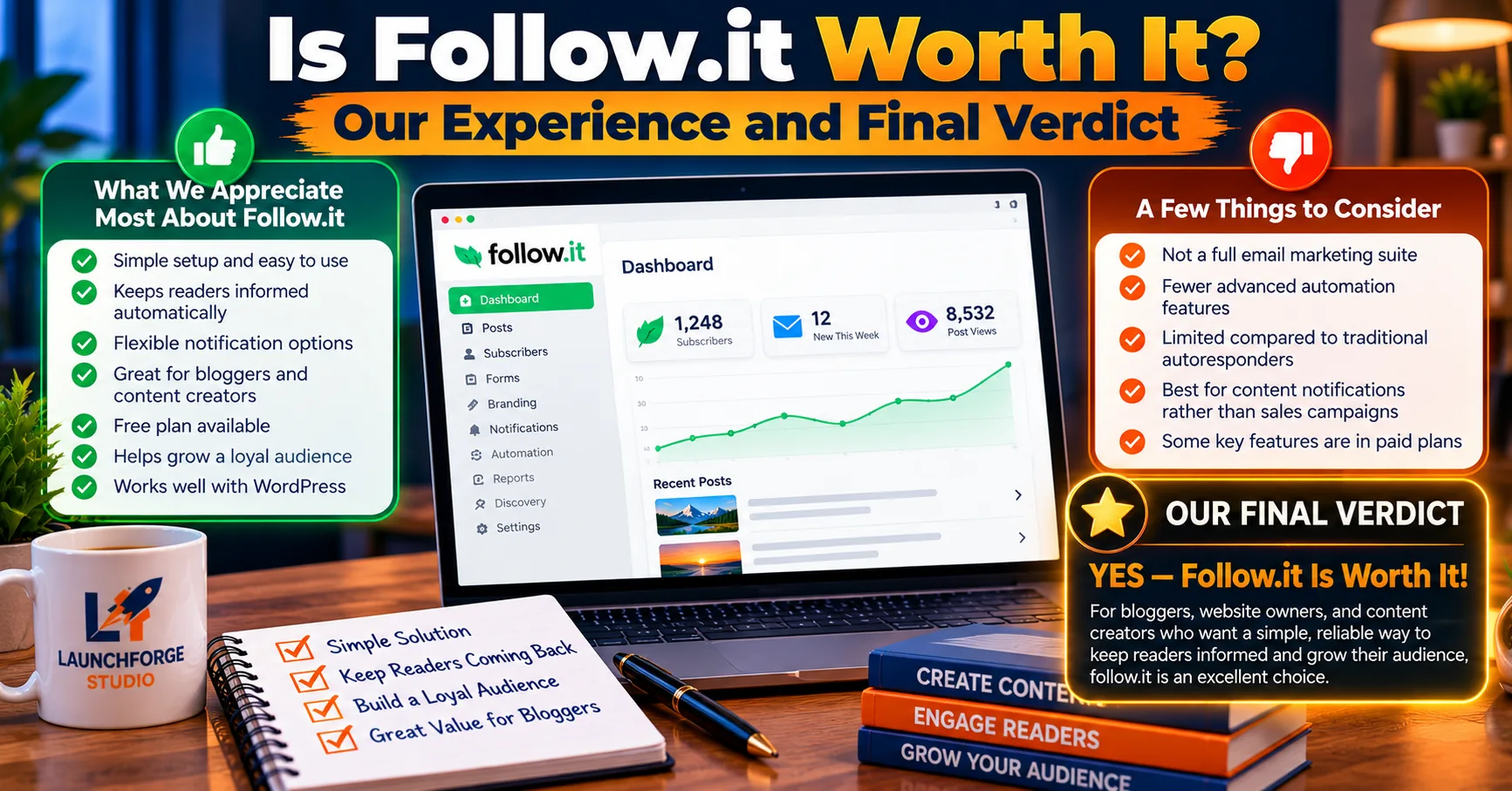
Our experience using follow.it at LaunchForge Studio has been positive, particularly for keeping readers connected to newly published content.
After exploring follow.it’s features, WordPress integration, subscription options, and publisher plans, we can answer the question that brought us here:
Is follow.it worth using for blog email subscriptions?
Based on our experience at LaunchForge Studio, yes. We believe follow.it is a valuable option for bloggers and website owners who want to make their content easier to follow.
We’ve enjoyed working with the platform, and so far, we haven’t encountered any problems with the service.
Our decision to use the Super-Cool publisher plan has allowed us to explore additional features while developing our content subscription strategy.
We’ve incorporated subscription forms into our website, configured our branding, and established our presence in the follow.it directory.
These are practical improvements that support our goal of making LaunchForge Studio’s educational resources more accessible to interested readers.
What We Appreciate Most About Follow.it
What stands out to us is how naturally follow.it fits into the publishing process.
We can concentrate on creating helpful articles while providing readers with a convenient way to receive updates about new content.
We also appreciate the flexibility of its publisher plans.
Beginners can explore the free Basic plan, while growing websites can consider additional capabilities through Cool or Super-Cool.
That makes follow.it accessible to publishers at different stages of development.
And because the platform is centered on content subscriptions, it complements our broader marketing systems rather than forcing us to replace tools that already serve other purposes.
Who Should Consider Using Follow.it?
We believe follow.it is particularly well suited to:
- WordPress bloggers who want to notify readers about newly published articles.
- Educational website owners who regularly share guides, tutorials, and useful resources.
- Content creators who want to build ongoing relationships with interested readers.
- Small business owners who publish helpful content alongside their products or services.
- Growing publishers who want additional options for managing feeds, branding, and subscriber engagement.
You don’t need a large website or an established audience to begin exploring the service.
And you certainly don’t need to purchase its highest-tier plan before discovering whether it fits your needs.
Our Final Recommendation
If you’re looking for a practical way to help readers stay connected with your blog, we recommend giving follow.it a look.
Start by exploring its free publisher plan, understand how its subscription system works, and consider upgrading when additional features genuinely support your publishing goals.
For LaunchForge Studio, follow.it has been a positive addition to our website.
We’re pleased with our experience so far, and we’ll continue exploring how its features can help us serve our readers.
A successful content strategy isn’t only about attracting visitors. It’s also about giving people a reason to return.
Follow.it provides a convenient way to support that connection.
If you’d like to explore the platform for your own website, you can get started with follow.it here.
Affiliate disclosure: This is our referral link. We may earn a commission if you become a paying customer, at no additional cost to you.
And whether you choose follow.it or another solution, remember that the most important part of any subscription system is what happens after someone signs up.
Keep publishing useful content. Respect your readers’ trust. Give them something worth coming back for.
Frequently Asked Questions About Follow.it
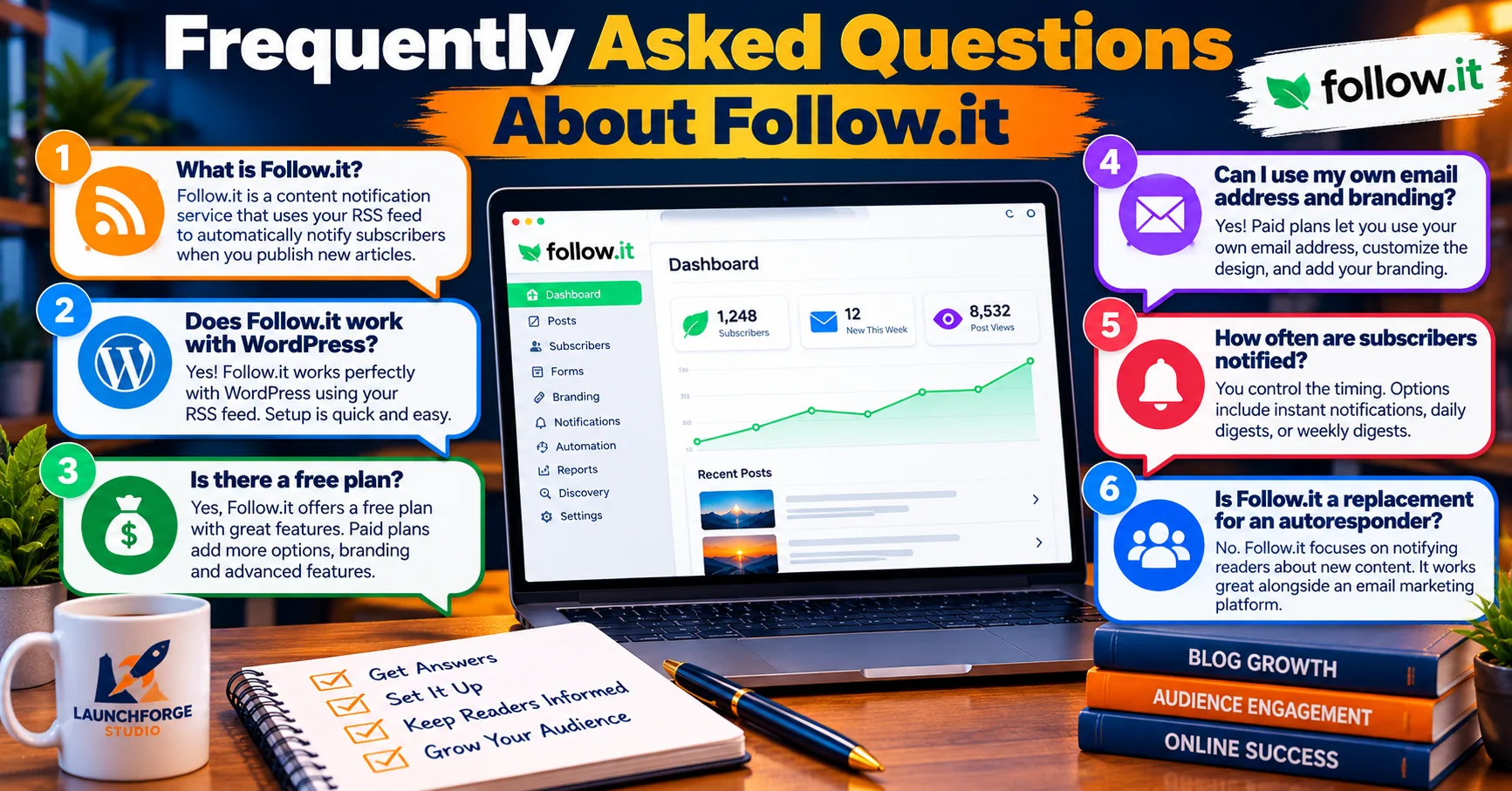
Answers to common questions about using follow.it for WordPress blog subscriptions and keeping readers informed.
Is Follow.it Free to Use?
Yes. Follow.it offers a free Basic publisher plan that allows website owners to set up content subscriptions without paying for a premium subscription.
One of the biggest advantages is that the free publisher plan includes unlimited followers and emails. This means you can continue growing your blog’s subscriber audience without worrying about hitting a follower limit or paying simply because more people subscribe.
For beginners, hobby bloggers, and small business owners, that’s a significant benefit. You can focus on publishing valuable content and building your readership without immediately taking on another monthly expense.
Paid Cool and Super-Cool publisher plans are available for website owners who need additional features, customization, and greater control over their content notification system.
Does Follow.it Work With WordPress?
Yes. Follow.it works with WordPress RSS feeds, allowing readers to subscribe to notifications about newly published content. Website owners can also add subscription forms to WordPress pages using supported integration methods.
Does Follow.it Automatically Notify Subscribers About New Blog Posts?
Yes. Once properly configured, follow.it can detect new articles through your website’s RSS feed and notify subscribers according to their delivery preferences. Notification timing may vary depending on the feed configuration and selected delivery method.
Is Follow.it Worth Paying For?
That depends on your publishing needs. Beginners may find the free Basic plan sufficient, while active publishers may appreciate the additional customization, management, and reporting capabilities available through paid plans. At LaunchForge Studio, we’ve had a positive experience using Super-Cool.
Can Follow.it Replace an Email Autoresponder?
Follow.it is particularly useful for content subscriptions and new-article notifications. A dedicated email autoresponder may still be preferable for businesses requiring advanced marketing sequences, segmentation, and automated sales follow-up. Both types of tools can work together.
Can Follow.it Help Grow My Blog Audience?
Follow.it gives interested readers a convenient way to stay connected with your content and may create additional discovery opportunities. However, audience growth isn’t guaranteed. Publishing useful content and making subscriptions easy to find remain essential.