Running a local business is already a full-time job.
You have customers to take care of, appointments to schedule, estimates to send, products or services to deliver, bills to pay, and dozens of other things competing for your attention every day.
Then there is marketing.
You may have a website. You might have a Facebook page or Google Business Profile. Maybe you collect leads through a contact form, send occasional emails, post on social media, or use different tools to keep track of customers.
The problem is that having those pieces does not necessarily mean they are working together.
A potential customer might find your business online, visit your website, fill out a form, and then wait for someone to notice the message. Another person might call when you are busy and never try again. Someone else may request information, show genuine interest, and disappear simply because there was no consistent follow-up.
Those are not necessarily traffic problems.
They are often system problems.
A simple online marketing system for local business connects the important parts of your marketing so potential customers have a clear path from discovering your business to taking action—and so you have a reliable way to respond when they do.
The idea is not to add more technology for the sake of technology.
It is not to automate every conversation.
And it certainly is not to replace the personal relationships and reputation that helped you build your business in the first place.
The goal is much simpler:
Make the marketing you already do work together more effectively.
Think of the basic customer journey like this:
Get Found → Build Trust → Capture Interest → Follow Up → Convert → Stay Connected
Your website can help establish trust. A landing page or contact form can capture interest. A follow-up system can keep promising leads from being forgotten. Automation can handle repetitive communication. Customer management tools can help you keep those relationships organized.
Individually, each piece can be useful.
Connected together, they become a system.
And you do not need to tear apart everything you already have and start over to build one.
Throughout this guide, we will break that system into manageable pieces, explain what each one actually does, and show you how they can work together around the business you have already built.
By the end, you will have something more useful than another list of marketing tools.
You will have a blueprint for building a simple online marketing system for local business that connects the pieces around the customer journey.
Your Local Business Needs More Than Just a Website
For many local businesses, getting a website online feels like the big digital milestone.
And it is an important one.
A good business website gives potential customers somewhere to learn who you are, understand what you offer, see where you operate, and decide whether they want to contact you.
But a website by itself is not an online marketing system.
Imagine someone searches for a local service and discovers your business. They visit your website, look through your services, and decide they might be interested.
What happens next?
Can they immediately tell what action you want them to take?
Can they request an estimate, schedule an appointment, call you, send a message, or provide their contact information without searching all over the site?
And once they do, what happens to that inquiry?
That last question is where the difference between simply having an online presence and building a connected marketing system becomes much clearer.
The Website Is the Beginning of the Journey
Your website can act as the central hub of your online presence, but potential customers may arrive there from many different places.
They might discover you through a Google search, a business listing, social media, an advertisement, a referral, an email, or even a QR code on something you handed them in person.
Where they came from matters less than what happens after they arrive.
Every visitor should have a clear path toward the next logical action.
For one business, that might mean requesting an estimate.
For another, it could mean scheduling an appointment.
Someone else may want visitors to call, fill out a contact form, join an email list, download information, or visit a physical location.
The website helps create the opportunity.
The rest of the system helps you do something with it.
Disconnected Tools Create Gaps
Many businesses already have several pieces of a marketing system without realizing it.
You may have a website from one provider, a contact form from another, customer information stored somewhere else, an email marketing account, social media profiles, and perhaps a scheduling or payment system.
There is nothing inherently wrong with using multiple tools.
The problem begins when important information and actions do not flow between them.
A customer submits a form, but nobody sees it until hours later.
An inquiry reaches an inbox, but there is no follow-up process.
A customer finishes a job or purchase, but there is no simple way to reconnect with them later.
A promising lead gets written on a piece of paper or buried in a text-message thread and is eventually forgotten.
Each individual tool may be working exactly as intended.
The gap is between the tools.
That is why building a better local marketing system is not automatically about buying more software.
Sometimes the biggest improvement comes from connecting what you already have.
Your Marketing System Should Work While You Run the Business
This is especially important for a local business because you may not be sitting in front of a computer when a new inquiry arrives.
You might be repairing a customer’s car, cutting someone’s hair, installing a sink, photographing an event, cleaning a property, meeting with a client, or working outside on a landscaping job.
The business still needs your attention.
Your marketing system should help support what happens around you while you are doing that work.
That does not mean every customer interaction should receive an automated response from a robot.
It means the basic system can help acknowledge inquiries, organize information, trigger appropriate follow-up, and make it easier for you or someone on your team to continue the conversation when human attention is needed.
The objective is simple:
Fewer opportunities forgotten. Fewer leads lost between disconnected tools. And a clearer path for potential customers who are already interested in what your business provides.
That starts by understanding what the complete system actually needs to do.
What Is an Online Marketing System for a Local Business?
An online marketing system is the connected process that helps move someone from discovering your business to becoming a customer—and gives you a way to continue that relationship afterward.
For a local business, that system does not need to be complicated.
At its simplest, it needs to help your business accomplish six things:
Get Found → Build Trust → Capture → Follow Up → Convert → Stay Connected
Think of these as stages of the customer journey rather than six separate marketing projects.
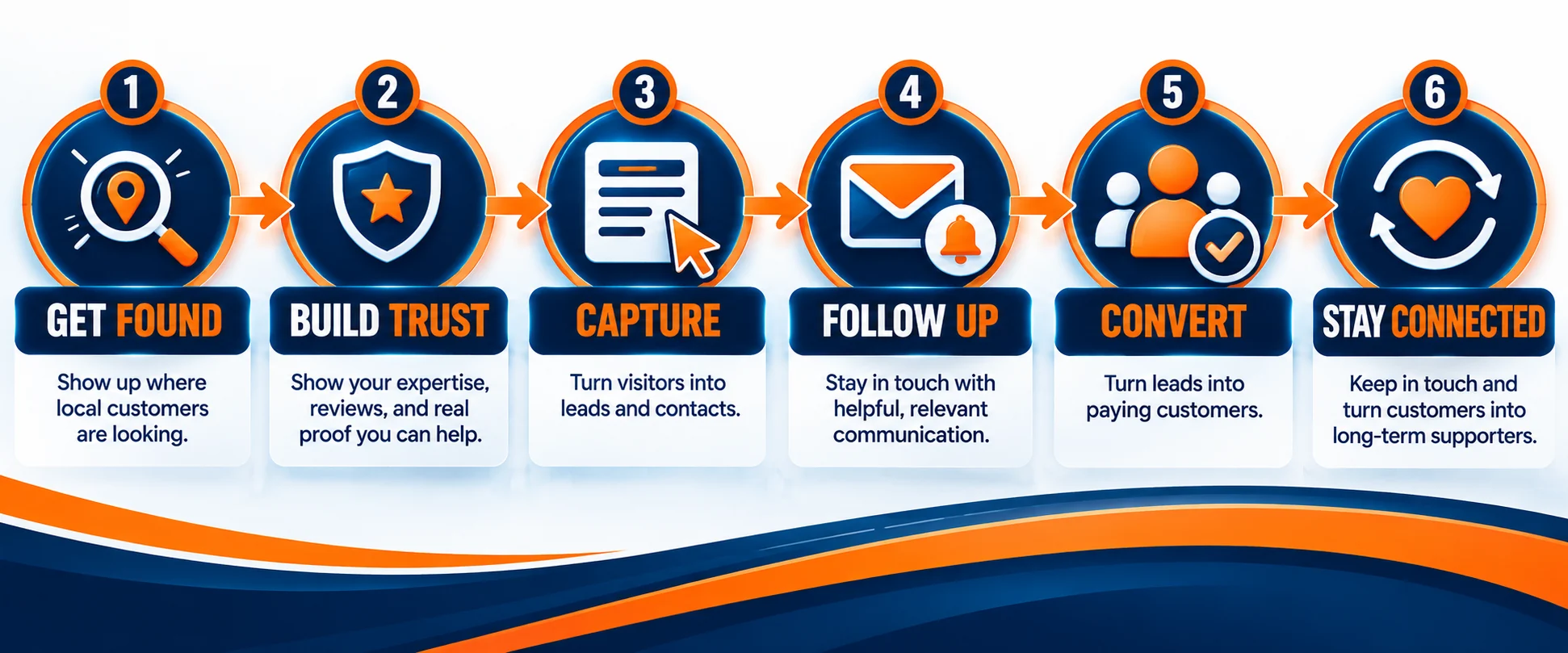
A simple local marketing system connects six stages: Get Found, Build Trust, Capture, Follow Up, Convert, and Stay Connected.
A potential customer discovers your business. They look for enough information to decide whether they trust you. They take an action that identifies them as an interested prospect. Your business follows up. They become a customer. Then you maintain the relationship instead of disappearing from each other’s lives after one transaction.
Let’s look at what each stage actually means.
Get Found
Before someone can become a customer, they need a way to discover your business.
That discovery might happen through search engines, a Google Business Profile, social media, online advertising, local directories, referrals, content, or offline marketing that sends someone online for more information.
You do not need to be everywhere.
You need to be visible in the places your potential customers are actually looking.
The purpose of this stage is simply to create a path that brings the right people toward your business.
Build Trust
Discovery gets someone’s attention.
Trust gives them a reason to keep going.
A potential customer may want to see your services, location, experience, photographs, reviews, testimonials, pricing information, answers to common questions, or examples of previous work before they contact you.
Your website can play an important role here because it gives you a place to bring that information together.
But trust can develop in other places too.
Your business profile, reviews, social presence, content, recommendations from other customers, and the consistency of your information across the web can all influence whether someone feels comfortable taking the next step.
Capture
Interest becomes much more valuable when a potential customer takes an identifiable action.
That could mean filling out a contact form, requesting an estimate, booking an appointment, calling your business, joining an email list, requesting more information, or responding to an offer.
This is the capture stage.
You are giving the visitor a clear way to raise their hand and say:
I’m interested. What’s next?
The exact method depends on the business.
A contractor may want estimate requests. A salon may prioritize appointments. A photographer might encourage consultation inquiries. A repair shop may want customers to call or request service information.
The important part is making the next step obvious and easy.
Follow Up
Capturing an inquiry does not automatically create a customer.
Someone still needs to respond.
A simple follow-up system helps make sure new opportunities do not disappear because the business was busy when the inquiry arrived.
That might include an immediate confirmation that a form was received, an email with additional information, an appointment reminder, a task for someone to make a personal call, or a sequence that keeps the conversation moving.
Some of that process can be automated.
Some of it should remain personal.
The purpose is not to bombard people with messages. It is to create a dependable process for continuing a conversation that the potential customer already started.
Convert
Eventually, the customer journey needs to lead somewhere.
For a local business, conversion might mean an appointment, signed estimate, service call, reservation, consultation, purchase, or another action that creates a real customer relationship.
Your marketing system should make that next step as clear and friction-free as practical.
If someone is ready to do business with you, they should not have to solve a puzzle to figure out how.
Stay Connected
The customer journey does not necessarily end when the first transaction is complete.
An existing customer already knows your business.
If they had a good experience, they may be more likely to use your services again, buy another product, recommend you to someone else, leave a review, or respond to a future offer.
Staying connected might include useful emails, service reminders, appointment reminders, seasonal messages, relevant promotions, review requests, or simple follow-up after a purchase or completed job.
The objective is not constant communication.
It is maintaining the relationship when continued communication makes sense.
Put all six stages together and the bigger picture becomes easier to see:
Get Found → Build Trust → Capture → Follow Up → Convert → Stay Connected
That is the system we are going to build around throughout the rest of this guide.
Start With How Customers Actually Find Your Business
Before choosing another marketing tool or building another landing page, start with a more basic question:
How do potential customers actually discover your business?
For a local business, the answer may be very different from one customer to the next.
Someone might search Google because they need a service immediately. Another person may notice your business on social media. Someone else might hear your name from a friend, see one of your vehicles around town, receive a recommendation in a local community group, or drive past your physical location.
Even when discovery happens offline, the next step often happens online.
A referral may still search for your business before calling. Someone who sees your sign may visit your website later. A potential customer who hears your name may look for reviews before deciding whether to contact you.
That is why the first part of your system is not simply generating more traffic.
It is making sure people who are already looking for what you provide can find useful information and easily move toward the next step.
Search and Local Discovery
Search is especially important when someone has a specific need and is actively looking for a nearby solution.
Think about searches such as:
plumber near me
dog groomer in my area
landscaping company near me
local auto repair shop
These searches carry very different intent from someone casually scrolling through social media.
The person searching may already have a problem they want solved.
Your job is to make it easy for that person to understand what your business does, where you provide it, and how to contact you.
A complete local search strategy can involve several pieces, including your website, Google Business Profile, customer reviews, accurate business information, relevant service pages, and useful content.
You do not need to master every part at once.
Start by making sure the information people are most likely to need is accurate, easy to find, and consistent.
Your Website as the Central Hub
Your business may appear in many places online, but your website gives you something especially valuable:
A destination you control.
Social platforms can change. Advertising campaigns can stop. Business directories have their own rules and layouts.
Your website gives you a central place to explain your services, answer questions, establish credibility, showcase your work, provide contact information, and direct visitors toward specific actions.
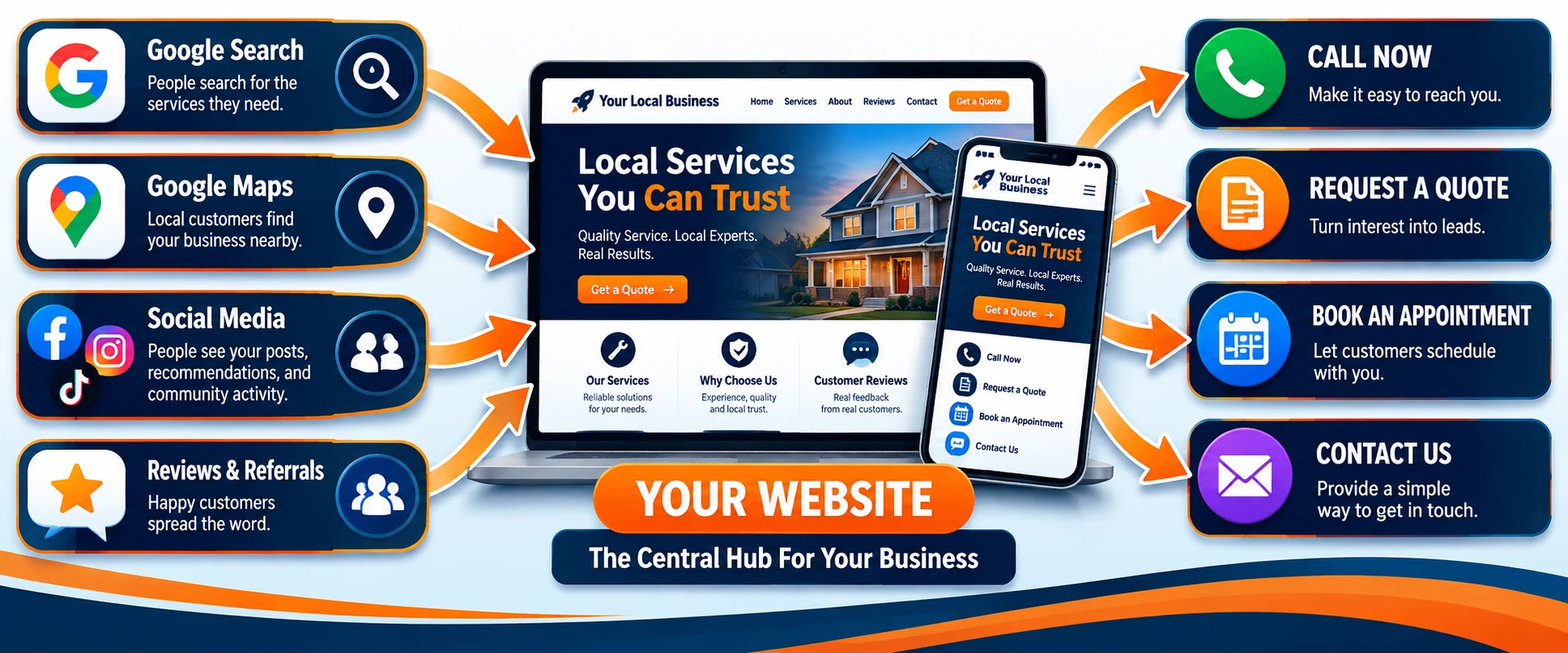
Your website connects the places customers discover your local business with clear next steps such as calling, requesting a quote, booking an appointment, or making contact.
That does not mean every visitor needs to land on your homepage.
Someone searching for a particular service may be better served by a page dedicated to that service. Someone responding to a specific promotion might benefit from a focused landing page. A returning customer may simply need your contact or booking information.
The website is the hub.
The individual pages create paths through it.
Give Every Visitor a Clear Next Step
Once someone reaches your website, do not make them wonder what to do next.
A visitor who is interested in your business should be able to quickly identify an appropriate action.
Depending on your business, that might be:
- Call now
- Request an estimate
- Schedule an appointment
- Ask a question
- Request a consultation
- Visit your location
- Join your email list
- Learn more about a specific service
You do not need to put every possible action on every page.
In fact, too many competing choices can make the next step less obvious.
Instead, think about why someone would visit a particular page and what action makes the most sense after they have read it.
A service page might lead to an estimate request.
A contact page might provide several appropriate ways to reach the business.
A landing page built around one specific offer may have a single focused call to action.
The goal is to create a natural progression:
Discovery → Useful Information → Clear Next Step
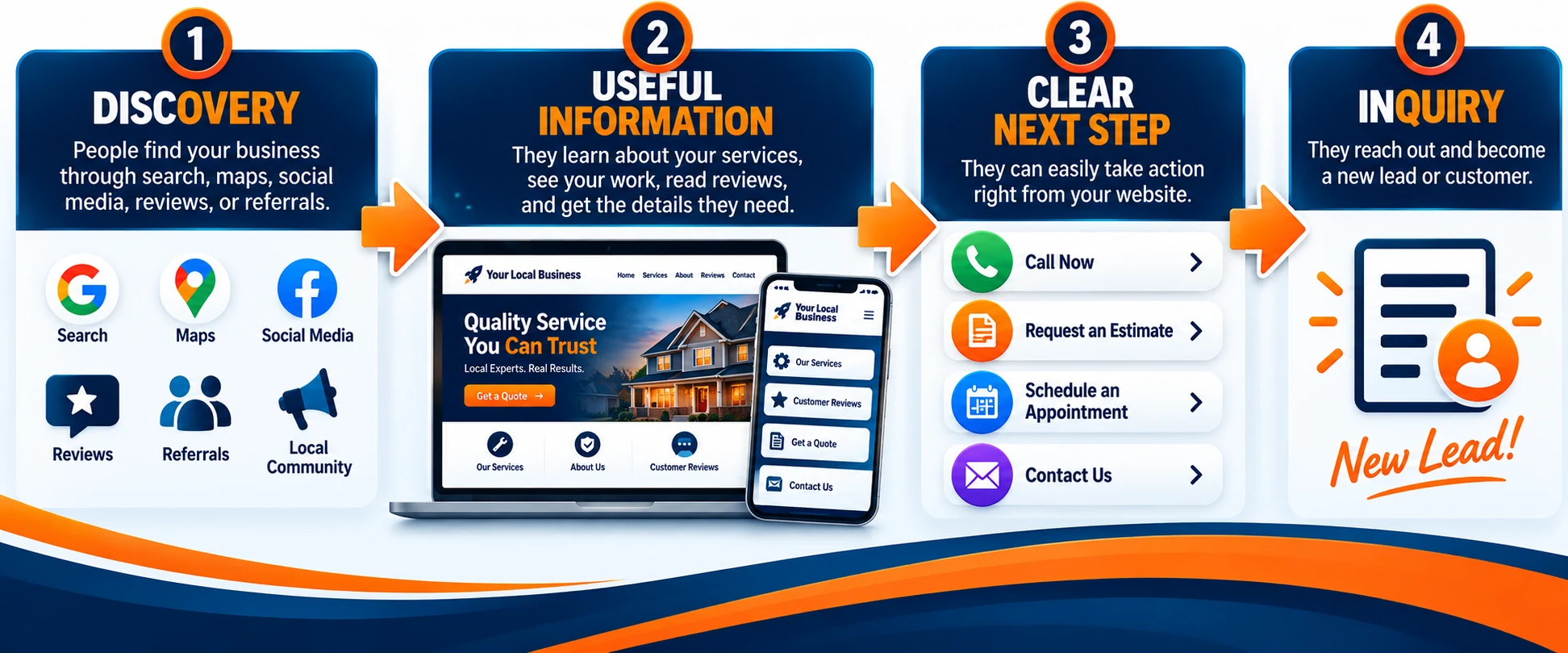
A clear customer journey moves people from discovering your business to finding useful information, taking the next step, and becoming a new lead.
Once that visitor takes the next step, your system has a new job.
It needs to turn that interest into an inquiry you can actually respond to.
Turn Website Visitors Into Leads and Inquiries
Getting someone to your website is an opportunity.
It is not yet a lead.
A visitor can read about your business, look through your services, decide you seem like a good fit—and still leave without ever identifying themselves.
That is why the next part of your online marketing system needs to make it easy for interested visitors to take action.
For a local business, lead capture does not need to involve an elaborate funnel or a complicated series of forms.
Sometimes the most effective next step is simply making it incredibly easy for someone to say:
I am interested. How do we get started?
Make It Easy to Contact Your Business
Every unnecessary obstacle between interest and contact gives a potential customer another opportunity to leave.
Your phone number should not be buried.
Your contact form should not ask for fifteen pieces of information when five will do.
Your visitor should not have to search through multiple pages just to figure out whether you serve their area or how to request an estimate.
Think about what information you actually need to begin the conversation.
For many businesses, a name, email address or phone number, and a short explanation of what the customer needs may be enough.
Other businesses may legitimately need additional information.
A contractor might ask about the type of project. A photographer may need an event date. A service provider might need a location or preferred appointment time.
The key is to collect information for a reason—not simply because your form builder gives you the option to add another field.
And remember that contacting you is not limited to filling out a form.
Depending on the business, customers may prefer to call, send an email, schedule an appointment, request a quote, start a chat, or visit your physical location.
Your system should reflect how your customers actually prefer to communicate.
Use Focused Landing Pages When the Situation Calls for One
Not every visitor needs to be sent to your homepage.
Suppose you operate a landscaping company and run a promotion specifically for spring yard cleanup.
Sending interested visitors to a general homepage forces them to find the relevant information themselves.
A focused landing page can instead continue the exact conversation that brought them there.
It might explain the spring cleanup service, show what is included, answer a few common questions, establish credibility, and provide one obvious way to request an estimate.
The same principle could apply to a seasonal promotion, consultation, special service, event, advertising campaign, or any situation where the visitor arrived with a specific expectation.
A landing page removes unnecessary distractions and focuses attention on one primary action.
That does not mean every local business needs dozens of landing pages.
Use them when a focused destination creates a clearer customer journey than sending everyone to a general page.
Capture Contact Information When It Makes Sense
Not every potential customer is ready to buy or book immediately.
Someone may be researching options for a project they plan to start next month. Another visitor may be comparing providers. Someone else may simply want more information before making a decision.
In those situations, having a way to stay connected can be valuable.
That could mean offering a useful guide, checklist, estimate request, consultation, newsletter, reminder, or another reason for the visitor to voluntarily provide their contact information.
The offer should make sense for the business and for the customer.
A generic Join Our Newsletter box may not give someone much reason to hand over an email address.
A useful resource connected to the problem they are already trying to solve gives the exchange a purpose.
For example, a home-service company might offer a seasonal maintenance checklist. A photographer could provide a short guide for preparing for a family photo session. A landscaper might offer a planning checklist for a new outdoor project.
You are not collecting email addresses simply to make a list bigger.
You are creating permission to continue a useful conversation.
And once someone gives you that permission—or directly asks your business for help—the responsibility shifts to the next part of the system.
You need a reliable way to follow up.
Build a Follow-Up System So Leads Don’t Fall Through the Cracks
A potential customer has found your business.
They have visited your website.
They have decided they are interested enough to call, complete a form, request an estimate, schedule a consultation, or ask for more information.
That is a win.
But it is also where another problem can begin.
What happens after the inquiry arrives?
For a busy local business owner, the answer is not always as simple as responding immediately.
You may be working with another customer. You could be driving between jobs, standing on a ladder, running equipment, meeting with a client, helping someone at the counter, or simply dealing with everything else required to keep the business moving.
The customer does not necessarily know any of that.
From their perspective, they reached out and are now waiting.
A follow-up system helps bridge that gap.
Respond Quickly to New Inquiries
Fast follow-up does not always mean you personally need to stop what you are doing and respond the second someone contacts you.
It means the inquiry should enter a process instead of disappearing into an unattended inbox.
One of the simplest improvements you can make is acknowledging that the customer’s message was received.
That acknowledgment might confirm the inquiry, explain what happens next, provide useful information, or set a reasonable expectation for when someone will respond personally.
For example, a customer requesting an estimate could immediately receive confirmation that the request was received and that someone from the business will be in touch.
That small interaction accomplishes something important.
The customer knows the form worked.
They know the business received their request.
And they are not left wondering whether they should submit the form again, call someone else, or simply move on.
The automated acknowledgment does not replace the real response.
It buys your business time to provide one properly.
Automate the Follow-Up You Shouldn’t Have to Remember
Some follow-up tasks happen repeatedly.
Those are often good candidates for automation.
A new inquiry can trigger a confirmation message.
An appointment can trigger a reminder.
A consultation request can trigger instructions about what the customer should prepare.
A completed form can create a contact record or notify the appropriate person.
A customer who requested information can receive the information they asked for without someone manually sending the same email every time.
These are predictable actions.
If the same task needs to happen every time a particular event occurs, asking yourself whether part of it can be automated is worthwhile.
The purpose is not to create complicated automation simply because the technology exists.
The purpose is to remove repetitive tasks that are easy to forget when the business gets busy.
A useful rule is:
Automate the predictable. Pay attention to the personal.
That keeps automation working in the background without allowing it to take over the customer relationship.
Know When a Real Person Needs to Take Over
Automation has limits.
A customer asking a detailed question about a project probably needs a real answer.
Someone trying to explain an unusual problem may need a conversation.
A complicated estimate, complaint, negotiation, special request, or high-value opportunity should not be trapped inside an automated sequence simply because that is easier for the software.
Your system should help identify when human attention is required.
Think of automation as the bridge between repetitive actions—not a wall between your business and the customer.
A strong follow-up process might look something like this:
Inquiry Submitted → Confirmation Sent → Business Notified → Customer Information Organized → Personal Follow-Up → Next Action
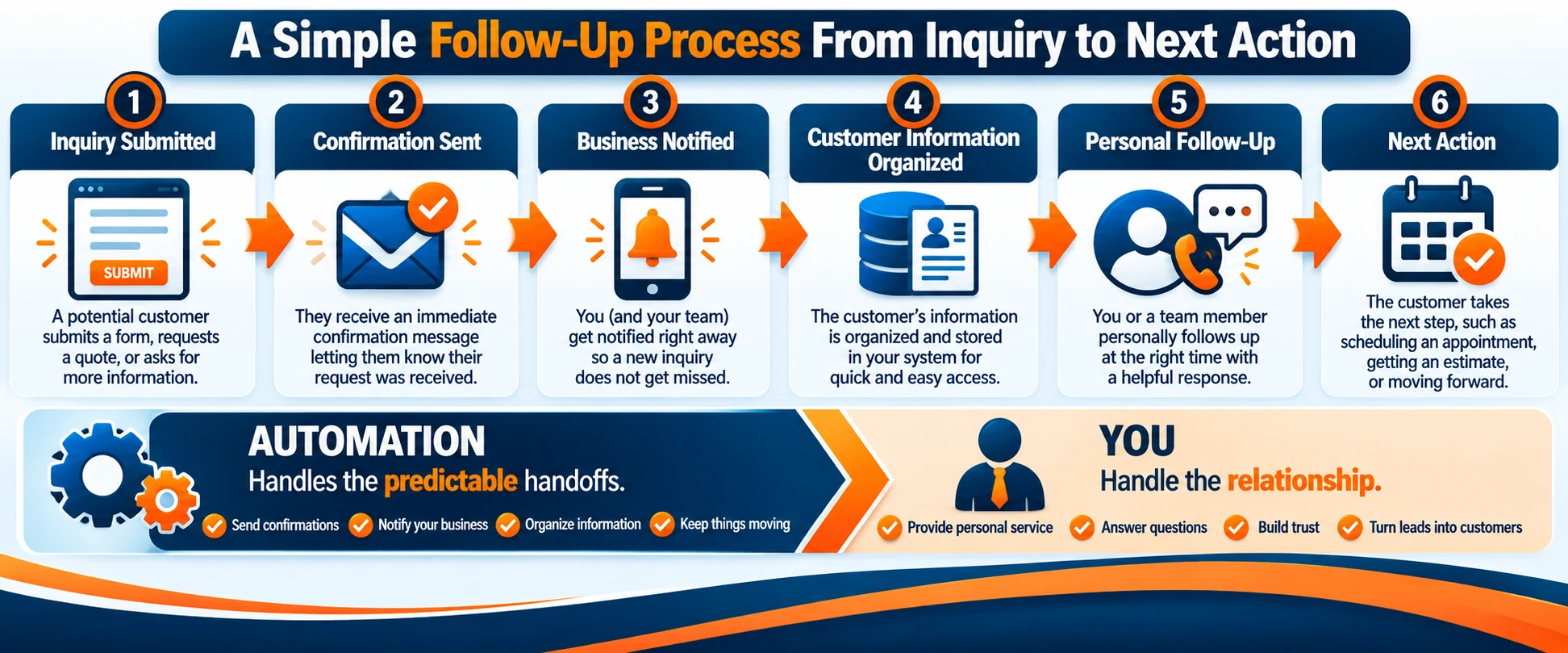
A simple follow-up process automates predictable handoffs while keeping personal service at the center of the customer relationship.
The technology handles the predictable handoffs.
You handle the relationship.
That balance is particularly valuable for a local business, where personal service, reputation, and trust can be some of your greatest advantages over larger competitors.
The goal is not to make your business feel automated.
The goal is to make sure being busy does not cause good opportunities to be forgotten.
Once the conversation is moving, the next part of the system is helping that interested lead take the final step toward becoming a customer.
Turn Leads Into Appointments, Sales, and Customers
Generating leads feels productive.
But leads are not the final objective.
A list of names, email addresses, phone numbers, estimate requests, and contact-form submissions only becomes valuable when those opportunities can move toward an actual business result.
For a local business, that result might be an appointment, service call, signed estimate, consultation, reservation, purchase, or another meaningful commitment from the customer.
This is where your marketing system needs to make the transition from interest to action as easy as possible.
Make the Next Step Obvious
Once a potential customer has expressed interest, they should understand what happens next.
Do they need to schedule an appointment?
Approve an estimate?
Choose a service?
Call to confirm availability?
Visit your location?
Complete another form?
Make a payment or deposit?
Whatever the next step is, communicate it clearly.
Confusion creates hesitation.
If someone receives your response but still has to figure out what they are supposed to do next, you have introduced unnecessary friction into the customer journey.
Consider the difference between:
We’ll be in touch.
and:
We received your request. We’ll review the details and contact you within one business day to discuss the project and schedule the next step.
The second message gives the customer a clearer expectation.
That clarity matters throughout the entire process.
Each step should naturally point toward the one that follows.
Reduce Friction Between Inquiry and Purchase
Every additional obstacle gives an interested customer another opportunity to stop.
That does not mean you should rush people into a purchase.
It means you should look for unnecessary friction in the process.
If someone needs to call during a narrow window just to schedule an appointment, could scheduling be easier?
If customers repeatedly ask the same questions before requesting an estimate, could those answers be provided earlier?
If a customer has to submit information they already gave you once, can that duplication be removed?
If someone is ready to take the next step but cannot figure out where to do it, can the call to action be made clearer?
Walk through the process from the customer’s point of view.
Better yet, test it yourself.
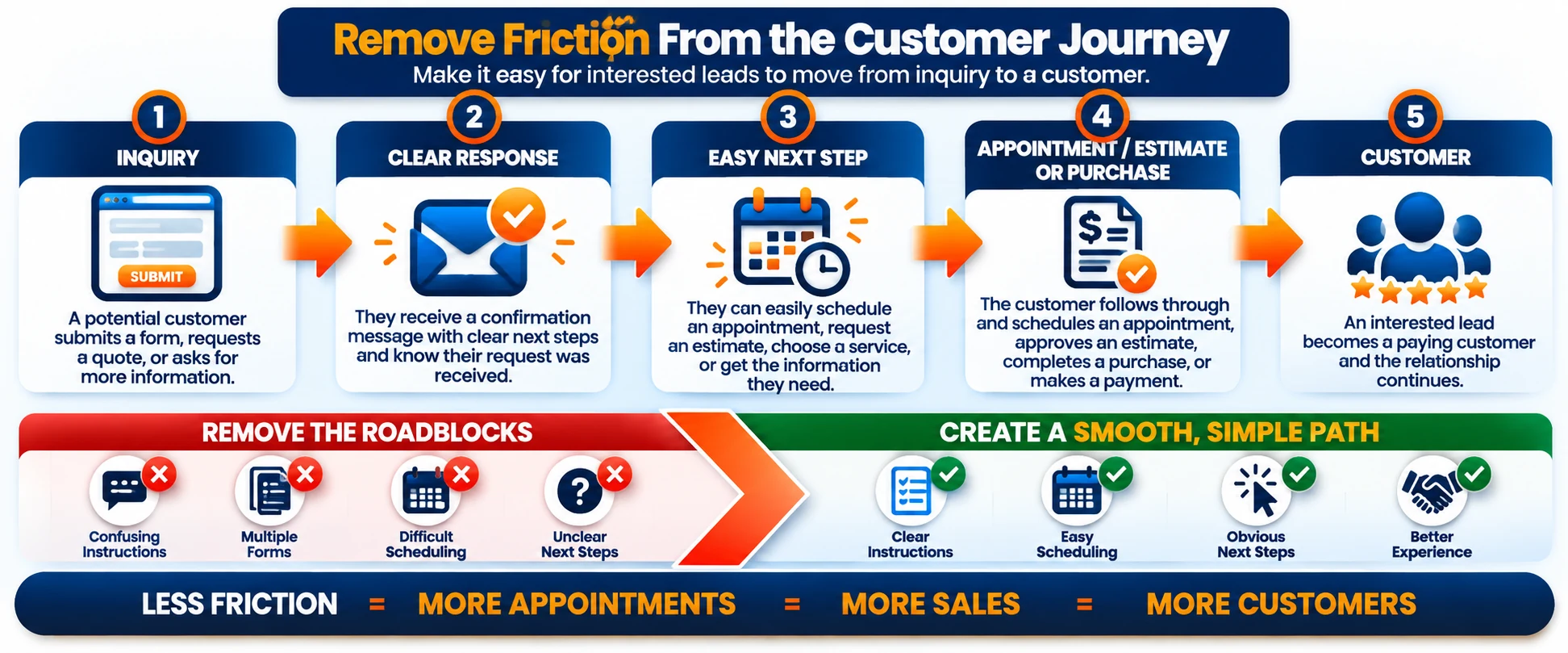
Removing confusing instructions, difficult scheduling, and unclear next steps creates a smoother path from inquiry to customer.
Visit your website from a phone. Submit your own contact form. Read the confirmation message. Open the follow-up email. Click the links. Try to schedule the appointment or find the information a customer would need.
Small problems become surprisingly obvious when you experience your own marketing system as a customer.
Keep the Human Part of the Customer Experience
Efficiency matters.
So does the human being on the other side of the inquiry.
A customer may have questions that do not fit neatly into a form. They may need reassurance before approving an expensive project. They may want to explain their situation before choosing a service.
That is where the personal side of a local business can become an advantage.
Automation can deliver information.
It can send reminders.
It can organize contacts.
It can trigger notifications and handle predictable steps.
But it cannot replace every conversation, judgment call, or relationship.
The strongest system does not force customers to choose between efficiency and personal service.
It uses technology to handle the repetitive parts so you have more room for the interactions where a real person adds value.
That is the difference between building a system that merely processes leads and building one that supports the way your business actually serves customers.
And when that lead finally becomes a customer, the system still has one more important job.
Do not treat the sale as the end of the relationship.
Stay Connected With Customers After the First Sale
Getting a new customer takes work.
They had to discover your business, decide they trusted you, reach out, move through your follow-up process, and ultimately choose to do business with you.
Then the transaction ends.
And for many businesses, so does the communication.
That can be a missed opportunity.
An existing customer already knows who you are. They have firsthand experience with your business. If that experience was positive, there may be a natural reason to stay connected.
Depending on what your business provides, that relationship could lead to repeat business, additional services, referrals, reviews, seasonal work, future appointments, or simply another opportunity to help when the customer needs you again.
Your marketing system should not forget about someone the moment they become a customer.
Follow Up After the Job or Purchase
A simple follow-up after a completed job, appointment, or purchase can serve several purposes.
You can thank the customer.
You can make sure everything went as expected.
You can provide instructions, maintenance information, or other useful details.
You can answer questions that may come up after the transaction.
And you can remind the customer that your business is still available if they need additional help.
The follow-up does not need to become an elaborate campaign.
Sometimes a short, useful message is enough.
The important part is that the relationship does not simply end because the invoice was paid or the appointment was completed.
Encourage Reviews and Referrals
For a local business, a satisfied customer can become part of how the next customer discovers you.
Reviews can help potential customers understand what other people experienced when working with your business.
Referrals can be even more personal.
Someone telling a friend, family member, neighbor, or coworker that they had a good experience with your business transfers a degree of trust before that new prospect ever contacts you.
But satisfied customers do not always think to leave a review or make a referral on their own.
Sometimes they simply need to be asked.
A post-purchase or post-service follow-up can create a natural opportunity to invite feedback or provide an easy path to leave a review.
Timing matters.
Ask after you have delivered the product or service and given the customer an opportunity to experience the result.
And keep the request simple.
The goal is not to pressure customers into praising your business.
It is to make it easy for people who genuinely had a positive experience to share it.
Give Customers a Reason to Come Back
Not every business naturally generates frequent repeat purchases.
A restaurant and a roofing contractor have very different customer cycles.
That is why staying connected should fit the type of business you operate.
A salon might send appointment reminders.
A landscaping company might communicate around seasonal services.
An auto repair shop could send maintenance reminders.
A photographer might reconnect when seasonal sessions become available.
A retailer could announce relevant new products or promotions.
A contractor might stay connected so a past customer remembers the business when another project comes up—or when a friend asks for a recommendation.
The purpose is not to manufacture reasons to contact people.
It is to recognize the legitimate reasons that already exist.
Build an Audience You Can Reach Again
There is another advantage to maintaining customer relationships:
You gradually build an audience your business can communicate with directly.
That might include customers, subscribers, leads, prospects, and people who have specifically asked to hear from you.
Instead of depending entirely on a social platform or advertising campaign every time you want to reach people, you have a direct communication channel with an audience that already has some connection to your business.
Email can be particularly useful for this because you are not relying entirely on an algorithm to decide whether your message appears in someone’s feed.
But direct access comes with responsibility.
People gave you their contact information for a reason.
Respect that permission.
Send useful, relevant communication. Make it easy for people to manage or end marketing emails they no longer want. Avoid turning every message into another sales pitch.
A smaller audience that actually wants to hear from your business is far more useful than a large list of people who have learned to ignore you.
This brings us full circle.
A stranger discovers your business.
They begin to trust what they see.
They take action.
You follow up.
They become a customer.
You continue the relationship when it makes sense.
Get Found → Build Trust → Capture → Follow Up → Convert → Stay Connected
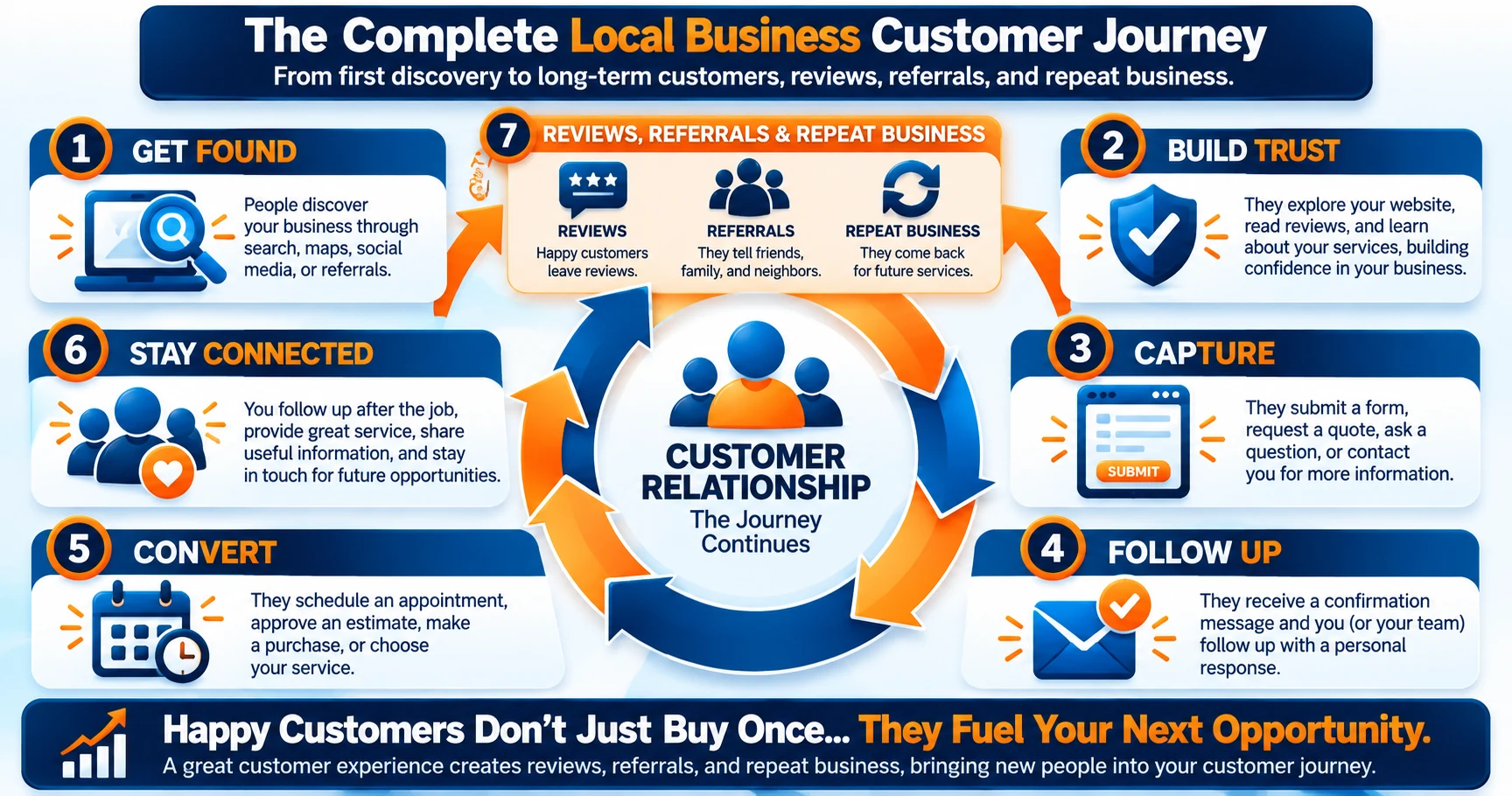
The customer journey continues after the first sale as follow-up, reviews, referrals, and repeat business create future opportunities.
That is no longer a collection of disconnected marketing tactics.
It is a customer journey supported by a system.
How the Pieces of a Local Marketing System Work Together
Looking at each part of an online marketing system separately is useful.
But the real value appears when those parts begin working together.
Instead of thinking about your website, contact forms, email, automation, customer information, reviews, and follow-up as separate marketing activities, think about the journey one potential customer takes through all of them.
That journey does not need to be complicated.
In fact, one of the best ways to understand the system is to follow a single customer from beginning to end.
Example: A Local Service Business
Imagine you own a local landscaping company.
A homeowner decides their backyard needs professional help and searches Google for landscaping services in their area.
Your business appears during their search.
That is Get Found.
They visit your website and land on a page explaining the landscaping service they are interested in. They see photographs of previous projects, learn about the areas you serve, read answers to common questions, and find information that helps them decide whether your company might be a good fit.
That is Build Trust.
At the bottom of the service page is a clear option to request an estimate.
The homeowner completes a short form with their name, contact information, location, and a few details about the project.
That is Capture.
Immediately after submitting the form, they receive confirmation that their request was received. At the same time, the inquiry is recorded and your business is notified that a new potential customer needs attention.
Later, you or someone on your team reviews the request and contacts the homeowner to discuss the project.
That is Follow Up.
After the conversation, you schedule a visit, prepare an estimate, and the homeowner decides to move forward.
That is Convert.
The project is completed.
A few days later, the customer receives a follow-up message thanking them for their business and making sure they are satisfied with the work. At an appropriate point, they may also receive an invitation to leave a review.
Months later, your business could reconnect with useful seasonal information or another service that genuinely relates to their property.
That is Stay Connected.
Now look at the complete journey:
Google Search → Website → Service Page → Contact Form → Automated Confirmation → Personal Follow-Up → Appointment or Estimate → Customer → Review → Future Follow-Up
No single piece created the customer.
The search created discovery.
The website and service page helped establish trust.
The form captured the inquiry.
Automation acknowledged it.
A real person continued the conversation.
The sales process converted the opportunity.
Follow-up helped maintain the relationship.
The system worked because the pieces were connected.
Your Customer Journey May Look Different
Not every local business will follow that exact path.
A salon might move someone from local search directly into an online appointment system.
A restaurant may move someone from discovery to a menu, reservation, online order, or physical visit.
A photographer might use a portfolio page, consultation form, personal conversation, booking process, and follow-up sequence.
A repair shop may rely heavily on phone calls.
A consultant might use educational content before asking someone to schedule a consultation.
The specific tools and actions can change.
The underlying principle does not.
A potential customer should be able to move from one stage to the next without repeatedly encountering dead ends.
That is why mapping the customer journey is more useful than simply asking:
What marketing tools should I buy?
A better question is:
What needs to happen between the moment someone discovers my business and the moment they become—and remain—a customer?
Once you can answer that question, choosing the technology becomes much easier.
You are no longer collecting tools.
You are choosing tools to perform specific jobs inside a system.
What Should You Automate — and What Should Stay Personal?
Once you begin connecting the pieces of your marketing system, automation becomes tempting.
If software can send an email automatically, why not automate every email?
If a system can respond to an inquiry, why not let it handle the entire conversation?
Because just because something can be automated does not mean it should be.
For a local business, personal service can be one of your greatest advantages.
Customers may choose you because they want to work with someone they can reach, trust, and build a relationship with—not an anonymous company that sends them through an endless sequence of automated responses.
The best use of automation is usually not replacing those relationships.
It is removing repetitive work around them.
Remember the principle we introduced earlier:
Automate the predictable. Pay attention to the personal.
Good Tasks to Automate
Look for actions that happen repeatedly and follow a predictable pattern.
These are often the easiest places to introduce useful automation.
Examples might include:
- Confirming that a contact form was received
- Sending appointment or consultation reminders
- Delivering information someone specifically requested
- Sending basic instructions before an appointment
- Notifying you or a team member when a new lead arrives
- Adding contact information to the appropriate system
- Creating a follow-up task after an inquiry
- Sending a thank-you message after a purchase or completed service
- Reminding customers about appropriate recurring or seasonal services
- Starting a review-request process after a completed customer experience
The common thread is predictability.
You already know what needs to happen, when it needs to happen, and what information the customer needs.
Automation simply helps make sure it happens consistently.
That can be particularly valuable when the business gets busy.
Instead of relying on someone to remember every repetitive step, the system handles the routine action and allows you to focus on the parts that require judgment or conversation.
Tasks That Usually Need a Human
Now consider situations where the customer’s needs are less predictable.
A homeowner may need help deciding between two approaches to a project.
A customer may be unhappy and want someone to listen to what happened.
A potential client may have questions about an expensive service before they are comfortable moving forward.
An estimate may require judgment.
A project may involve unusual circumstances.
A customer may simply want to speak with another human being.
Those interactions usually benefit from personal attention.
Your system can still help.
It can organize the customer’s information, notify the appropriate person, preserve previous communication, and make it easier to understand what has already happened.
But technology should support the conversation rather than prevent it.
Use Automation to Create More Room for Personal Service
There is an important difference between using automation to avoid customers and using automation to serve them more consistently.
Suppose a customer submits an inquiry while you are working with someone else.
An automated confirmation can immediately let them know their message arrived.
Your system can organize their information and notify you that follow-up is required.
When you become available, you can enter the conversation already knowing who contacted you and why.
The customer received an immediate response.
You did not have to interrupt the customer you were already serving.
And the important personal conversation still happened.
That is automation doing its job.
The objective is not to make your business appear larger, more complicated, or more technologically advanced than it is.
The objective is to build a reliable system around the human service your business already provides.
And once you understand which jobs technology should handle, another question becomes much easier to answer:
Do you really need a different piece of software for every one of them?
Do You Need a Different Tool for Every Part of the System?
Once you start mapping your customer journey, something else becomes obvious.
There are a lot of different jobs happening behind the scenes.
Your website needs somewhere to live.
You may need forms to capture inquiries.
You might want email marketing, automated follow-up, landing pages, contact management, scheduling, analytics, payments, social media tools, or other software specific to your business.
That can quickly lead to another problem:
Do you need a separate platform for every one of those jobs?
The answer depends on your business.
There is nothing inherently wrong with using several specialized tools. In some cases, that is exactly what makes sense.
But every additional platform also introduces another account to manage, another interface to learn, another subscription to evaluate, and potentially another connection that needs to work correctly with the rest of your system.
The objective is not to use the fewest tools possible.
It is to use the right combination of tools without creating unnecessary complexity.
The Separate-Tool Approach
One way to build your system is to choose a specialized platform for each function.
You might use one provider for your website and hosting, another for email marketing, another for landing pages, another for contact management, another for automation, and additional tools for scheduling, payments, or other business needs.
There can be advantages to this approach.
A specialized tool may offer features that a broader platform does not. You can choose exactly what you want for each part of the system. And if your business has advanced requirements in a particular area, dedicated software may be the better fit.
The tradeoff is that you become responsible for making those pieces work together.
You need to understand where information goes when someone completes a form.
You need to know whether your email platform receives the contact.
You need to make sure automations trigger correctly.
You need to maintain integrations between different services.
And you need to keep track of what each platform costs.
None of those challenges automatically make the separate-tool approach wrong.
They simply become part of the system you are responsible for managing.
The Integrated-Platform Approach
Another option is using a platform that combines several marketing and business functions in one environment.
Instead of connecting separate systems for every task, you may be able to manage multiple parts of the customer journey from the same dashboard.
For a business owner who does not want to spend significant time connecting software, that can simplify things.
There may be fewer integrations to maintain.
Customer information may be easier to keep organized.
Forms, pages, email, automation, and other marketing functions may already be designed to work together.
But an integrated platform is not automatically the right answer for every business either.
Convenience does not eliminate the need to evaluate what your business actually requires.
A platform can include dozens of features and still be missing one specialized function that is essential to the way you operate.
That is why the decision should begin with your customer journey—not a software feature list.
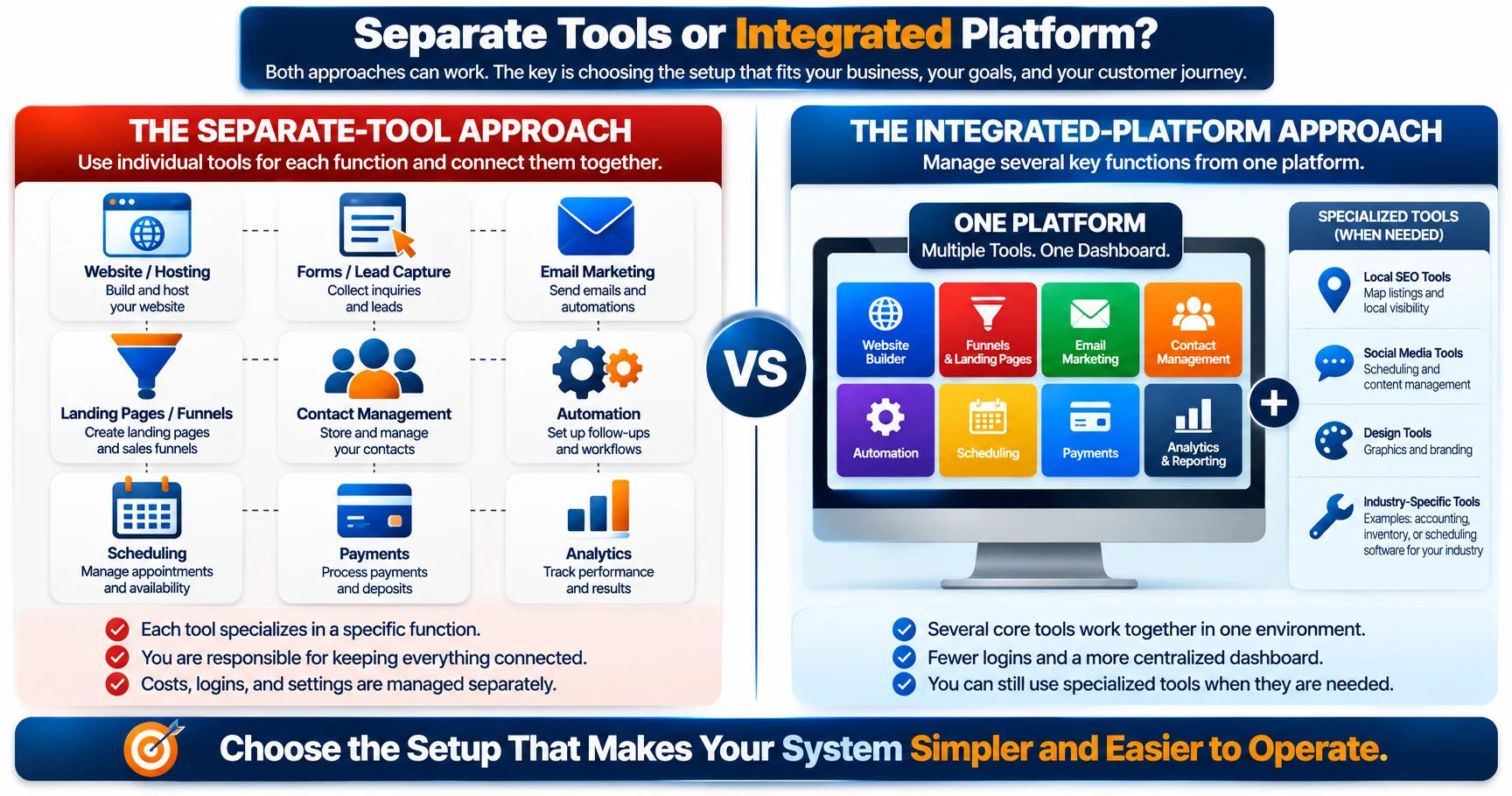
Separate tools and integrated platforms can both work—the right setup is the one that fits your business, customer journey, and operating needs.
Choose Tools Around the System, Not the Other Way Around
It is easy to discover a new marketing platform and start imagining ways to use every feature it includes.
Try reversing that process.
First, map what your business needs to accomplish.
For example:
People need to find us.
They need somewhere to learn about our services.
They need an easy way to contact us.
We need to capture and organize those inquiries.
We need a reliable follow-up process.
Customers need a clear way to take the next step.
We want an appropriate way to stay connected afterward.
Now evaluate your tools against those requirements.
You may discover that several platforms you already pay for are unnecessary.
You may discover that your current collection of tools works perfectly well and simply needs better connections.
Or you may decide that consolidating several functions into one platform would make the system easier to operate.
All three outcomes can be valid.
The important part is that the technology serves the system.
The system should not exist merely to justify the technology.
Some Local Business Tools May Always Remain Separate
Even if you choose an integrated marketing platform, your business may still rely on specialized software.
A restaurant may need a dedicated point-of-sale or reservation system.
A contractor may use estimating and project-management software.
A salon may depend on specialized scheduling and payment tools.
A retailer may require inventory management.
An accounting platform may handle financial records.
And your Google Business Profile remains part of Google’s ecosystem regardless of which platform runs your website or marketing automation.
There is no reason to force every business function into one piece of software.
Instead, look for opportunities to simplify the areas where consolidation genuinely helps while keeping specialized tools where they genuinely earn their place.
That gives you a much better standard for evaluating technology:
Does this tool make the customer journey or the operation of my marketing system simpler, more reliable, or more effective?
If the answer is yes, it may deserve a place in the system.
If the answer is no, another shiny dashboard probably will not solve the problem.
At LaunchForge Studio, this same question influenced the platform we chose to build our own online business infrastructure.
And that gives us a practical example of where an integrated platform can fit—and where its boundaries still matter.
Where Profit Hub System Fits Into the LaunchForge Approach
Throughout this guide, we have intentionally focused on the system before the software.
There is a reason for that.
No platform can decide how your customer journey should work for you.
Before choosing technology, you need to understand how people discover your business, what information they need, how they contact you, what happens after an inquiry arrives, and how you want to stay connected after someone becomes a customer.
Once those pieces are clear, an integrated platform can become much more useful.
At LaunchForge Studio, the platform we use as the foundation for much of our own online business infrastructure is Profit Hub System.
That does not mean every local business should automatically use the same platform.
It means we can use our own experience to demonstrate what consolidating several online business and marketing functions can look like—and help you think about whether that approach makes sense for your situation.
The Platform LaunchForge Uses
LaunchForge Studio itself is built using Profit Hub System as its underlying business platform.
Rather than assembling every part of our online infrastructure from completely separate providers, we can access multiple website, funnel, lead-generation, marketing, automation, and business tools within the same broader ecosystem.
That approach fits an important part of the LaunchForge philosophy:
Simplify the technology so you can spend more time building the business.
For someone starting from scratch, the number of tools available for building an online presence can become overwhelming quickly.
You can spend hours comparing website builders.
Then hosting.
Then landing-page software.
Then email marketing.
Then automation.
Then contact management.
Then another tool that promises to connect the tools you just bought.
An integrated platform attempts to reduce some of that fragmentation by putting multiple functions under one roof.
For LaunchForge, that makes sense.
For your local business, the important question is whether the same type of consolidation would solve a real problem for you.
What an Integrated Platform Can Simplify
Think back to the customer journey we have been building throughout this guide.
A visitor reaches your website.
They view a page describing a service.
They complete a form.
Their information needs to go somewhere.
A follow-up action needs to occur.
You may want to continue communicating with that person.
Each of those actions can potentially involve different software.
When several of those functions exist within the same ecosystem, there can be fewer connections to build and fewer separate platforms to manage.
Depending on the tools you choose and how you configure them, an integrated approach can help bring functions such as these closer together:
- Website and page building
- Landing pages and funnels
- Lead capture
- Contact management
- Email marketing
- Marketing automation
- Follow-up workflows
- Online business and marketing tools
The benefit is not simply having more features.
The benefit is reducing unnecessary separation between features that need to work together.
That distinction matters.
A dashboard containing fifty tools is not automatically useful.
A smaller collection of tools that supports a clearly defined customer journey can be far more valuable.
What Your Local Business May Still Need Separately
An integrated marketing platform should not be confused with software designed specifically for every type of local business.
Your company may have operational requirements that deserve specialized tools.
A restaurant may need a point-of-sale system, online ordering, or specialized reservation software.
A salon may depend on an industry-specific scheduling platform.
A contractor may need estimating, job costing, project management, or field-service software.
A retailer may need inventory management.
Your accounting system may remain completely separate.
Your payment processing needs may require another provider.
And platforms such as Google Business Profile continue to play their own role in local discovery.
That is not a failure of integration.
It is simply a recognition that marketing infrastructure and business operations are not always the same thing.
The objective should never be forcing your entire company into a single dashboard.
Instead, determine which pieces make sense to connect and which specialized systems should remain specialized.
Use the Platform That Fits the System You Are Building
Profit Hub System is part of the LaunchForge approach because it gives us an integrated environment for building and connecting many of the online business and marketing pieces we use.
That makes it something we can demonstrate, document, test, and discuss from the perspective of actually building with it.
But the larger lesson is not:
Use the same software we use.
The larger lesson is:
Understand the system you need, then choose technology that helps you build it without creating unnecessary complexity.
If Profit Hub System fits those requirements, you can explore how the platform works and decide whether it belongs in your setup.
If your existing tools already accomplish what you need, the better move may simply be connecting and improving what you already have.
Either way, the decision begins with the same question:
What does your customer need to happen next?
That question keeps the technology focused on its real purpose.
Supporting the journey between someone discovering your business and becoming a customer you have the opportunity to serve again.
Build Your Local Marketing System One Piece at a Time
By this point, an online marketing system can sound like a lot of moving parts.
Website.
Search visibility.
Service pages.
Lead capture.
Email.
Automation.
Follow-up.
Customer management.
Reviews.
Ongoing communication.
But you do not need to build or replace all of those things at once.
In fact, trying to overhaul everything simultaneously can create exactly the kind of complexity this system is supposed to reduce.
A better approach is to build around the customer journey one piece at a time.
Start with what already exists.
Identify the biggest gap.
Fix it.
Then move to the next one.
Step 1: Map Your Customer Journey
Before changing any technology, write down what happens when someone becomes interested in your business.
Start with discovery.
Where do customers usually find you?
Then follow the journey.
Where do they go for more information?
How do they contact you?
Where does their information end up?
Who responds?
How quickly?
What happens after the first conversation?
How do they schedule, approve, purchase, or otherwise become a customer?
What happens after the job, appointment, or sale is complete?
You do not need special software to do this.
A piece of paper is enough.
Your first version might look something like this:
Google Search → Website → Service Page → Contact Form → Email Inbox → Phone Call → Estimate → Customer
Now look at that journey carefully.
Where could someone get lost?
Where are you relying entirely on memory?
Where does information need to be copied manually?
Where does the customer have to wait without knowing what happens next?
Those are potential gaps in the system.
Step 2: Fix the Biggest Gap First
Once you see the journey, resist the urge to rebuild everything.
Find the problem that is creating the most friction.
Maybe your website gets visitors, but nobody knows how to contact you.
Fix the call to action.
Maybe people complete your contact form, but inquiries disappear into an inbox that is rarely checked.
Fix the notification and follow-up process.
Maybe you respond to inquiries consistently but have no organized way to keep track of those conversations.
Fix contact management.
Maybe customers regularly ask the same questions before scheduling.
Improve the information they receive before that step.
Your biggest problem may have nothing to do with adding another marketing channel.
Sometimes improving one broken handoff is more valuable than generating another hundred visitors and sending them into the same broken process.
Step 3: Connect Lead Capture and Follow-Up
If there is one connection worth examining carefully, it is the handoff between someone expressing interest and your business responding.
Test it from beginning to end.
Submit your own contact form.
Request your own estimate.
Join your own email list.
Use whatever method a potential customer would normally use to contact your business.
Then watch what happens.
Does the submission arrive?
Is the customer shown a useful confirmation?
Does anyone receive a notification?
Is the contact information stored somewhere useful?
Is there a clear responsibility for personal follow-up?
Does the customer know what to expect next?
If the answer to any of those questions is no, you have found an opportunity to strengthen the system.
Lead generation without reliable follow-up is like filling a bucket that has a hole in the bottom.
Before pouring in more traffic, fix the leak.
Step 4: Test the Entire Journey Yourself
Do not assume the system works because every individual tool says it is active.
Experience it like a customer.
Start on your phone.
Search for your business.
Visit the website.
Navigate to an important service page.
Try to find the phone number.
Complete the form.
Click the buttons.
Read the confirmation page.
Open the automated email.
Test the links.
Try to schedule the appointment or take whatever action you are asking the customer to take next.
Pay attention to anything that feels confusing, slow, repetitive, or unnecessary.
You may discover a button that is difficult to find on mobile.
An old phone number may still appear somewhere.
A form may ask for information you do not actually need.
An automated email might contain an outdated link.
A page may explain a service perfectly but never tell the visitor how to get started.
These problems can be difficult to notice from inside the business because you already know how everything is supposed to work.
Your customer does not.
Step 5: Improve the System From Real Results
Your first version does not need to be perfect.
It needs to work well enough that you can learn from it.
Once people begin moving through the system, pay attention to what actually happens.
Which pages generate inquiries?
Where do customers commonly have questions?
Which calls to action get used?
Where do people stop responding?
Which follow-up messages are useful?
Which repetitive tasks continue consuming your time?
What do customers repeatedly tell you they found confusing?
Those observations give you something far more valuable than guessing.
They give you evidence about what should be improved next.
Over time, you may add a landing page for a popular service.
You might automate another repetitive follow-up step.
You may improve your contact forms.
You could create content answering questions customers repeatedly ask.
You might consolidate tools that are creating unnecessary work.
Or you may discover that part of the system is already working perfectly well and should be left alone.
That is how a useful marketing system develops.
Not through one massive rebuild.
Not by chasing every new tool.
Not by trying to automate the entire business overnight.
Map it. Fix the biggest gap. Connect the pieces. Test the journey. Improve from real results.
Then repeat the process as the business grows.
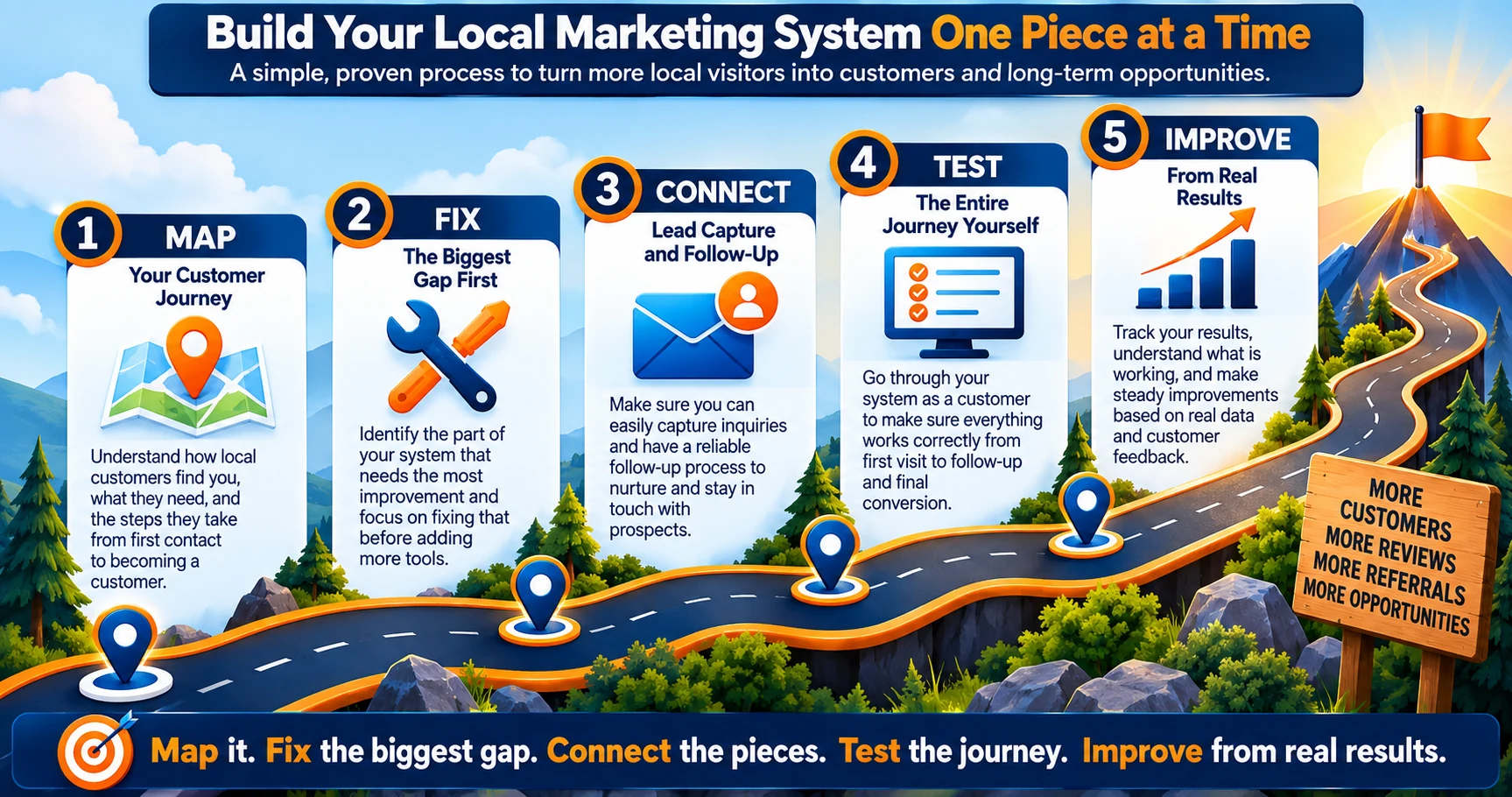
Build your local marketing system one piece at a time: map the journey, fix the biggest gap, connect the pieces, test the system, and improve from real results.
Common Local Business Marketing System Mistakes
Building an online marketing system does not require perfection.
But there are several common mistakes that can make even a good collection of marketing tools less effective.
Most of them have something in common.
They create a break in the customer journey.
Someone gets interested but cannot figure out what to do.
A lead arrives but nobody follows up.
A customer gets buried in automation.
A business keeps buying new tools instead of fixing the process it already has.
Recognizing these gaps can help you avoid adding unnecessary complexity while you improve the system.
Sending Everyone to a Generic Homepage
Your homepage has an important job.
It introduces your business, communicates what you do, and helps visitors find their way to the information they need.
But it is not automatically the best destination for every visitor.
Someone who clicks an advertisement for a specific service should not necessarily have to arrive at your homepage and start searching for that service again.
Someone interested in a particular promotion may benefit from a page built specifically around that offer.
A potential customer searching for one of your primary services may be better served by a dedicated service page.
Think about the visitor’s intent.
The more specific their reason for arriving, the more useful a focused destination can become.
Your homepage can remain the front door to the business without becoming the only door.
Making It Difficult to Contact You
You have convinced someone that your business may be able to help them.
Do not make the next step a scavenger hunt.
Contact information should be easy to find.
Forms should be easy to understand.
Calls to action should clearly explain what happens when someone uses them.
And the contact method should make sense for the customer.
This becomes especially important on mobile devices.
A potential customer standing in their driveway looking for a contractor or sitting in a parking lot searching for a repair shop may be using a phone, not a desktop computer.
Check the experience from that perspective.
Can they find your phone number?
Can they tap it to call?
Can they complete your form without fighting tiny fields?
Can they understand what to do next without zooming, searching, or guessing?
Removing those small frustrations can make the path from interest to inquiry much easier.
Collecting Leads Without Following Up
A contact form is not a follow-up system.
Neither is an email list.
Collecting someone’s information creates an opportunity.
What happens afterward determines whether that opportunity goes anywhere.
If a potential customer requests an estimate and hears nothing, the fact that their information was successfully stored in your database does not help them.
If someone requests information and never receives it, your lead-capture system technically worked while the customer journey failed.
Every method of capturing a lead should have a defined next step.
Ask:
Who receives this?
What happens immediately?
What needs to happen personally?
When should that happen?
What happens if nobody responds?
Those questions turn lead capture into a process rather than a collection box.
Automating Too Much
Automation can make a business more consistent.
Too much automation can make it feel impossible to reach.
Be careful about creating systems that repeatedly send customers through automated messages when what they really need is a person.
An automated confirmation is useful.
Ten automated messages avoiding a straightforward question are not.
An appointment reminder can be helpful.
A complicated sequence that keeps sending irrelevant messages after the customer’s situation has changed can become frustrating.
Use automation where the next action is predictable.
Create a path to human interaction when it is not.
Your customers should benefit from the technology without feeling trapped inside it.
Buying More Tools Instead of Connecting the Ones You Have
A new platform can feel like progress.
Sometimes it is.
Sometimes it simply adds another login.
Before buying another tool, look at the tools you already use.
Does your website platform already include the function you are considering purchasing?
Does your email marketing system already support the automation you need?
Could your existing contact form connect to the follow-up process?
Are you paying for overlapping features across several platforms?
Is the real problem missing software—or is it that nobody has connected the software already there?
Adding another tool to a disconnected system can create another disconnected tool.
Solve the process problem first.
Then add technology when you can clearly explain the job it needs to perform.
Forgetting About Existing Customers
Marketing often concentrates so heavily on acquiring new customers that existing customers almost disappear from the strategy.
But the customer who already chose your business has crossed hurdles a new prospect has not.
They already discovered you.
They already evaluated you.
They already decided to trust you enough to make a purchase, schedule an appointment, or hire you.
If the experience was positive, maintaining that relationship may create future opportunities for repeat business, referrals, reviews, and additional services.
That does not mean sending constant promotions.
It means including existing customers when you map your marketing system.
Ask what should happen after the sale.
Should they receive useful follow-up information?
Is there an appropriate time to request feedback?
Does your type of business have a natural reminder cycle?
Could they benefit from another related service later?
Would occasional useful communication help keep your business familiar?
A customer should not fall out of your system simply because the first transaction is complete.
Avoid Complexity for Complexity’s Sake
There is one final mistake underneath many of the others:
Building a system that is more complicated than the business actually needs.
You do not earn extra points for having the largest technology stack.
A simple system that reliably moves customers from discovery to follow-up can outperform a sophisticated system nobody understands how to operate.
Every page, tool, automation, form, and workflow should have a reason to exist.
If you cannot explain what job something performs in the customer journey, question whether it belongs there.
Simple does not mean incomplete.
It means the pieces that matter are connected, understandable, and doing useful work.
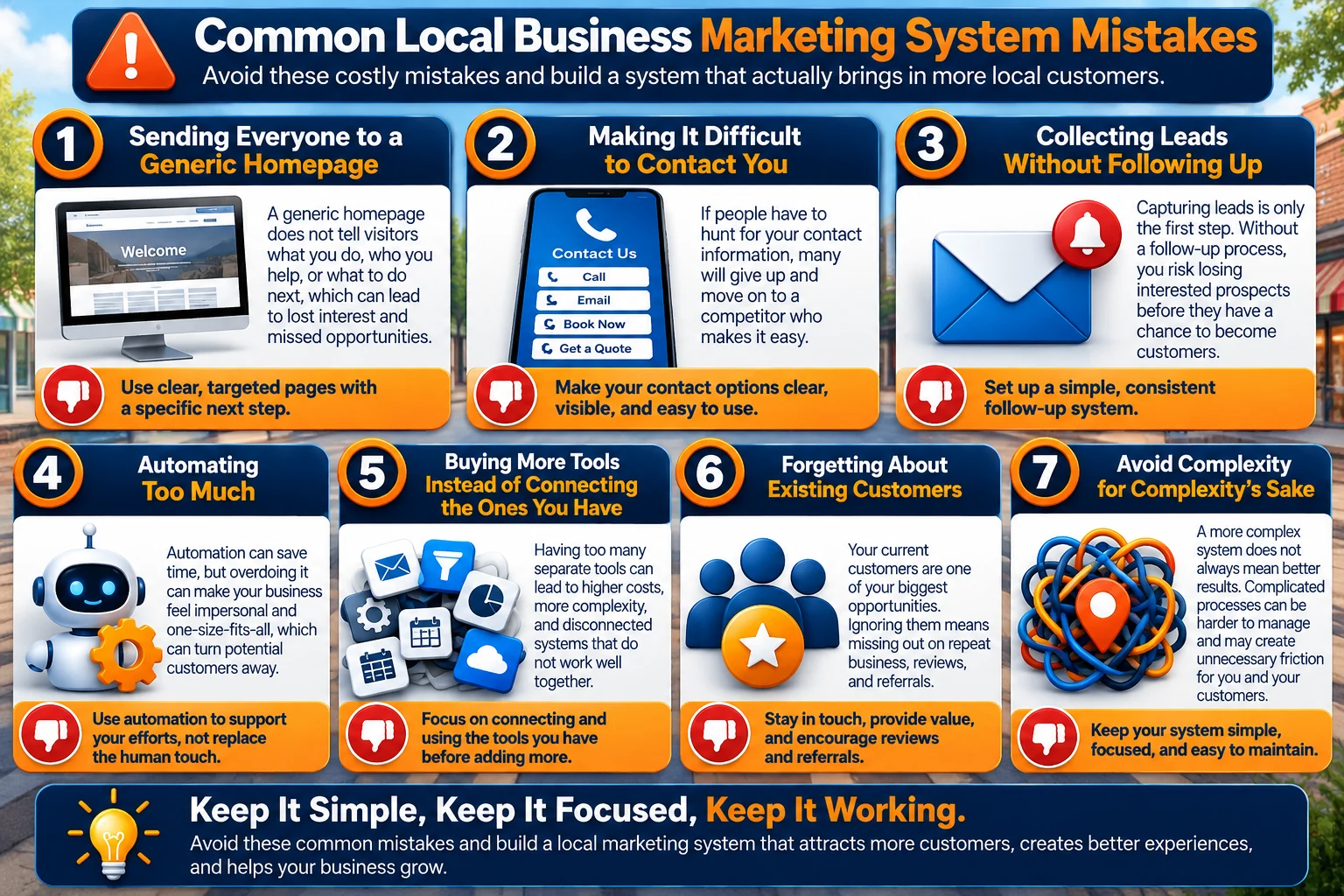
Avoid common marketing system mistakes by making customer actions clear, following up consistently, connecting the tools you already have, and keeping the system simple.
Local Business Online Marketing System FAQs
Building an online marketing system can raise a lot of questions, especially when you are trying to improve an existing business without turning marketing technology into another full-time job.
Here are answers to some of the most common questions a local business owner may have when putting the pieces together.
Does a Local Business Really Need a Website?
Not every customer will discover your business through your website, but having one gives your business an online destination you control.
Your website can explain your services, establish credibility, answer common questions, display contact information, showcase your work, and provide clear ways for potential customers to take action.
It can also support other marketing channels.
Someone may first discover you through Google, social media, a referral, an advertisement, or an offline interaction and then visit your website to learn more before contacting you.
Think of your website as the central hub of your online presence rather than the only way customers can find you.
What Marketing Tools Does a Small Local Business Need?
There is no universal list that applies to every local business.
Start with the jobs your marketing system needs to perform.
At a basic level, you may need tools that help you:
- Maintain your online presence
- Explain your products or services
- Capture inquiries
- Organize contact information
- Follow up with potential customers
- Communicate with existing customers
- Measure whether important parts of the system are working
Your particular business may also need scheduling, payments, estimating, reservations, inventory management, project management, or other specialized software.
Choose tools based on the jobs they need to perform rather than trying to duplicate another company’s technology stack.
Can I Automate Follow-Up With Potential Customers?
Yes, parts of the follow-up process can often be automated.
For example, a new inquiry might automatically receive confirmation that their message was received. An appointment could trigger a reminder. Someone requesting specific information could receive it automatically.
But automation should not eliminate personal interaction when the situation requires it.
Questions, estimates, unusual requests, complaints, consultations, and other conversations often need a real person.
Use the principle we established earlier:
Automate the predictable. Pay attention to the personal.
Do I Need a CRM for a Local Business?
A customer relationship management system, commonly called a CRM, can help organize contact information, conversations, leads, and customer activity.
Whether you need one depends partly on the volume and complexity of the relationships you are managing.
A very small business with only a handful of active inquiries may initially be able to manage contacts with a simpler system.
As the number of leads and customers grows, however, relying on memory, scattered emails, text messages, notebooks, and disconnected spreadsheets can become difficult.
The important question is not whether every local business needs a sophisticated CRM.
It is whether you have a reliable way to know who contacted you, what they needed, what happened next, and whether additional follow-up is required.
If you cannot answer those questions consistently, better contact management may be worth considering.
How Much of My Local Marketing Should I Automate?
Automate enough to make repetitive processes more reliable without removing the personal interactions that matter to your customers.
Good candidates often include confirmations, reminders, notifications, information delivery, routine follow-up tasks, and other actions that happen predictably.
Personal conversations, unusual requests, complex estimates, customer concerns, and situations requiring judgment generally deserve human attention.
The right balance will vary by business.
Your goal is not maximum automation.
Your goal is appropriate automation.
Do I Need Separate Software for My Website, Email, Funnels, and Automation?
Not necessarily.
You can build a marketing system using specialized tools from several different providers, or you can use an integrated platform that combines multiple functions.
Both approaches can work.
Separate tools may provide deeper specialized features, while an integrated platform may reduce the number of systems and connections you need to manage.
Evaluate what your business actually requires before deciding.
The best setup is not the one with the most software or the fewest subscriptions.
It is the one you can reliably operate and that supports the customer journey you are trying to create.
Can I Build My Online Marketing System Gradually?
Absolutely.
In many cases, building gradually is the better approach.
Map your existing customer journey first.
Then identify the biggest gap.
Fix that problem before moving to the next one.
You might begin by improving your website’s calls to action.
Then connect your contact form to a reliable follow-up process.
Later, you might organize contacts more effectively, add appropriate automation, create focused landing pages, or improve communication with existing customers.
You do not need to rebuild everything at once.
A simple system that works today can become more sophisticated as your business and your needs grow.
How Do I Know Whether My Marketing System Is Working?
Do not judge the system only by how many tools are connected to it.
Look at what happens to actual customers and leads.
Are people finding the information they need?
Are visitors taking the next step?
Are inquiries reaching you reliably?
Are potential customers receiving appropriate follow-up?
Are appointments, estimates, consultations, or sales resulting from those inquiries?
Are existing customers staying connected when there is a legitimate reason to do so?
And perhaps most importantly:
Where are people still falling through the cracks?
Those questions give you a practical way to evaluate the system.
The goal is not a perfect marketing machine.
It is a customer journey that becomes clearer, more reliable, and easier to improve over time.
Build the System Around the Business You’ve Already Built
You do not need another business to run.
You already have one.
The purpose of building an online marketing system is not to surround that business with so much technology that managing the marketing becomes a second full-time job.
It is to create a clearer path between the people looking for what you provide and the business you have already worked hard to build.
Throughout this guide, we have followed that path from beginning to end:
Get Found → Build Trust → Capture → Follow Up → Convert → Stay Connected
None of those stages needs to be complicated on its own.
People need a way to discover you.
They need enough information to decide whether they trust your business.
They need an obvious way to take the next step.
Their inquiry needs to reach you.
Someone needs to follow up.
The process needs to help them become a customer.
And when the relationship is worth continuing, you need a way to stay connected.
That is the foundation.
Start With the Business, Not the Technology
It is easy to look at everything available online and feel as though your business is behind.
There is always another platform.
Another automation.
Another social network.
Another funnel.
Another marketing strategy someone insists you need immediately.
But your local business does not exist to give marketing software something to do.
The technology exists to support the business.
Start with your customers.
How do they find you?
What do they need to know?
What questions do they ask?
What makes them comfortable contacting you?
What happens when they do?
Where does your current process work well?
Where does it break?
Those answers tell you far more about what your marketing system needs than another list of popular tools ever could.
Build the Next Useful Piece
You also do not need to wait until you can build the perfect system.
Start with the next useful improvement.
If people cannot easily contact you, fix that.
If inquiries are being missed, fix the follow-up.
If your website does not clearly explain an important service, improve that page.
If customers repeatedly ask the same questions, make those answers easier to find.
If repetitive tasks are consuming time, look for appropriate automation.
If your tools are becoming difficult to manage, consider whether some of them can be connected or consolidated.
Then test what you changed.
Watch what happens.
Learn from real customers.
And improve the next piece.
That process can continue as your business changes.
Your marketing system should be able to grow with you rather than forcing you to build everything before you are ready.
Keep the System Simple Enough to Use
A marketing system only helps if you can actually operate it.
The most impressive collection of software in the world is not useful if nobody understands what happens when a lead arrives.
You should be able to explain your basic customer journey in plain language.
Someone finds us here.
They learn about us here.
They contact us this way.
Their information goes here.
This happens next.
A real person steps in here.
This is how they become a customer.
This is how we stay connected afterward.
If you understand that journey, you have something you can improve.
If part of it stops working, you have somewhere to look.
And when a new marketing tool comes along, you have a way to decide whether it solves an actual problem or simply adds another layer of complexity.
You Already Built the Local Business. Now Build the Online System Around It.
Your online marketing system for local business should always be built around the business itself.
Not the website.
Not the email platform.
Not the automation.
Not the CRM.
Not the funnel.
Not any single piece of software.
Those are tools.
The system exists to help real people discover your business, understand what you offer, reach you when they are interested, receive appropriate follow-up, become customers, and stay connected when it makes sense.
You can build that system gradually.
You can use tools you already have.
You can replace pieces that no longer serve you.
You can automate repetitive work while keeping important conversations personal.
And you can continue improving the system based on what actually happens—not what another marketing checklist says you should be doing.
That is the LaunchForge approach to building online.
Understand what you are trying to accomplish. Build the pieces that serve that purpose. Connect them into a system. Then improve that system as you learn.
You do not need to build everything today.
You just need to know what the next useful piece is.
You already built the local business.
Now build the online system around it.